2010-10-03 StamboomNederland GEDCOM Export
StamboomNederland
- StamboomNederland: First Impressions
- StamboomNederland & Verborgen Verleden
- Getting Started with StamboomNederland: Projects
- Getting Started with StamboomNederland: Online Editing
- StamboomNederland Consistency Checks
- StamboomNederland GEDCOM Import
- StamboomNederland GEDCOM Export
- StamboomNederland GEDCOM Quality
- StamboomNederland Search
- StamboomNederland Paid Features
- StamboomNederland: conclusion
premium feature
not free
The first thing to know about StamboomNederland's GEDCOM export is that it is a paid feature. Users with a free account cannot export their data. The GEDCOM export functionality is only available to users who've paid to upgrade their Basis account to either a Premium or a Premium Plus account.
I consider the ability to export your data a major feature. Without it, you are locked into the product. I first heard about the plan to charge for GEDCOM export during my private presentation about StamboomNederland a few months ago. I immediately recommended against this idea, and suggested charging for advanced search features instead. Alas, StamboomNederland GEDCOM export is only available to paying users.
Export GEDCOM
button
A problem with StamboomNederland that users have been complaining about on
public fora is it less than intuitive user interface.
You cannot choose an individual by clicking on their name, but have to click on a
small icon shown after the name instead. There are multiple
icons whose meaning is not immediately clear. Buttons are not where you expect
them to be. GEDCOM import is a project-level action, yet the Import
GEDCOM
button is on the Sources page, and the progress status of an import is
on subpage of your Profile. The Reports
button is not on the Dashboard
page or Project page, but on the Person details page, the edit
page for individuals.
The Import GEDCOM
Import button is on the Sources pages, but the Export GEDCOM
button
is not. There is no Export GEDCOM
button on one of the Profile pages
eithers. There is no GEDCOM export option on the dialog show when choose the
Reports button. There is no GEDCOM export option on the Dashboard. I
was ready to conclude that there is no GEDCOM export option when I noticed the
Export GEDCOM
button
on the Project Details page. That is a shockingly logical place for an
application that excels at illogical placement.
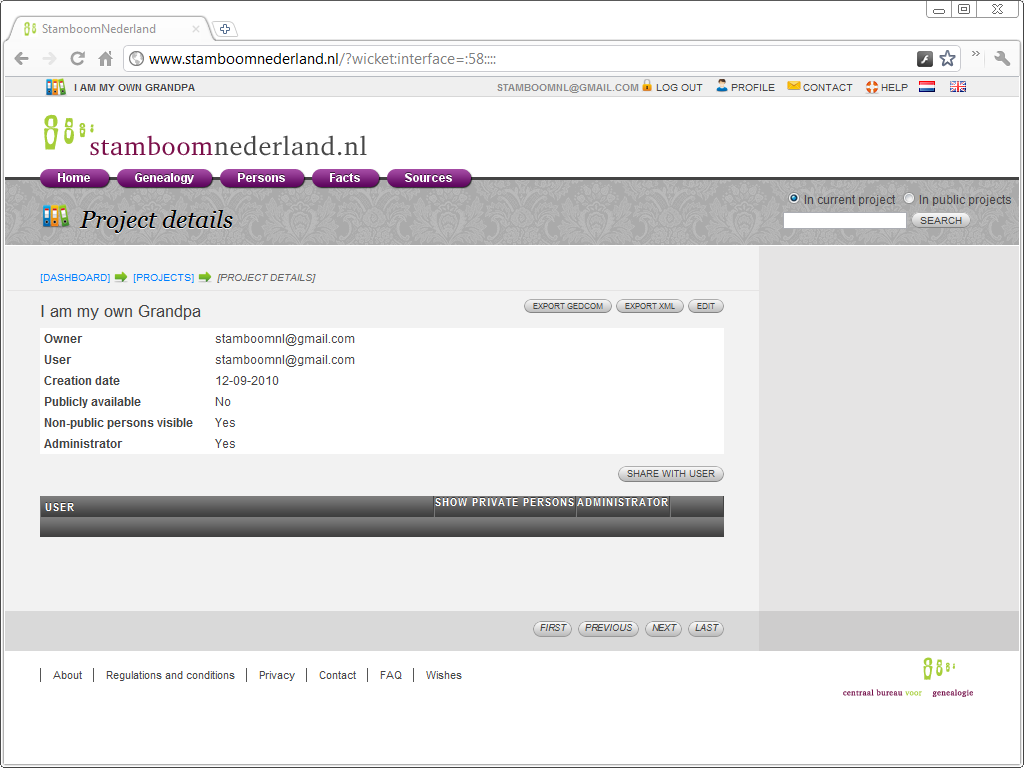
That I did not start looking on the Project Details page is because there is neither a menu item nor a button to get to the Project Details page. It is not possible to get there by clicking or double-clicking the Project name either. The only way to get there is to click the pencil icon behind the Project name, and that is not the most intuitive action.
The small icon is all there is, and the user is expected to guess its meaning.
The pencil icon serves as the edit icon, something that would be immediately obvious if
it actually were an Edit
button. Many applications add icons to their
buttons, StamboomNederland uses icons instead of buttons. There is no button, so
there is no button text. There is not even tooltip when you hover over the icon.
The small icon is all there is, and the user is expected to guess its meaning.
StamboomNederland has quite a few problems that need fixing, but even if all technical problems were solved, it would still be an unappealing and somewhat annoying web app. The Central Bureau of Genealogy may want to suggest to Kensas, the company that developed StamboomNederland, that they hire a user interface designer to fix the awfully confused and unintuitive user interface.
GEDCOM Export
When you choose the Export GEDCOM
button, StamboomNederland does not
pop-up a dialog with some options. There are no GEDCOM export options. The only
feedback you receive is
that StamboomNederland adds two sentences to the page: The workspace was
successfully added to the export queue
in red
and Look in the processes overview for more information
in blue.
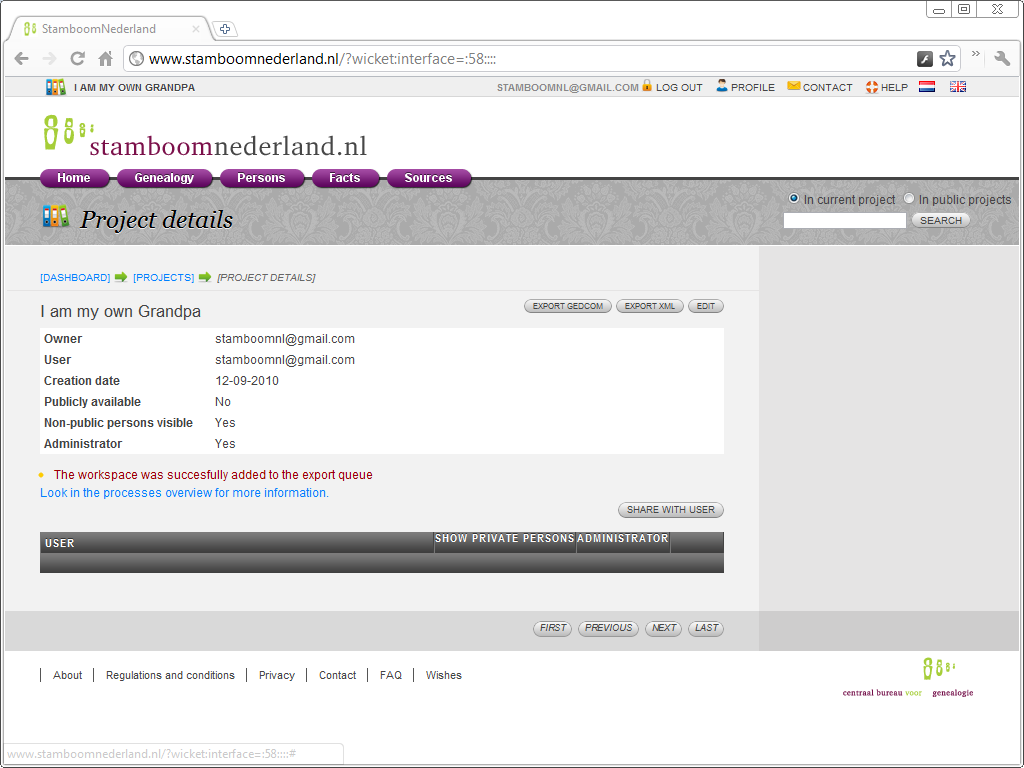
StamboomNederland does not show a GEDCOM export dialog with options. StamboomNederland does
not prompt you for a file name either. When you click the Export GEDCOM
button,
StamboomNederland queues the GEDCOM Export process. My experience so far is the
export processes are started almost immediately. The progress of the export
process is not shown with a progress bar on the Project Details page
where you started the process. There is no progress bar, StamboomNederland only
shows whether the export is Started
or is Finished
. That export
status is not shown on the Project Details page, but on
the Import and Export processes page.
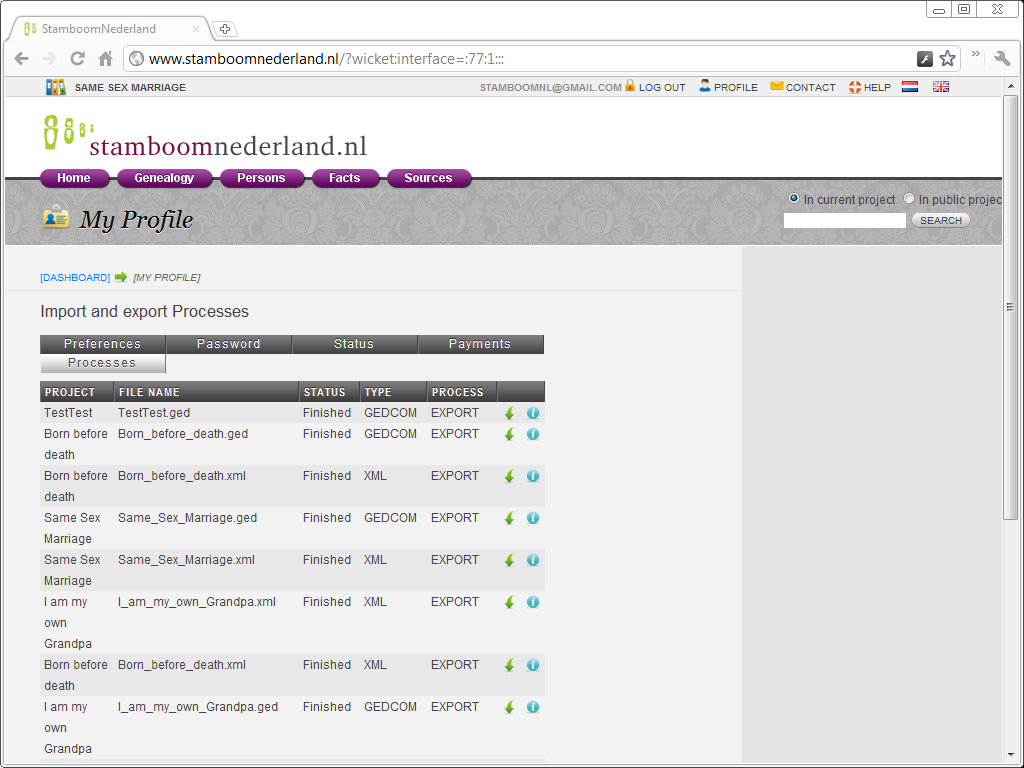
I exported a bunch of projects so tiny that the GEDCOM export process
finished almost immediately. All the exports are shown as Finished
.
Notice the Export Type; StamboomNederland supports both GEDCOM and XML export,
and the page shows which export was chosen.
There are two icons for each export. The green downwards pointing arrow is for downloading the GEDCOM or XML file. The info icon is for downloading a export report. This export report is as useless as the import report, but there is something about StamboomNederland that I can show with reports for both an XML and GEDCOM export of the same database.
report for XML export
===========================================================
XML export report log information
File exported name : I_am_my_own_Grandpa.xml
Date : Sat Oct 02 22:53:52 CEST 2010
===========================================================

--------------------- PROGRESS LOG ---------------------
 02-10-2010  10:53:52  : Export process is finished
report for GEDCOM export
===========================================================
GEDCOM export report log information
File exported name : I_am_my_own_Grandpa.ged
Date : Sat Oct 02 22:46:07 CEST 2010
===========================================================

--------------------- PROGRESS LOG ---------------------
 02-10-2010  10:46:07  : Start transforming XML data to GEDCOM format
 02-10-2010  10:46:07  : Finished transforming XML data to GEDCOM format
 02-10-2010  10:46:07  : Export process is finished
two-step process
These are two complete reports, the first for export to XML, the second for export to GEDCOM. After comparing them, it should be obvious that StamboomNederland lacks native GEDCOM export functionality.
StamboomNederland has native XML support, and the GEDCOM export is bolted
on top of that. When you choose to export to GEDCOM, StamboomNederland takes two
steps; first, it exports your project data to an XML file, then another process
is started to convert that XML to
a GEDCOM file.
Import of GEDCOM files is done in a similar manner; first, your GEDCOM file
is converted to an XML file, and then that XML file is imported into the
database.
XML and GEDCOM
StamboomNederland supports both XML and GEDCOM. The XML support is easy: it comes free with the database system.
The developers did not create GEDCOM import and export routines for the
StamboomNederland database as they should have done, but XML to GEDCOM and
GEDCOM to XML conversion processes. This is relatively easy, as GEDCOM and XML
are similar in design.
This approach is okay for slapping together a quick demo, it is not so okay
for a production system. There are some serious problems with this less than
professional approach.
raw XML for end users
First of all, every modern database system offers built-in export to some XML format, but that is a raw format meant for developers, not for end users. Developers can use it to export from one database and import into another. They may need to modify the XML a bit to make that work, but that's okay, because they are developers.
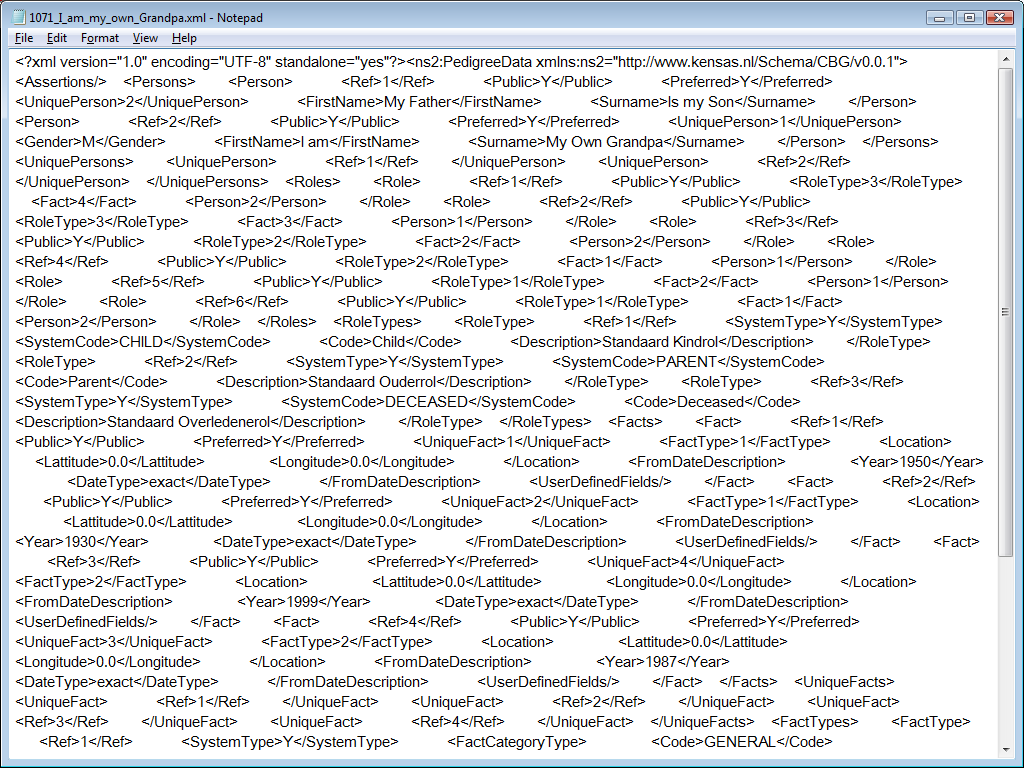
The raw XML format was never meant for end users. Pushing raw database XML on end users as
StamboomNederland does is asking for trouble. The raw XML format reflects the
current design of the database. Sooner or later, the database design will change,
and when the database design changes, the raw XML format changes. Most likely, the system
will then fail to import back XML files it wrote before. That is not only a less
than sastisfactory experience for the user, it also conflict with the idea of an
e-depot; what good is an e-deport that a few updates later is no longer able to read
back the files it currently writes?
One way to fix this problem is to introduce another process that detects the
versions of the XML file and then either converts it to the current XML format
or imports it directly. That isn't a pretty solution.
The real solution is stop publishing raw XML.
inefficient conversion
Another problem is that the GEDCOM import and export are inefficient. The GEDCOM import is done by first exporting to XML and then converting to GEDCOM, while the system could export directly to GEDCOM. The import first converts GEDCOM to XML and then imports the XML, while it could import GEDCOM directly. Now, if you have a fast server, inefficiency may not seem a big issue, but I already experienced and reported in StamboomNederland GEDCOM Import that it is a big issue; the GEDCOM import failed because the import process ran out of memory. This problem limits the current StamboomNederland design to small and medium sized databases.
GEDCOM is a rather verbose format. XML is even more verbose. A process that converts from GEDCOM to XML is likely to need say three or four times the size of the GEDCOM file in memory, but only if the conversion code is designed and written by an experienced professional who pays attention to memory use. Leave writing that code to a programmer who merely tests whether it seems to work for tiny files, and you are likely to be presented with massively inefficient code that gobbles lots of memory; ten, twenty or even a hundred times the size of the GEDCOM file.
This seems to be case for StamboomNederland; there is a GEDCOM to XML
conversion process, but it was hurriedly written and insufficiently tested. The
practical upshot is that when you attempt to import a large
file, the conversion process will cause an out of memory error and crash.
Assuming a server with
just 4 GB of RAM, and knowing that the GEDCOM file is close to 38 MB, a
simplistic back of
the envelop calculation suggests that Kensas's GEDCOM to XML conversion process
demands more than (it failed) 108 times the size of the GEDCOM file it
is processing. Whatever the actual factor is, it is sure isn't 3 or 4; if it had
been 4, the conversion would not have run out of memory.
Because the import of large files failed, I am now unable to try to the XML to GEDCOM conversion with a large file. It is reasonable to assume that the XML to GEDCOM and the GEDCOM to XML processes are of identical quality because they were written by the same person using identical coding techniques. If that is true, those who manage to build a large tree in StamboomNederland, may discover that they cannot export their data to a GEDCOM file, because the XML to GEDCOM conversion crashes…
unusable XML format
Export to the XML format does include a memory-hungry XML to GEDCOM conversion process, but for end users, export to the database's raw XML format isn't a practical option. There is no other application that will read that specific format, and there is no public tool to convert it to GEDCOM.
This XML format isn't one the many XML formats that have been introduced as GEDCOM alternatives, some of which are supported by one or two applications. This is yet another XML format. StamboomNederland is the only application that support it at all, and the only reason that StamboomNederland supports is that the developers implemented the GEDCOM support on top of it.
RootsXML
The Central Bureau of Genealogy (CBG) has been talking about RootsXML. The name already makes it clear that the CBG imagines RootsXML to be some XML format, but not a raw one, a nicely cooked one. The CBG would like RootsXML to become an alternative for GEDCOM. It was (and as far as I know, still is) the intention that StamboomNederland supports RootsXML. So far, RootsXML doesn't exist at all. There is not even a preliminary specification, there is only a name. None of that makes RootsXML irrelevant, the mere announcement of the idea affects Dutch genealogy software vendors already.
Ever since the CBG said that it would introduce RootsXML and that StamboomNederland would support RootsXML, vendors of Dutch genealogy applications have been awaiting its arrival. It remains to be seen how many vendors will support it, but one thing is pretty sure; the Dutch genealogy software vendors will bw considering support of RootsXML, not support of the raw database dump that StamboomNederland currently produces.
StamboomNederland GEDCOM
Evaluation of the GEDCOM support is based on examination of a few tiny files.
The initial impression visual inspection gave me is that it seems to be in the
right format. The GEDCOM header lists the source as SNL, which is an
abbreviation of StamboomNederland. The version is listed as 2200, which strikes me
as a rather random number, but that does not matter.
The GEDCOM header lists the
destination as GED55, instead of SNL as it should. The
header's destination field indicates the system the GEDCOM is intended for and
thus the GEDCOM dialect used; when no particular system is targeted, an
application should specify itself as the destination.
According to
StamboomNederland, my name is SNL user
, and my address is SNL user's address
.
That StamboomNederland does not include my address is a mistake, but not an
insurmountable one.
UTF-8
The StamboomNederland GEDCOM export experience does not present any options. StamboomNederland is a Unicode application, so all exported GEDCOM file are encoded using UTF-8, the one legal GEDCOM encoding that will not lose any data.
BOM
The UTF-8 GEDCOM files that StamboomNederland produces lack a Byte Order Mark
(BOM). The GEDCOM specification does not demand it, but the BOM ensures that
non-genealogical applications, which do not know about GEDCOM headers, will recognise the text file as UTF-8 encoded
anyway, thus
preventing misinterpretation and mangling of the data when files are examined
with other applications.
The StamboomNederland GEDCOM export should include the Byte Order Mark.
5.5.1
The GEDCOM header line VERS 5.5 claims that the file is a GEDCOM
version 5.5 file, but that is not true. The GEDCOM file is encoded in UTF-8, which is not allowed in GEDCOM
5.5, only in GEDCOM 5.5.1. The StamboomNederland GEDCOM export should be fixed
to correctly state that it is a GEDCOM 5.5.1 file.

LF
The GEDCOM files that the StamboomNederland produces have lines terminated
with a line-feed (LF). The GEDCOM specification allows it, but it is the wrong
choice.
Different platform use different line terminations. The line termination
that practically all software on all platforms recognises is a carriage return
(CR) followed by a line-feed (LF), so that should be the default.
StamboomNederland should either use CR LF or use my browser string to
detect what platform I am on, and then adjust the GEDCOM accordingly.
practical issues
The use of LF instead of CR LF may present a problem for some dated Dutch genealogy applications. On the one hand, these applications should be fixed to support it, as it has been legal GEDCOM for decades. On the other hand, I expect the CBG to tell the StamboomNederland developers to just use CR LF instead, which takes care of this issue.
Another practical issue is that several Dutch applications still in widespread use do not support UTF-8 yet. Here, the onus is on the developers of these applications to start supporting it. They should have done so years ago already. Users of applications that still don't support UTF-8 should switch to something better.
13 Feb 2000
I was surprised by the creation date in the GEDCOM header: 13 FEB 2000. That is a
claim that the file was created on 13 Feb 2000, more than ten years before
StamboomNederland existed. This raises serious worries about the quality of the
date handling, but other dates in the GEDCOM file appear to be unaffected by the
underlying defect.
reports
StamboomNederland supports a few reports, but not many. The Central Bureau of Genealogy has publicly expressed the idea that users can take advantage of the RootsXML output of StamboomNederland to define reports themselves. I have serious trouble believing that they actually believe this will work. There are so many problems with this notion.
First of all, RootsXML isn't available, all that is available right now is raw XML. RootsXML will probably become available eventually but there is no RootsXML documentation, and no example of how you could create your own reports. Let's assume that in time, those issues are taken care of as well; I still don't think users are going to define reports in XML. One reason is that the CBG limits the RootsXML audience by restricting RootsXML export to paying users, but even making it available to all users is unlikely to unleash a flood of user-defined reports.
The average user isn't going to define reports at all because the average user
does not want to define reports, the average user just
wants to use reports. Dutch genealogy software developers are unlikely to
create reports for StamboomNederland when they can be creating features for
their own software instead.
Perhaps a contests with attractive prizes is a way to spark
some interest, but there is another question to consider; it may be possible to
create reports based on RootsXML, but is anyone going to use such reports?
Why would anyone export to RootsXML, wait for the RootsXML file to be
created, download the RootsXML file and then start some third party application
just to get a report?
Why bother with RootsXML at all? If you download the GEDCOM file instead, you can
import the data into many genealogical applications and enjoy all the reporting
capabilities these applications offer.
Users don't want to have to export, download, and then import a file into another
application just to view a report. Users want to view reports within the
application they are using, so even easy-to-create user-defined reports are
unlikely to be a big success until users are able to define reports for use
within StamboomNederland; and such reports probably won't be based on
RootsXML.
What bothers me more, much more, than any technical flaw is that GEDCOM export is only available to users with a paid subscription.
conclusion
There are several technical issues with the GEDCOM export, but most of these are relatively easy to fix.
The big problem with the StamboomNederland GEDCOM export is that it is proof-of-concepts quality. It works for tiny databases, but is so memory-inefficient that it fails for larger ones. That is a serious problem for which the obvious solution is to replace the proof-of-concept GEDCOM-on-top-of-XML code with GEDCOM support in the StamboomNederland application itself.
What bothers me more, much more, than any technical flaw is that GEDCOM
export is only available to users with a paid subscription. I've noticed that I cannot download GEDCOM files for public
projects created by others, not even with a paid subscription, but that does not
really bother me.
The ability to download your own data is a fundamental feature. It is an issue
of ownership; if I cannot download it, I lack the control over my data that I
should have, because it is mine.
Demanding money for advanced features such as cooperation with other users is fine. Demanding money for the ability to
download my own data is wrong.
The CBG is hurting its own image and reputation with this decision. Many users that the CBG attracts through the Verborgen Verleden series are likely to be beginners who have no idea what to look for in a genealogy application, online or offline. These users must be able to trust the CBG to do the right thing. These users may be pleased with a free genealogy app now, but will be less than pleased with the CBG when they find out later that they cannot download their own data unless they pay for a subscription.
Show me the GEDCOM
I've repeatedly advised against applications that you cannot export your data from or whose export is horrible. I've advised against buying Ancestral Quest because its trial did not allow you to examine the quality of its GEDCOM export; I dared them to show me the GEDCOM and Incline Software has changed its ways. I now dare the CBG to show users the GEDCOM; allow all users to download their own data.
links
Copyright © Tamura Jones. All Rights reserved.