2010-06-17 Logitech Illuminated Keyboard
desktop keyboard

Logitech
I own quite a few desktop keyboards. Looking around, I notice a Digital keyboard for a VT320 terminal. In a corner are several solidly build and by now decades-old beige IBM keyboards with metal plates inside. I have several Apple keyboards, from the original Macintosh keyboard to more modern white models. There is a NeXT keyboard. I have several foldable Palm keyboards for various Palm models. A Microsoft Internet Keyboard with a blue-grey wrist-rest and several blue-grey buttons. A black KeyTronic keyboard from before black keyboards became fashionable. It is quite a collection.
Logitech S510
The last five or six I’ve mainly been using Logitech keyboards, always opting for black models. I bought a Logitech Cordless Desktop S510, a keyboard & mouse combo, about five years ago.
A good thing about this particular combo is that both the keyboard and the
mouse use standard AA and AAA batteries respectively, sizes you can buy
everywhere and for which rechargeable batteries are easily available.
I don’t remember the exact claims Logitech made for the mouse batteries, but I
can tell you that it is nonsense. With heavy use, you have to replace the
batteries every few days.
Logitech S520
Late in 2008 the S510 combo died and I replaced it with its successor, the Logitech S520. Both the keyboard and the mouse use standard AAA batteries. I believe that Logitech claimed improved battery life, but I hardly noticed it. The keyboard batteries last for months, but the mouse batteries last just a few days.
Compaq keyboard
When I bought the Hewlett-Packard Compaq Presario SR5215 desktop computer
which I am using now, I initially tried using the mouse and keyboard that came
with it, but these are not very good. These are of typical check item quality; we
have a keyboard, so we can place a check item and claim it is a nearly complete
system, just add a monitor.
The included mouse and keyboard appear to be dated models, still
sporting PS/2 connectors while the world is leaving these behind and switching
to USB. It did make sense though, as the Compaq desktop still has PS/2
connectors, and I did not have to sacrifice any of the USB connectors.
better bundle
Still, I did not like either the mouse or keyboard, and bought a new set to last me another few years. I did not buy a ready-made bundle, but something better. I made my own bundle by picking a mouse and keyboard from the many models available.
I bought the Logitech Illuminated Keyboard. Not a mouse and keyboard bundle, but a keyboard that’s more expensive than many keyboard & mouse combos. I combined it with the Logitech LX 8 Cordless Laser Mouse.
character deterioration
One problem I have with practically all modern keyboards, not just the cheap ones included with systems, is that the letters, numbers and other symbols all fade with use. Sure, I am a touch typist, but when I look at the keyboard, I like to see characters, not blank key caps. Yet that is what happens all the time.
Logitech S510

The first photo show what the Logitech S510 keyboard looks like after a few years of intense usage; many letters have completely eroded through use, leaving nothing but blank keycaps. As well as I can recall, it took about a half a year for me to start noticing it.
Logitech S520

You’d think that vendors would improve their product with time, but soon after buying the Logitech S520, I noticed that the quality of its lettering is even less. I noticed character deterioration within a month. The second photo shows what the Logitech S520 looks like after several months of intense usage.
The Shift key and the letter A have eroded off already, the letter O is almost gone and the E has looked better.
Logitech Illuminated Keyboard
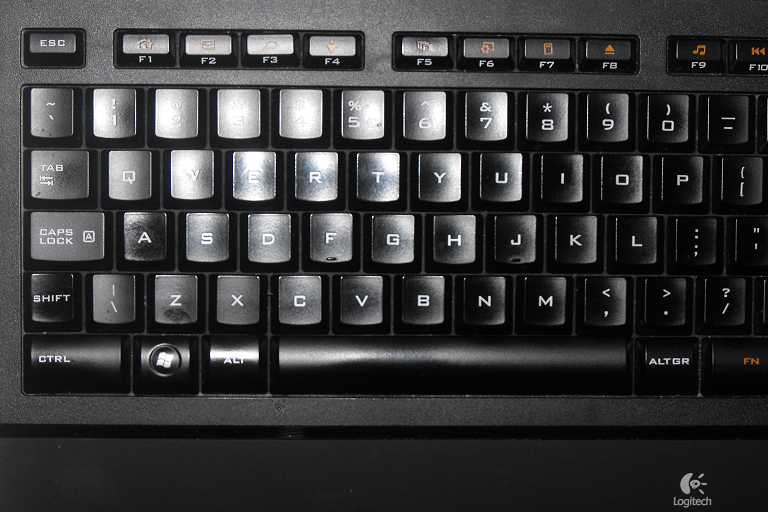
This third photo shows what the Logitech Illuminated Keyboard looks like after half a year of intense usage; it still looks like new.
Logitech Illuminated Keyboard
looks
The Logitech Illuminated Keyboard is a minimalist keyboard for every day use. It does not have a whole slew of extra buttons or an USB hub, it is just a keyboard.
The Logitech Illuminated Keyboard looks great. The keys are quite smooth and a bit shiny, the rest of the keyboard is matte black. The slight curved front section of the keyboard is the anti-slip wrist-rest surface. The transparent frame adds a modern, techie touch to the classic black.
The first thing you notice when you held in your hand is just how thin it is. If you do not extend the two feet that tilt it at a small angle, but lay it flat on the table, it is less than a centimetre high, just 9,3 mm to be precise. That is slimmer than an iPhone 3G (12,3 mm), and just as slim as an iPhone 4 (9,3 mm), and that is including the height of the keys.
I dislike flat laying keyboards. I found this one to be usable in flat position, but prefer the slightly tilted position provided by extending the two feet. The angle of that tilt is fixed. There are anti-slip pads on all four corners of the keyboard. In tilted position, the keyboard rests on the two feet and the front pads. The tilt seemed too little to me, but I have found the small tilted angle to work very well.
The finishing touch of the layout is the font, which is slightly wider and thinner than usual, with a squarish design, which gives the keyboard a somewhat futuristic look without any negative impact on legibility.
backlit
The gimmick that makes the Logitech Illuminated Keyboard stand out is that the characters are backlit. There are some cheap keyboards with fairly transparent keys that light up entire keys, showing the black characters against a sea of light. That may be cool for a few seconds, but it is not convenient.
The Logitech Illuminated Keyboard does it right. When the illumination is off, it seems a stylish but otherwise perfectly ordinary black keyboard with white letters on black keys. When you switch the illumination on, the keys remain black, and the light shines through the transparent white characters. There is a little bit of light leakage between the keys, but not too much.
A small complaint is that function keys have icons on top and function key numbers on front, but that only the icons are lit.
SetPoint
The Logitech Illuminated keyboard is a normal keyboard that can be used without installing any software, but the Logitech SetPoint software allows you to customise the function keys. You can also disable the Caps Lock, Windows Start, Scroll Lock, NumLock and Insert key.
connector and cord
The Logitech Illuminated Keyboard is a corded keyboard, not a cordless one. It has an USB connector. A PS/2 adapter is not included, and the average spare passive adapter you may have lying around will not do the trick. This keyboard needs an USB port.
I do not know how many LEDs there are inside this keyboard, but I can read by
the light of this keyboard. Despite the considerable brightness, the light isn’t
annoying. Although quite striking in dark rooms, it is hardly noticeable in
daylight.
The keyboard draws the necessary power through the USB connection. A cordless,
battery powered backlit keyboard would require unacceptably frequent battery
replacement.
The keyboard cord is straight, not spiralled. It is matte black like the keyboard, makes a durable impression and neither too flexible nor too stiff. It is not one of those minimal cords that barely allows you plug the keyboard in your machine, but a nice long one that leaves plenty of wiggle room. The cord is more than 1½ meters long. I measured it about 1,8 meters including the connector.
If you want a sleekly designed cordless keyboard, have a look at the Logitech diNovo Edge - then look at its price tag and the keypad on the Logitech Illuminated Keyboard. The corded Logitech Illuminated Keyboard is the better keyboard and a better deal.
layout
The Logitech Illuminated Keyboard is somewhat minimalist. It isn’t a tricked out multimedia keyboard. It does not have extra buttons along the left or right, like the S 510 does, nor a row of buttons snuck between the keyboard and the hand rest, like the S 520 does. It does have the most essential ones; the row of keys above the keypad provide keyboard control over sound volume with buttons to increase, decrease and - most importantly, mute the sound.
Additional multimedia controls are available by pressing both the Fn key (to the
right of the spacebar, between the AltGr and Ctrl keys) and one of the twelve
function key. That includes another biggie, the pause/stop button, so the
Logitech Illuminated Keyboard is less than ideal for multimedia control.
Another key that many modern keyboards have but that the Logitech Illuminated
Keyboards lacks is a Sleep key.
Enter
Every keyboard layout takes a bit of getting used to, but the Backspace, right Shift and and regular Enter key are smaller than usual. The regular Enter is remarkable small, hardly any larger than the keypad Enter key. I believe in a big Enter key that you can hit with your eyes closed, and I like a sizeable Backspace button as well, but have to admit that both are big enough. Once I was used to the layout, I never failed to hit the keys.
Still, Logitech could easily have accommodated the traditional size with a
slightly wider keyboard. Even though the current layout works well, I feel sure
that I would like a traditional layout better.
Maybe I am old-fashioned about this, but I would prefer normal-sized function
keys as well, but with both Microsoft and Logitech using half-size function
keys, I doubt these will ever return.
Something you may not immediately notice is that there is no separate Scroll Lock key. Scroll Lock is hardly used anymore, but if it is supported if you need; the combination of the Fn and the Pause / Break key turns Scroll Lock on or off.
Locked
Probably the oddest layout decision is that the LEDs that indicate the Caps Lock, Num Lock and Scroll Lock status are not in the upper right as has been usual since early IBM PC keyboard, but in the lower right. It is probably because of the limited space in that keyboard corner, which already accommodates one of the feet, the USB cord and the aforementioned row of buttons. I like to able glance at these indicators for visual conformation of the lock status. Oh well, at least the status indicators are on the keyboard itself, and not on a receiver, as is the case with the S 510 and the S 520.
feel
Although I liked the slim look, the thin profile does not leave much room for key travel. I worried that the keyboard would feel as mushy as that of a cheap laptop. The keyboard feels pretty good and with the exception of the space bar, the keys are not clickety-click noisy. The Logitech Illuminated Keyboard uses Logitech’s PerfectStroke system of micro-scissors that distributes applied force evenly across the key to eliminate slippage; if you hit the edge of a key, your finger does not slip off, but the key goes down as intended. The keys have sufficient travel, and bounce back nicely. The tactile feedback is excellent. Now that I am used to it, I like it better than the S 520. The S 520 has more key travel, but the keys do not bounce back as nicely as those on the Illuminated Keyboard.
Just as on may other keyboards, including the S510, but a bit more noticeable in a keyboard so thin, the keys on the bottom row of the alphanumeric pad are convex instead of concave, so that your finger do not rest in but on those keys. If look at the keyboard sideways, you can easily see that these keys are higher than the other keys.
spaced out
The space bar may be the weakest part of the design. It should detect key hits on both the left and the right side, but there is only one button beneath the key, and it is in the middle. The three micro-scissors below the key make sure that the entire key travels down, but only if the key has been put on correctly. I initially experienced that the right side produced spaces just fine, but the left side did not. After carefully removing the key, putting the left micro-scissor in its place and putting the key back on, the space bar works fine.
I’ve read some comments about phantom key blocking during normal typing, but although I am a fast typist, I never experienced it on this or other Logitech keyboards. After my experience with carefully reattaching the space bar that did not seem to work, I wonder whether the real problem that sometimes, some other key is not perfectly attached to its micro-scissors.
illumination
There are four illumination settings; and off setting and three different levels of brightness; high, medium and low intensity. I normally have the illumination turned off. It looks cool in a dimly lit room. The Logitech site suggests you can type in the dark, but I believe that it is better to turn your monitor on so that you can really see what you are typing. I didn’t buy this keyboard for the gimmick, I bought it for how it was done.
On most keyboards the characters are silk-screened on. The thin layer of paint wears off quite easily. The characters on the Logitech Illuminated Keyboard aren’t a thin layer of silk-screened white paint on top of the black keys. Instead, the characters have been laser-etched out of the thin black layer of paint to reveal the transparent white keycap under it.
Laser-etching is a more expensive technique, but a high-precision one, that results in very sharp lettering with height contrast. It is also more durable. I contacted Logitech to find out how much more durable. I expected them to give me a number of keystrokes for both the silk-screen and the laser-etching technique, but even their product manager did not know.
What I do know that is that even after half a year, I still do not notice any deterioration of the character shapes.
conclusion
Most premium keyboard are aimed at gamers. The Logitech Illuminated Keyboard is designed for productivity. It is a minimalist but ergonomic design with keys that feel just right. The layout takes a few days to get used to, but works well. The backlighting is done right, and the characters do not erode easily. This is a keyboard for heavy-duty typists.
product details
| property | value |
|---|---|
| product | Logitech LX 8 Cordless Laser Mouse |
| version | Y-Y95 |
| company | Logitech |
| website | Logitech |
| price | € 79,99 |
| requirement | Windows XP or later, USB port |
| note | slightly odd layout, nice long USB cord |
| Verdict | serious typist keyboard |
| Rating | typetastic |
links
Copyright © Tamura Jones. All Rights reserved.