2010-03-24 Family ChArtist

free charting app
GenerationMaps
GenerationMaps is a company that provides printing and consulting services for genealogy charts. GenerationMaps doesn’t do research, it is all about the printing.
announcement
On 2010 Feb 17, The Chart Chick pre-announced Family ChArtist, a new genealogy charting application in the blog post And We’re Back..... Introducing Family ChArtist.
A later post revealed that Family ChArtist will be released on 2010 Mar 8 12h00m MST. I feel sure that was an unintentional mistake, that GenerationMaps is hip with the Internet and really meant to say that it will be released on 2010 Mar 8 19h00m UTC.
The ChArtist part of the name is a geneartistic contraction of Chart Artist, and ChArtistry with a capital letter A is not related to either chartists or chartism, only to ChArtistry.
claims
That first post did not reveal anything about the application itself other than
its name, but does show fifteen examples of its output.
The Family ChArtist pre-announcement lacks every hint of modesty. It claims that Family ChArtist
is not just easy
and fast
but The most powerful, easy to use, fantastic, amazing, wonderful way to make a
genealogy chart
.
I immediately had to think of FamilyLink’s WebTree, which it introduced with a
wide variety of utterly ludicrous claims, including the wonderfully meaningless
promise of software-quality charts
.
There is a relevant difference between FamilyLink and GenerationMaps.
FamilyLink has
managed to built itself a sizeable reputation for overpromising and
underdelivering; they hardly have anything to lose by exaggerating once again
about yet another project.
GenerationMaps has built itself a reputation as the go-to company for chart
printing. They are the printing service for both Legacy Charting and RootsMagic
Chart. They do have a good reputation to lose. Lucky for GenerationMaps, most of
their initial claims hardly mean anything because they are not quantifiable.
features
The first blog post about Family ChArtist was followed by one blog post a day, each one highlighting some application features. On 2010 Feb 10, the press release announcing the release date was posted.
If you visited
the www.familychartist.com domain name following that pre-announcement, you got to see this It’s
almost here…
page.

Family ChArtist
Flash app
Family ChArtist isn’t a desktop application, it’s a web application. Well, not a real web application based on open web standards, but the still more common species of a Flash application served over the web.
Family ChArtist will only works if you have a Flash plug-in installed, which is not available for all browsers. Flash is most famously unavailable for Safari Mobile, Apple’s browser for the iPhone and iPad.
competition
TreeSeek
A fairly new competing product is TreeSeek by Misbach Enterprises. TreeSeek prints charts based on New FamilySearch data. The charts on the home page look beautiful, but to try and use TreeSeek at all, you will need an NFS account, and those are not publicly available yet. Family ChArtist can import data from FamilySearch, but you do not need an NFS account to use Family ChArtist.
WebTree
As WebTree is another Flash site and FamilyLink claims its produces nice charts, I’ve tried to compare Family ChArtist with WebTree. Alas, WebTree is so dysfunctional right now that it actually manages to produce a server error when I merely select an individual in a tree containing just two individuals! I do make some comparisons with several desktop applications.
fixed size?
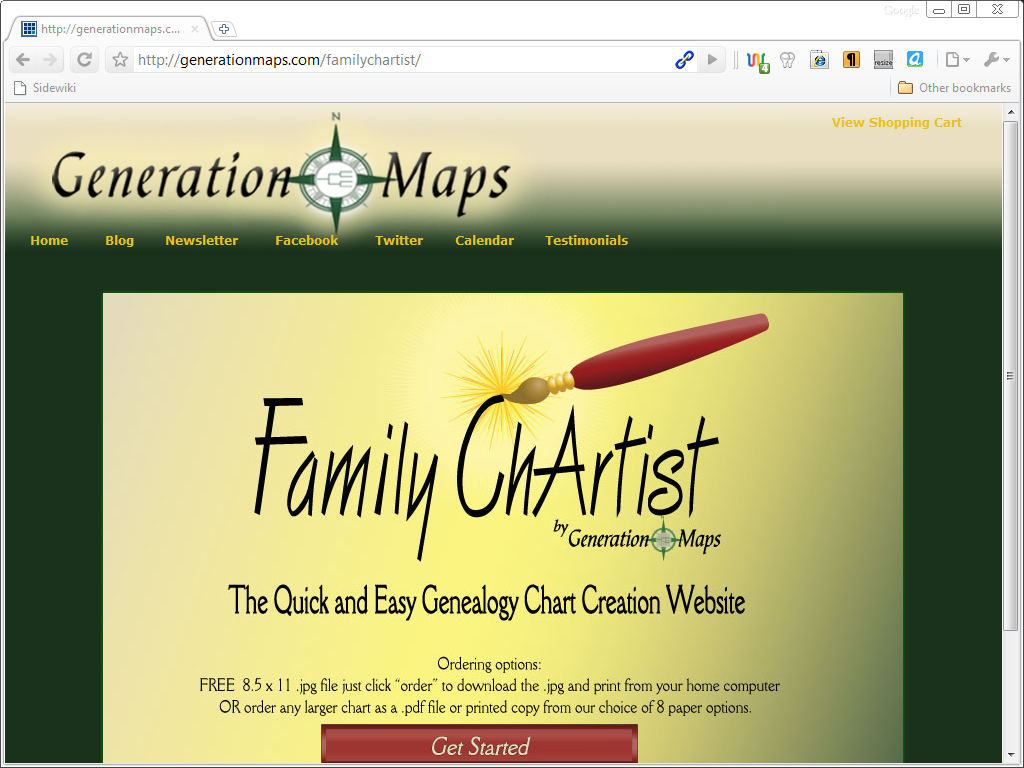
The first thing I noticed about the Family ChArtist home page is that it is a fixed-size design. It seems designed for a frame of 1024 x 768 pixels - and that is a design mistake. Not only do fixed size designs result in the postage stamp effect for anyone with a high resolution monitor, there is another mistake here. It is fine to assume 1024 x 768 as the minimum desktop monitor resolution nowadays, but if you have a 1024 x 768 monitor, the browser doesn’t have a 1024 x 768 frame. If you have a higher resolution, this isn't a problem, but if your monitor runs at 1024 x 768, you have to switch the browser to full screen mode to see it all and avoid scrolling.
Luckily, it is just the ChArtist home page that has this issue. The app itself auto-sizes to fit the browser frame, to make full use of the available space.
The screenshot shows how the Family ChArtist page looked when I started the review. GenerationMaps has since added a link to their privacy policy.
application
When you choose the Get Started
button, the first thing you'll see is
a small Loading
dialog box. Once the loading has finished, you get to see
the Family ChArtist app itself.
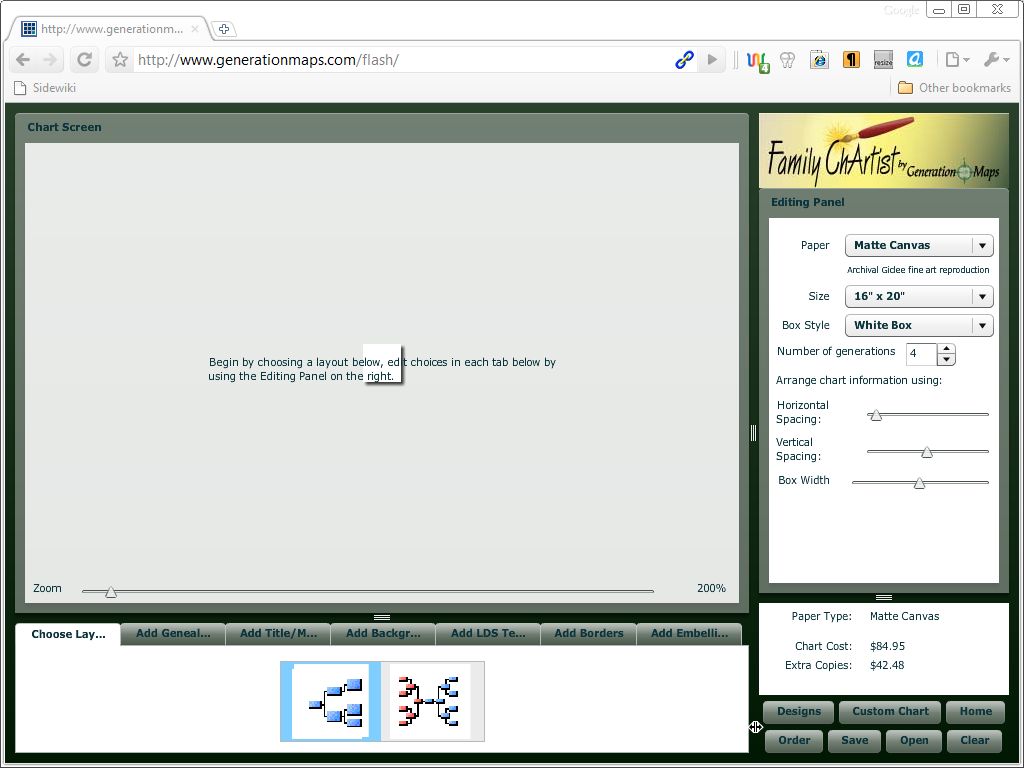
Family ChArtist divides the browser frame into several panels. The centre of
attention is the so-called Chart Screen
(actually a panel) which takes up
most of the space. Notice the zoom slider at the bottom of the chart panel.
The white box with a shadow in the middle is the paper you make charts on. It
showed this small the first time I ran Family ChArtist.
Below the chart panel is a ribbon of tabs for adding content to the chart panel.
To the right of the chart panel is the editing panel.
When you work with Family ChArtist, you make choices from the tabs along the bottom and edit selected objects through the panel on the right.
The lower right corner has buttons which would normally be on a File menu, and the info box above it shows the printing price for the selected paper type and size.
business
That info box highlights a business reason for the development of Family ChArtist; GenerationMaps wants you to order your chart from them, and they are the only company that Family ChArtist lets you order from.
The printing price shown in the info box does not include shipping & handling. If I were to order a chart in the default size and type, 16″ by 20″ on Matte Canvas, by Priority Mail, that would cost me US$ 84,95 for the chart and US$ 30,95 shipping & handling, for a total before import tax of US$ 115,90. With taxes added it is approximately € 100 for a chart of 40,64 cm by 50,80 cm, less than A2 (59,4 by 42,0 cm).
paper

paper types
GenerationMaps will print charts on various paper types and sizes. Family
ChArtist lets you choose between Matte Canvas
, Matte Canvas (stretched)
,
Parchment paper
, Photoglossy Paper
, Presentation Paper
, Professional Paper
,
Vinyl
and Standard Bond
. That last one is the cheapest option.
There is no manual or help file for Family ChArtist. GenerationMaps will probably argue that you hardly need one, but it sure would be nice if they put up a web page that showcases these paper types.
paper sizes
Family ChArtist does not support standard international paper sizes (ISO
216). You cannot order a chart on size A0. Instead, all paper sizes are in
inches, an outdated unit of measurement, and it does not even list the size in
centimetres.
GenerationMaps is based in the USA, one of the few remaining countries that
still does not use international paper sizes, and they print on locally
available paper sizes, but that doesn't mean there isn’t a problem when you
order from them: the odd sizes they use will not fit standard frame sizes,
you’ll have to order a custom frame or settle for a border around your chart.
getting started
Starting a web app is easy; just surf to the web page and wait for the app to load. Over my ADSL line, loading takes a few seconds. The first time took about fifteen seconds.
Family ChArtist isn’t a full-featured genealogy application, but a genealogy
charting application. Although you’ll probably want to import a GEDCOM file,
Family ChArtist does allow you to enter data manually. Just choose a layout from
the first tab, and then choose manual entry
on the second tab.
box items
| box item | FC | LC | FTF | RM4 |
|---|---|---|---|---|
| Name | Y | Y | Y | Y |
| First Name | N | Y | Y | Y |
| Middle Name | N | Y | Y | N |
| Last Name | N | Y | Y | Y |
| Nickname | N | N | Y | N |
| Alternate Name | N | N | N | Y |
| Use Married Name | N | Y | Y | N |
| Reference Number | N | Y | Y | Y |
| ID code | N | N | Y | N |
| Include Mr. or Mrs. | N | Y | Y | N |
| Title (Nobility) | N | N | N | Y |
| Birth Date | Y | Y | Y | Y |
| Birth Location | Y | Y | Y | Y |
| Christening Date | N | Y | Y | Y |
| Christening Location | N | Y | Y | Y |
| Marriage Date | Y | Y | Y | Y |
| Marriage Location | Y | Y | Y | Y |
| Divorce Date | N | N | Y | Y |
| Divorce Location | N | N | Y | Y |
| Death Date | Y | Y | Y | Y |
| Death Location | Y | Y | Y | Y |
| Burial Date | N | Y | Y | Y |
| Burial Location | N | Y | Y | Y |
| Cremation Date | N | N | N | Y |
| Cremation Location | N | N | N | Y |
| Lifespan (deceased) | N | Y | Y | N |
| Reached Age (living) | N | N | Y | N |
| Picture | N | Y | Y | Y |
| Occupation | N | N | Y | Y |
| Note | N | N | Y | N |
| DNA Test | N | N | N | Y |
| Additional Info | Y | N | N | N |
| Sources | N | N | Y | N |
| Religion | N | N | Y | Y |
| LDS events | N | N | N | Y |
| Ancestral File Number | N | N | N | Y |
As soon as you’ve made that choice, Family ChArtist will show an outline of the selected layout, and you can select a box to edit the details for that person. Family ChArtist supports a single name field and both a place and date field ford the birth, marriage and death events.
table
The table shows what box items Family ChArtist (FC), Legacy Charting (LC), FamilyTreeFactory (FTF) and RootsMagic 4 (RM4) support.
The RootsMagic 4 column shows box items its supports on a wall chart. It actually support even more items. RootsMagic supports not only Divorce, but Annulment and Separation as well. It seems to support practically every event and fact, including Adoption, Bar Mitzvah, Social Security Number, Residence, Nationality, Immigration and Naturalisation.
FamilyTreeFactory supports a few more events and facts than shown in the table as well, including Witnesses and Godparents, and offers the option to show Ancestor numbers or Descendant numbers.
FamilyTreeFactory and RootsMagic allow many events that most people would not
want to include a chart. These product arguably support more box items than you
need. Still, it is nice to know you can include some less customary events if
you want to.
The first version of Family ChArtist disappoints because it lacks supports for
basic box items.
name
That Family ChArtist support just a single name field immediately implies that it does not allow you to use different colours styles for the different parts of a name, nor allow you to reorder them as Legacy Charting does.
christening & burial
For the oldest generations in your tree, you often do not have either birth or death information, but have to make do with christening and burial information, but Family ChArtist does not support christening or burial events. As Family ChArtist lacks support for burial events, it won’t surprise that it lacks support for cremation as well.
marriage & divorce
Family ChArtist shares a shortcoming with Legacy Charting; it does support the marriage event, but doesn’t support the divorce event. It may not be popular to include it, but once you have a marriage event, the divorce event becomes possible, the application should support it, and can let the user control which fields are displayed. Divorce is often preceded by Separation, and Annulment may be rare, but is an important when it occurs. Family ChArtist does not support Separation or Annulment.
pictures
What really surprised me is that Family ChArtist does not support pictures as a box item. You can liven up the chart with background and borders, but you cannot add pictures for the individuals. Legacy Charting allows pictures.
Some of the mentioned omissions can be understood as the result of a focus on the graphical side of Family ChArtist instead of the data side - but a strong focus on the graphical side of the application makes the lack of support for individual pictures especially surprising.
FamilyTreeFactory allows pictures. RootsMagic will print a Photo Tree. Even Family Tree Maker supports pictures in pedigree charts. Family ChArtist is about nothing but family charts, and it doesn’t support individual pictures? That just doesn’t make sense to me.
Family ChArtist does allow you to use your own images for a background or as embellishments, so you can include a bunch of pictures on a chart, but not inside the individual boxes.
additionally
FamilyTreeFactory supports GEDCOM’s INDI.NOTE field as a box item. Family
ChArtist’s has an Additional Info field, and that name is well-chosen, as it
does not correspond to the Note field for individuals.
You can this field for anything you like, for example to simulate some of the
fields that Family ChArtist doesn't support.
LDS events
Support for LDS events isn’t a genealogical feature, but it is something that many genealogical applications have come to support. The LDS has included LDS events in the GEDCOM standard and vendors want to claim full GEDCOM support.
Generally, whether a genealogical application support LDS events is a
non-issue, but not so in the case of Family ChArtist.
GenerationMaps sells charts especially designed for LDS members. Family ChArtist
has a tab with nothing but temple backgrounds, and the only social genealogy
application this first version can import data from is New FamilySearch, yet it
doesn’t support LDS events. All that makes the lack of support for LDS events a
bit odd.
privacy
Legacy Charting’s ribbon interface has one tab section labelled
Privacy Options
. It allows suppressing living people and private data.
Family ChArtist has no such options. If you want exclude living people, you’ll
have to manually edit the chart after importing your data.
Although Family ChArtist allows you to edit your data, it is not a genealogy editor. It is a genealogy viewer with editing capabilities.
genealogy viewer
Family ChArtist has editing capabilities, but it was not designed as a genealogy editor. You could build a tree in Family ChArtist, but you would not be able to use the result of your effort anywhere else. Family ChArtist will import from GEDCOM, but not export to it.
Once you’ve selected the root person from a GEDCOM you import, Family ChArtist extract the data it needs to fill the chart, and that is the data it will save with your layout choices. If you make any changes to that data, the chart is changed. The GEDCOM you imported from is not changed, and there is no option to save the changed data to another GEDCOM file.
Although Family ChArtist allows you to edit your data, it is not a genealogy
editor. It is a genealogy viewer with editing capabilities.
That is a bit odd; why bother including editing capabilities without the ability
to save these back?
the FamilySearch problem
The blog post FamilySearch Certification states the reason; so that
you can import data from New FamilySearch, but do not have to rely on that
database. That makes some sense; FamilySearch trees are of notoriously low
quality, so the ability to correct errors seems very welcome.
However, if you are someone who is going to bother to correct the data you
download, would you do
so in charting app that will only let you print the corrected tree, or would you
download a free genealogy editor to edit the downloaded data, perhaps upload the
corrections, and then import that data into Family ChArtist?
I do agree with GenerationMaps that applications that import from
FamilySearch need corrective capabilities. That those corrections do not make it
beyond the chart is a secondary issue, perhaps something to address in a future
version of Family ChArtist.
The ability to edit all the fields that Family ChArtist supports does allow you
to build a chart without importing data from anywhere else, and that is
something that some people are sure to like.
I also discovered that you may need Family ChArtist’s editing capabilities to correct its import errors.
character encodings
Family ChArtist is a Flash application, and that implies that it is a Unicode application. So, you’d think that it supports Unicode. Then again, Family Tree Maker is a .NET application, and that implies that it is a Unicode application, yet it somehow manages to not support Unicode…
| character encoding | PAF | FC | LC | FTF | RM4 |
|---|---|---|---|---|---|
| ANSEL | Y | N | Y | Y | Y |
| UTF-8 | Y | Y | Y | Y | Y |
| UTF-8 without BOM | Y | Y | Y | Y | N |
| UTF-16 LE | Y | Y | N | Y | Y |
| UTF-16 LE without BOM | N | N | N | Y | N |
| UTF-16 BE | N | Y | N | Y | Y |
| UTF-16 BE without BOM | N | N | N | Y | N |
| Windows ANSI (CP 1252) | Y | Y | Y | Y | Y |
Unicode app
Family ChArtist does support Unicode. Family ChArtist will read Windows ANSI and UTF-8 encoded files, and UTF-16
files, both Little Endian and Big Endian as long as they start with a BOM.
Support for UTF-16 (what the GEDCOM specification confusingly refers to as UNICODE
,
as if
UTF-8 isn’t Unicode) is still rare among genealogy applications, and support for
Big Endian UTF-16 especially so.
For example, PAF supports UTF-16, but only the Little Endian format used by Windows, and only if the file starts with a BOM as it should. PAF does not support Big Endian UTF-16 nor BOM-less UTF-16.
ANSEL
That Family ChArtist does not only support UTF-16, but even supports
both the Little Endian and Big Endian variant may seem impressive, but it is
not. That is merely what LoadVars.Load, the Flash function to load a file, supports.
Merely supporting what Flash supports already isn’t impressive, but
disappointing.
That Flash includes support for UTF-8and UTF-16 is nice, but not good enough for
genealogy applications. A genealogy application has to support ANSEL. Family
ChArtist does not do so. Family ChArtist lacks support for ANSEL. That is a
serious omission, as ANSEL is the character encoding for non-Unicode
genealogy applications.
Family ChArtist will import an ANSEL-encoded GEDCOM file without producing any error or warning - and that is the problem. It isn’t capable of importing ANSEL, imports the file anyway as if it were encoded as Windows ANSI and mangles your data as a result.
GenerationMaps has confirmed this defect and hopes to have it fixed before the release date.
GEDCOM import
1 MB GEDCOM
When you choose to import a GEDCOM file, Family ChArtist prompts you to choose the root person from a list of all individuals in the file. For the 1MB GEDCOM, it did so in about a second. Once you select the root person, the dialog disappears, and ChArtist fills in the chart.
I measured an import time of 1 second on both the Windows XP and the Vista machine. That doesn’t mean GEDCOM import is just as fast on both; it only means the that both import speeds are so close to one second that I can’t tell the difference.
100k INDI GEDCOM
About half a minute after I started upload of the 100k INDI GEDCOM on my Vista machine, Chrome told me that the page had become unresponsive, but a few seconds later, Family ChArtist showed a dialog that let me choose from the slightly more than hundred thousand individuals in the file. The warning happened just once, after Windows had already complained that there was little free memory left. When I retried later, import proceed without warning, and took 30 seconds. On the Windows XP machine, it took 60 seconds.
However, because 100k INDI GEDCOM is an ANSEL GEDCOM and Family ChArtist doesn’t import ANSEL correctly, I consider this import a failure.
speed
Compared to most genealogy editors, Family ChArtist’s import speed is
respectable, but Family ChArtist isn’t a genealogy editor, it is a genealogy
viewer; it does not modify your data.
Compared to GENViewer Lite and Legacy Charting, desktop applications that have been
designed to read the data but not modify it, Family ChArtist’s import speed does
not look so hot at all. Legacy Charting is 5 times as fast and GENViewer is more
than 25 times as fast.
Then again, although it is a bit slow on large files, it is fast enough for most
files, and at least it manages to import the 100k INDI GEDCOM; competitor
FamilyTreeFactory 6.0.1.1 failed to import it because of its arbitrary 25
children per family limit.
This import speed does not take into account the time it takes to select the right person from the dialog; for purposes of the import speed test it is assume that will simply opt for the first person on the dialog, the one with reference identifier 1.
memory usage
I’ve been trying Family ChArtist in Google Chrome. If you type about:memory in the Google
Chrome OmniBar it will open a tab that displays memory usage. Once Family
ChArtist is running, it displays data for the Family ChArtist tab and the Flash
plug-in.
| data | total memory | difference |
|---|---|---|
| None | 23.016 | - |
| 1 MB GEDCOM | 80.764 | 57.748 |
| 100k INDI GEDCOM | 363.452 | 340.436 |
As you import data into Family ChArtist, the numbers for the Family ChArtist tab hardly change. Family ChArtist gets its memory from the Flash engine. After importing the 1 MB GEDCOM, the total memory used by the Flash plug-in had increased from about 23 MB to more than 80 MB, an increase of 57 MB for a 1 MB GEDCOM. Import of the 100k INDI GEDCOM of about 38 MB increased memory usage to 363 MB.
Family ChArtist is rather wasteful with memory, and that makes it less suitable for use with large databases on small computers.
selection
The table in the selection dialog shows four columns: RID, Name, Sex and Birth date. The table defaults to sorting by RID, but you can click any column heading to sort on that column.

The first time I tried sorting by RID, I discovered that Family ChArtist
suffers a defect that I first noticed in Legacy 7; the numbers are not sorted as
numbers, but as text, so 19.999 is followed by 2, 20, 200, 2.000 and 20.000.
GenerationMaps tells me this should be fixed before the release date. In contrast,
the defect that I reported in my Legacy 7 review of 2008 Jun 26 has
still not been fixed. Legacy 7.4 still contains this defect.
Sorting by names does not sort as you’d like; because Family ChArtist has just one name field instead of several separate fields, it cannot sort by last name, only by the entire name. The screenshot above shows HundredThousand.ged sorted by name. There is no way GenerationMaps can fix this before release without first adding a few extra fields.
saving
This first version of Family ChArtist does not allow you to save back changes to your data, but it does it allow you to save your chart and everything in it.
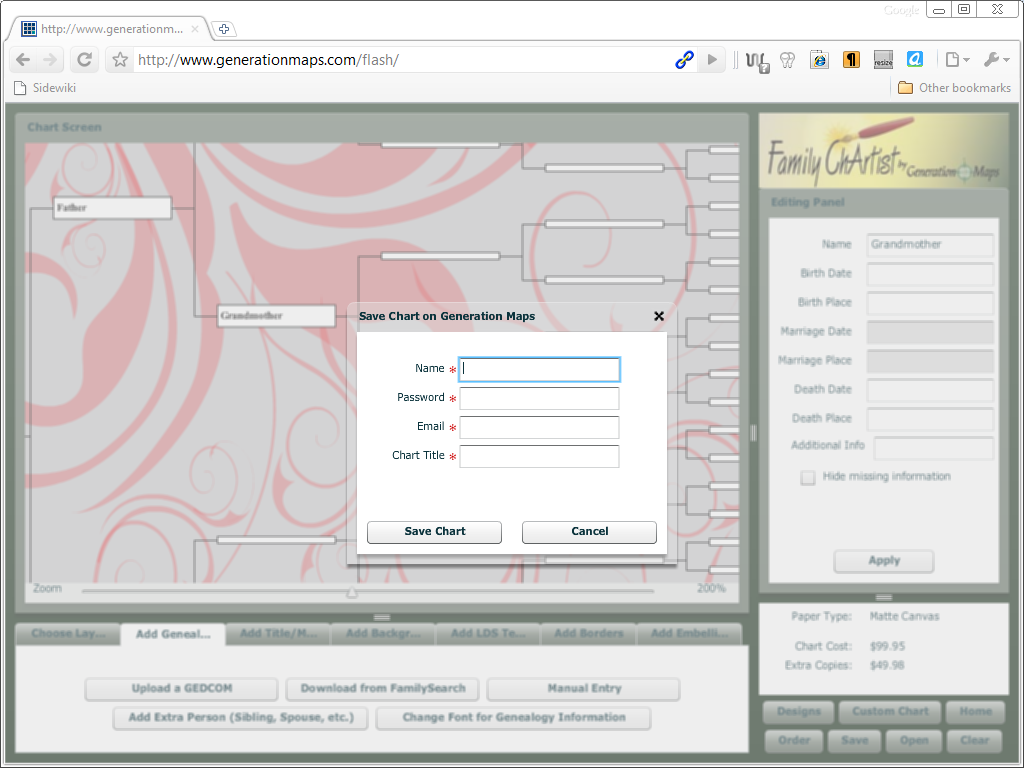
When you click the Save button on the lower right panel, Family ChArtist pops
up a dialog box that asks for your Name, Password, Email and Chart Title. Notice
that all the fields are blank and mandatory. Once you’ve filled all the fields and choose the
Save Chart
button, Family ChArtist uploads your chart to GenerationMaps’
web server. That’s why there is a privacy policy.
Family ChArtist does not upload the entire GEDCOM you imported. It only uploads the data that’s on the chart.
This dialog box prompts for a password as if you already have one, as if you already created an account, but it actually expects to come up with a password right there and then, yet it only asks for a password once. Family ChArtist does not even ask you to retype your password, so if you foul up, that’s it. There is no option in the application to reset your password.
Family ChArtist keeps asking for your name and password every time you upload a chart.
Every time you merely want to save your work, it bugs you to enter your name,
password, email address and chart title again.
I tried saving regularly, but it is hard to keep that up; every time you merely
want to save your work so far, Family ChArtist pops up that dialog demanding
that you fill in all four fields again. It is maddening.
GenerationMaps should stick with the tried and true process of registering an account, using credentials to log in. It should only ask for a chart title, and it should default that save title to the title you’ve used on the chart.
Family ChArtist would be a better product if it regularly saved your work locally without requiring any password from you, to avoid disappointments like the following screen I got to see after trying to save about half an hour of work:

When you get to see a not unlike this one, all your work is down the bit bucket. You have to start over.
When everything goes well, you’ll be able to retrieve your work later. When
you choose the Open
button from the button panel on the lower right,
Family ChArtist will prompt you for your chosen user name and password, and then
display a dialog box that lets you choose from all the charts you’ve uploaded
before.
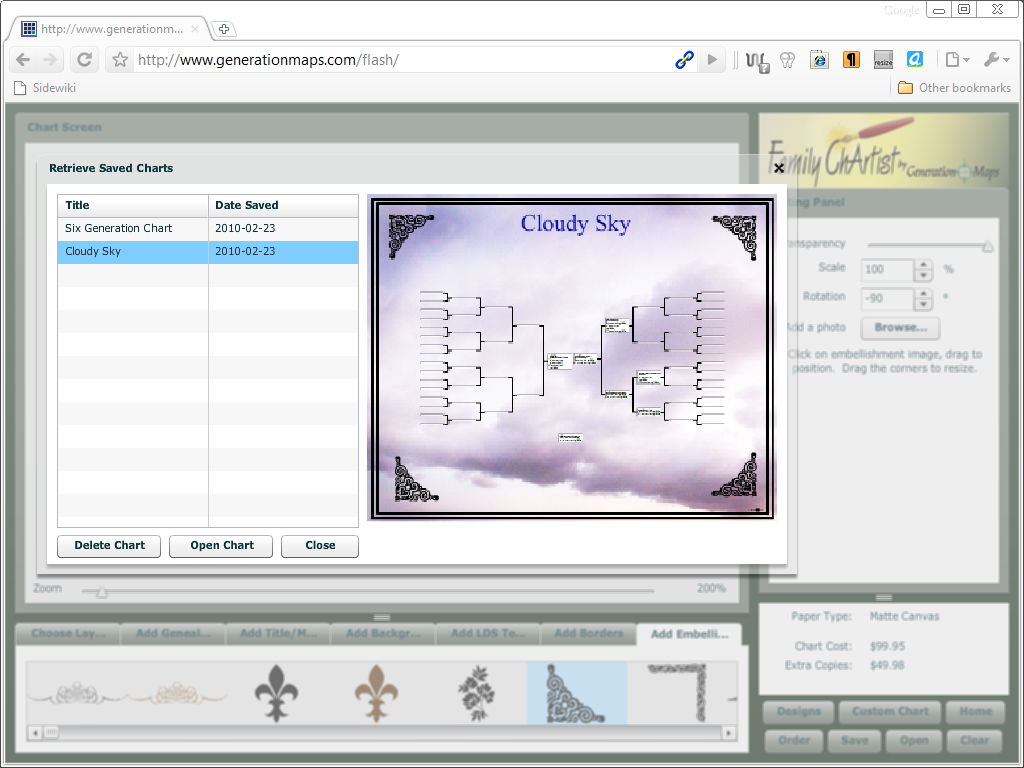
The open dialog box shows a list of chart names and dates on the left, and a thumbnail of the currently selected chart on the right.
maximum number of generations
It initially seemed to me as if Family ChArtist did not support more than
five generations. There is a maximum, but it is not fixed. The maximum number of
generations depends on the selected paper size. The smallest paper size does not
allow more than four generations, and only the two largest paper sizes allow
seven generations.
These limits seem a bit low and arbitrary to me. I think the largest size
allowed should depend on the selected font, box size and spacing.
chart types
Family ChArtist version 1.0 offers just two layouts to choose from; a
pedigree chart or a bowtie chart. You can select either on the first tab,
labelled Choose Layout
. That tab label isn’t a mistake; you do not just
choose a chart, you choose a layout. Your layout choice determines both the
chart type, the paper orientation and the chart position on that paper. All you
can still do is resize the chart by changing the box size and spacing.
I consider this straightjacket a mistake. I think we should be able to choose
our chart type and paper orientation separately, and have the freedom to place
that chart anywhere we like.
However, the biggest complaint is simply that there are only two choices.
Where is the descendants chart? Where is the ancestral chart that looks like a
upward tree? Where is my favourite, the fan chart?
Why does the selection of charts available in this new product from a chart
printing company pale in comparison to the selection available in Legacy
Charting?

Legacy Charting Chart Types.
backgrounds
Family ChArtist comes with a lot of backgrounds. Well, to be truly accurate, it does not come with them, and waiting for the thumbnails to download when you try to scroll through the selection isn’t a great experience. There is an understandable delay when you opt for particular graphic, when you choose a particular background, the high resolution version gets downloaded, and even on a fast line, the download can be surprisingly slow. Several times, the download hung, and I had restart Family ChArtist by reloading page. Having another user interface delay on top of that is simply not enjoyable. GenerationMaps has confirmed that some graphic files hang the app, I’ve suggested to take those files out until that problem has been fixed.
This issue of delayed thumbnails does not only affect the backgrounds tabs, but all the graphics tabs. It sure would be nice if the thumbnails were downloaded with the app, or if the app downloaded them in the background.

Anyway, there are a lot of backgrounds to choose from. Quite a few are actually the same graphic with different base colours. You can specify the transparency of these backgrounds, but you have to settle for the colour combinations that GenerationMaps came up with. If Family ChArtist were to allow control over the base colours as well, it would be more flexible with less graphics.
Do not misunderstand. The graphics look great. There are different graphics
for different tastes and the transparency setting allows you to control how
intense or subdued the graphic is.
The one thing that stands out is the high quality of the graphics. They do not
just look good on your screen, but will look good when printed. Many of the designs are
vector art that scales to whatever resolution is used, and all the bitmap images are
high resolution.

There is no doubt in my mind that the graphics are this app’s best feature. I don’t care much for the few hundred images of LDS temples, but I do like the many embellishments that are included.
I think the religious symbols and country flags should have their own tab. If those were moved out of the embellishment tab, their wouldn’t be very many embellishments left, but their quality is high. Some may seem too big, but you can resize them to your liking.
You can rotate embellishments and specify the rotation in degrees. That is flexible, but the simple act of adding the same embellishment to each corner got me to wonder why there is no button to rotate by 90°. A related problem is that when I place those four embellishments manually, there is no way for me to make sure that they line up correctly. A misalignment that will be clearly visible once printed may not be noticeable onscreen.
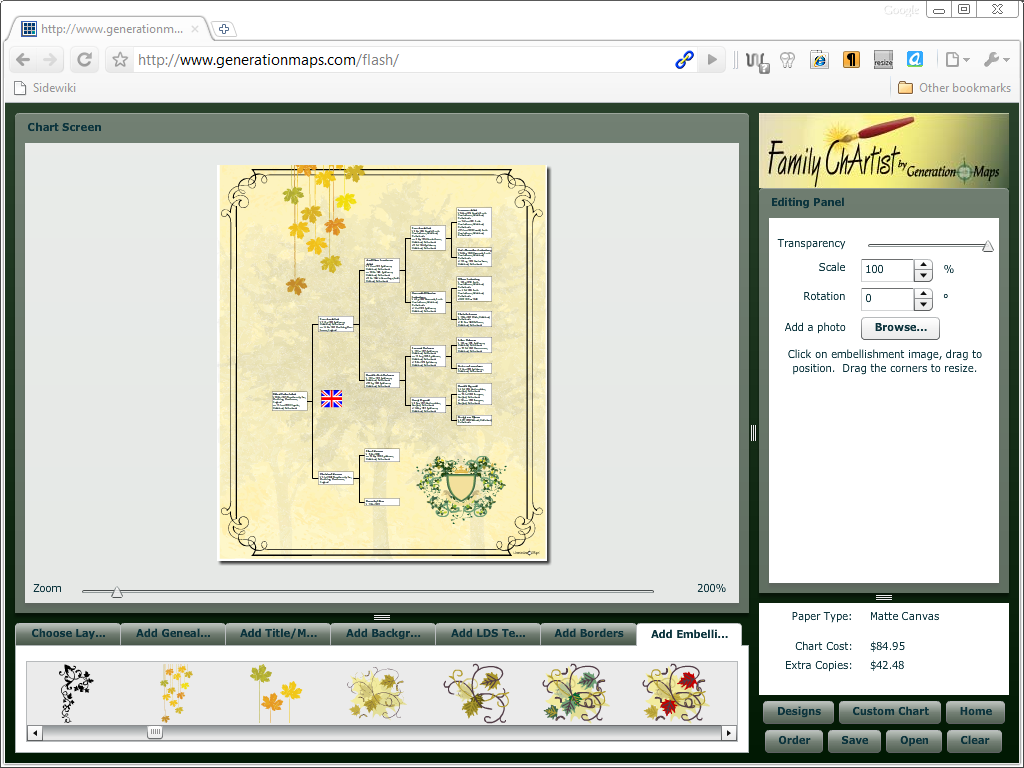
There are quite a few border to choose from as well. I tried some border madness, showing a bunch of border around each other, but Family ChArtist is too sensible for that; it will show only one border at a time. You can switch border styles whenever you like, but there can be only one.
printing

Printing costs money. The press release claims that the smallest paper can be
printed free on your home computer
. I am not aware of Flash support for any
home computer, and the graphics on my ZX Spectrum aren’t so great anyway.
Inadvertent abusage of vintage computer terminology aside, there is a small
practical problem: there is no print button.
To print a chart from your PC on your printer, you need to order a print from GenerationMaps,
save a bitmap and then print that bitmap. You start by double-checking that you are using the smallest format and
then choose the Order
button. Once you’ve chosen the Order
button,
Family ChArtist will pop up a dialog box that ask for even more information than
the save dialog box.
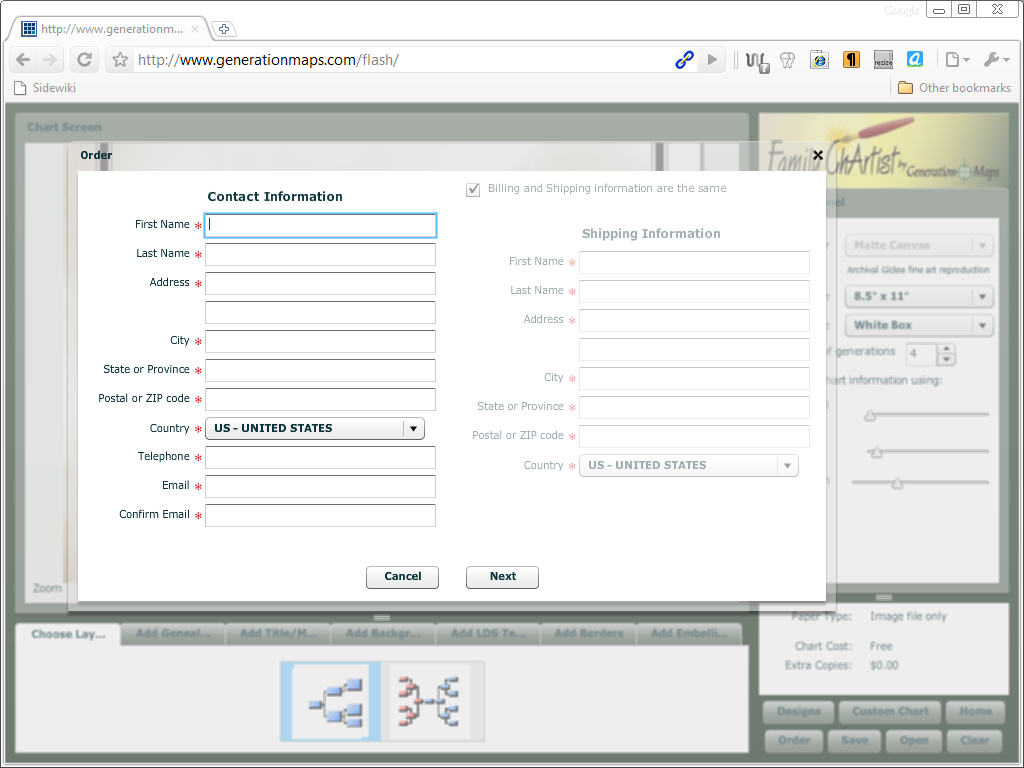
I’ve tried skipping the dialog by immediately clicking the
Nextbutton, but Family ChArtist insists that you fill it all out every time you want print a chart. Leave any of the mandatory fields blank, and it will nag you about it.
Once you’ve filled in the left side of the dialog box, you can choose the Next
button. Family
ChArtist then throws up a dialog box to save the file genealogychart.jpg. That
happens so fast, that there is no doubt that this file is created locally.
It is a 32-bit colour JPEG-format file of 2654 by 3433 pixels. The file size will vary, but is approximately 5 MB. The use of JPEG, a lossy format, made me expect the worst, but when I opened the file I was happy to notice that it does not contain artefacts so typical of JPEG files. All lines and text are as sharp as they should be.
Less options provide less chance to make tasteless choices, but how is my good taste going to stand out if others aren’t given sufficient opportunity to foul up?
limitations
I noticed a few odd limitations. For example, there are all these backgrounds, but there are background colours to choose from. The lines of your tree are available in just one colour and style; straight black lines. You can opt to have border around boxes or not, but you cannot choose a style for these borders, nor does Family ChArtist support a shadow effect. The box itself can be either completely transparent or plain white. There are no other colours to choose from, there are transparency setting and no fill gradients.
Less options provide less chance to make tasteless choices, but how is my
good taste going to stand out if others aren’t given sufficient opportunity to
foul up?
That everyone can access this app, make a few random choices and still end up
with a chart that looks good just ain’t right.
conclusion
Unicode
Family ChArtist is a Unicode application, so you it can handle any character
you can throw at it.
An issue discovered during testing is that Family ChArtist does not support
ANSEL but mangles your data upon import instead. GenerationMaps hopes to have
this fixed before the release date.
user interface
Import could be a bit faster, but is fast enough. Zooming in and out is somewhat sluggish at times, and waiting for thumbnails to load is annoying. Mouse support could be a bit better, and a grid to align items to would be nice The hoop-jumping you must do to merely save your work is a major design blunder, and having to fill out an entire dialog box every time you merely want to print chart is ridiculous. Other than these complaints the Family ChArtist app sure is so simple and easy to use that the lack of a manual isn’t an issue.
reliability
Family ChArtist is relatively memory hungry, yet I still experienced only two app crashes and one full browser crash during a small week of intensive use. Considering that I was testing a beta as well as Flash’s reputation as a browser crasher, that isn’t bad at all.
LDS
The app’s overbearing focus on the LDS may be attractive to LDS members, but is a bit off-putting to everyone else, and LDS member won’t be truly satisfied until Family ChArtist supports LDS events.
paper
That Family ChArtist does not support international standard paper sizes
established in a previous millennium is
anachronistic.
There are only two charts types and the even at the largest paper sizes that
Family ChArtist supports, you still cannot have more than seven generations -
and seven simply isn’t enough.
overall
Family ChArtist is easy to use, but only until you want to save your work or
make a test print; that is a dialog box drama. Family ChArtist 1.0 offers merely
two chart types, only a few core box items, and will print just a few
generations. This is only version 1.0, and Family ChArtist is likely to improve
with future versions, but right now, the app doesn’t impress.
What does impress are the graphics. The graphics are great.
I’d like to have all these backgrounds, borders and embellishments available in
an application as flexible and feature-rich as Legacy Charting. What I’d really like right now is
a GenerationMaps Graphics Pack for Legacy Charting.
updates
2010-02-26: GEDCOM Torture Tests
Family ChArtist does not pass the Three Torture Tests.
2011-06-01: Family Chart Masters
GenerationMaps changed its name to Family ChartMasters.
GEDCOM import
Windows XP machine
| file | 1 MB GEDCOM | 100k INDI GEDCOM |
|---|---|---|
| time | 1s | 60s |
| time in seconds | 1 | 60 |
| INDI per second | 4.862,00 | 1.667,78 |
| bytes per second | 1.055.895,00 | 646.656,55 |
Windows Vista machine
| file | 1 MB GEDCOM | 100k INDI GEDCOM |
|---|---|---|
| time | 1s | 30s |
| time in seconds | 1 | 30 |
| INDI per second | 4.862,00 | 3.335,57 |
| bytes per second | 1.055.895,00 | 1.293.313,10 |
product details
| property | value |
|---|---|
| product | Family ChArtist |
| version | 1.0 |
| company | GenerationMaps |
| website | Family ChArtist |
| price | free |
| requirement | browser with Flash plug-in |
| note | |
| Verdict | infant app with great graphics |
| Rating | Flashy |
links
- Family ChartMasters
- Family ChArtist
- Family ChartMasters: Family ChArtist
- TreeSeek
- FamilyTreeFactory 6
- FamilyLink introduces WebTree
- Legacy 7
- Millennia introduces Legacy Charting
- More about Legacy Charting
- RootsMagic 4
- Family Tree Maker 2009
- FaceBook Genealogy
- GEDCOM Import Speed
- Three Torture Tests
- Some GEDCOM Torture Test Results
GenerationMaps blog posts
- The Chart Chick 2010-02-17: And We’re Back..... Introducing Family ChArtist
- The Chart Chick 2010-02-17: Family ChArtist -- Transparency
- The Chart Chick 2010-02-19: Family ChArtist--Adding Additional People
- The Chart Chick 2010-02-20: Family ChArtist--Come get early access in St. George
- The Chart Chick 2010-02-20: Family ChArtist--gedcom import and manual entry
- The Chart Chick 2010-02-21: Family ChArtist--FamilySearch Certification
- The Chart Chick 2010-02-22: Family ChArtist--Release Date and Press Release
- The Chart Chick 2010-02-22: Family ChArtist Video
- The Chart Chick 2010-02-23: Family ChArtist--Even if you don’t like genealogy
- The Chart Chick 2010-02-24: Family ChArtist--Great pricing and multiple delivery options
- The Chart Chick 2010-02-25: Exciting Days and Angels, and Late Blog Posts
- The Chart Chick 2010-02-25: Family ChArtist--Colors and Fonts
- The Chart Chick 2010-02-26: Family ChArtist--Twitter and Facebook and Genealogy Wise pages
- The Chart Chick 2010-02-27: Family ChArtist--LDS temples
- The Chart Chick 2010-02-28: Family ChArtist--Religious symbols
- The Chart Chick 2010-02-28: The St. George sneak peek went great
- The Chart Chick 2010-03-01: Family ChArtist--Additional Information
- The Chart Chick 2010-03-02: Family ChArtist--Genealogy chart display options
- The Chart Chick 2010-03-03: Family ChArtist--Shields and Monograms
- The Chart Chick 2010-03-04: Family ChArtist--Adding Pictures
- The Chart Chick 2010-03-06: Family ChArtist--coming with an all new website
- The Chart Chick 2010-03-06: Family ChArtist--Screenshots, keeping it simple
- The Chart Chick 2010-03-08: Family ChArtist--And We're Live
- The Chart Chick 2010-10-12: Family ChArtist's first week/Monday's winners
Copyright © Tamura Jones. All Rights reserved.