2014-02-28 RootsMagic for Android 1.0

RootsMagic for Android lacks the Magic
RootsMagic everywhere
RootsMagic 6 was released late in 2012, and it has several nice new features,
but the most significant development was the release of an app that RootsMagic calls the RootsMagic App for iPhone, iPad, and iPod touch
.
I call it RootsMagic for iDevices.
Early in October 2013, the RootsMagic for Android app went into Private Beta,
and early this month, RootsMagic announced the public release.
RootsMagic has stated, more than once, that RootsMagic for MacOS is in development.
RootsMagic database viewer
The RootsMagic for iDevices and RootsMagic for Android apps are quite similar.
Both RootsMagic apps are RootsMagic database viewers, not editors. All editing has to be done in RootsMagic for the desktop. You can install RootsMagic on a laptop, and you can use RootsMagic-to-Go to carry RootsMagic and your database on an USB stick to edit your data on another machine, but the RootsMagic apps are viewers.
Both RootsMagic apps are RootsMagic database viewers,
you can use them to view RootsMagic databases.
The RootsMagic apps do not support third party formats,
and do not support viewing or importing GEDCOM files either.
It is not necessary to use the latest version of RootsMagic,
the RootsMagic apps do work with all RootsMagic 4+ files (*.rmgc).
The RootsMagic apps are free, and work with with all RootsMagic 4+ files;
There are database format differences between different RootsMagic versions,
but there are no database differences between the paid and free version.
You do not need to buy RootsMagic Standard Edition to take advantage of the RootsMagic apps;
you can use the apps with the free RootsMagic Essentials.
There are format differences between different RootsMagic database versions, but not between the different platforms. The RootsMagic apps use the same database format as RootsMagic for the desktop. The use of a single database format avoids the need to convert from one format to another, all you need to do is take advantage of the RootsMagic app is copy your database to your mobile device.
copying files
There are many ways to copy files from your desktop or laptop computer to an Android device.
Many Android devices, such as my Samsung Galaxy S phone, have an SD Card slot.
You can copy the files you want to the SD Card, and then put the SD Card in the Android device;
you don't even need to copy the files to RAM.
My Google Nexus 7 (2012) tablet does not have an expansion slot,
but it does have an mini USB port.
That port and an USB cable can be used to transfer files between the PC an the tablet.
In fact, you can even use that port and an USB OTG cable to attach an USB hard disk to the tablet…
Although these methods are easy enough once you've done it few times,
many users prefer transferring files via cloud storage, such as DropBox,
simply because it does not involve any SD Card, USB cables or other hardware.
There are apps that use Wi-Fi to transfer files directly between your network and your Android device,
but many users still use cloud service such as DropBox, because these files can be accessed from any device
in any location.
There are several competing services, but With RootsMagic for Android,
you'll probably want to use DropBox, simply because the RootsMagic app has DropBox support built in.

DropBox
The first time you use the RootsMagic app to access your DropBox folder, DropBox will prompt you to authorise the RootsMagic app.
The RootsMagic for Android apps looks for RootsMagic files in a particular location.
It is possible to load the files from elsewhere, but it is easiest to load them from the default location.
The RootsMagic for Android apps defaults to the Apps/RootsMagic folder within DropBox.
You don't need to create it; if it doesn't exist yet, the RootsMagic app will create it for you.
You should drop the files you want to view using the RootsMagic app in that sub-folder.
loading files
When you load a file from DropBox,
you'll see a Downloading file from DropBox. Please wait...
message box while the file is downloading.
The download speed depends on your network.
You should probably avoid using your mobile data contract, and download using your home Wi-Fi instead.
You'll not only get better speed, but avoid the data charges as well.
Once the file has been downloaded, RootsMagic displays the local copy.
So here's another tip; if you downloaded and viewed several RootsMagic databases,
do not choose the Dropbox
menu item to download a database again,
but choose the On Device
menu item to load the local copy directly.
The RootsMagic app lets you take your data on the go. It also lets you download on the go, but you should avoid doing so. Prepare for a trip by downloading your databases while still at home.
crash on start-up
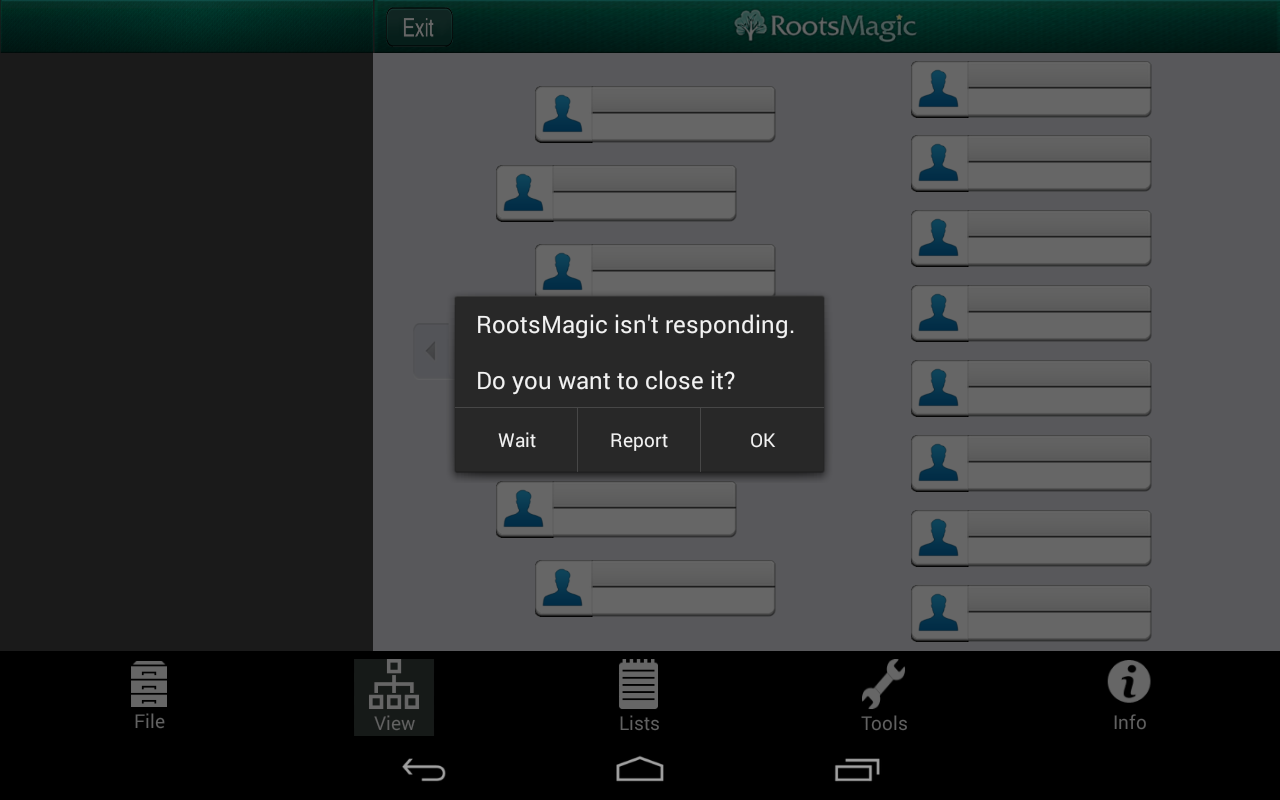
RootsMagic for Android 1.0 isn't as stable as I expect a RootsMagic product to be.
The RootsMagic app may crash for no apparent reason, and that isn't a rare occurrence.
I have seen the Unfortunately, RootsMagic has stopped
dialog box message quite regularly.
It is not even unlikely that it crashes upon startup…

The RootsMagic app suffers from a serious user interface mistake, a so-called anti-pattern; it not only remembers which RootsMagic database you viewed last, which is a good thing, but it also automatically opens that file when you start the app, and that's a bad thing, particularly with a one-dot-zero product, which is likely to suffer some teething problems. What the app should do is remember a list of recently used files and let you pick from that.
The RootsMagic app may crash during the automatic database load.
When that happens, and you try to start it again,
it will try to load the database again, and, you guessed, crash again…
The app will will keep crashing every time you start it because of this anti-pattern.
Don't dismiss as a theoretical issue.
I've experienced it during the Beta.
RootsMagic for Android 1.0 doesn't support GEDCOM files,
but the Beta allowed you to pick a GEDCOM file.
When you did, the app would not warn you it is limited to RootsMagic databases,
it would try to load the GEDCOM as a RootsMagic database, and crash quickly.
RootsMagic for Android 1.0 filters the list of files it shows,
limiting it to *.rmgc files.
That prevents the user from loading of *.GED files, but it does not
prevent the app from crashing because of an unexpected database format.
The design defect still in there is that the app cheerfully assumes the database is in the expected format.
It should make no such assumption.
The app should verify that the database is in the expected format, and report an error when it isn't.
By the way, if you happen to get stuck in RootsMagic's crash-on-startup cycle, the thing to do is to rename the database, so the app can't find that file anymore.
user interface
The crash-on-startup issue isn't the only problem. It is perfectly normal for the RootsMagic 1.0 app to display nothing but a black screen while loading a database. I am not kidding; no message, no progress bar, no wait cursor, just an entirely black screen. Unexpected black screens make for a poor user experience. You don't even notice it when the tablet turns off automatically because the loading takes so long.
A minor user interface shortcoming that isn't a problem if you use just one RootsMagic database, is that the app doesn't show which database you're currently viewing. Showing the current filename on screen would be a helpful addition.

The above image is a screenshot of RootsMagic for Android 1.0 running on my Google Nexus 7. The Google Nexus 7 (2012) does not have the 1920 × 1080 (full HD) screen size of the Google Nexus 7 (2013), but its 1280 × 800 display is still more than average for an Android tablet, and considerable larger than the display offered by typical Android smartphones. There's plenty of space to show a four generation pedigree, even in landscape mode. Upon a a first glance at this screenshot, you may think that there's something missing, but upon a second glance, you notice that everyone in those four generations is there, but the connecting lines are messed up. The lines themselves aren't important, but it does have a confusing effect.
I find the font size small but readable, but can easily imagine some other
users finding the fonts too small to read easily.
The entire pedigree could be larger, if it weren't for the title bar along the top,
and the icon menu along the bottom.
The title bar is superfluous.
I don't need a title bar to remind me that I am running RootsMagic,
the entire display tells me I am running RootsMagic
already,
and I want that space for the pedigree.
What's that redundant exit
button on the title bar doing there anyway, other than distracting us?
We don't need an exit button, and if we needed it, it should be part of the menu.
I don't particularly like the icon-based menu either, it does not feel very Android.
The menu should be hidden, to allow the app to make good use of the available display space,
and, in landscape mode, a permanently shown menu should probably not be shown along the bottom,
but be shown along the side.
Have another good look at the screenshot.
Do you spot the almost unbelievable inconsistency, the anti-genealogical no-no?
The pedigree shows the actual names, as they're stored in the database: One
, Two
, Three
, etcetera.
The name browser on the left does not show the actual names, instead, all names have been CAPITALISED
for no reason whatsoever.
That is wrong, period.
This is a genealogical issue: names should be spelled and cased correctly.
Your genealogy software has no business casing your name different than you entered it.
The Android and iOS apps should not be completely identical, they should be functionality identically, with each app respecting the user interface guidelines and conventions of its platform.
Android
There seems to be a particularly stubborn strain of wrongthink behind the inferior user interface experience,
namely that the Android app, and thus the Android user interface should be identical to the iOS app.
If the RootsMagic folks persist in thinking that way, RootsMagic for Mac is going to disappoint many Mac users.
The Android and iOS apps should not be completely identical, they should be functionality identically,
with each app respecting the user interface guidelines and conventions of its platform.
I expect a Windows interface on Windows, an MacOS interface on MacOS,
an iOS interface on iOS, and an Android user interface on Android.
performance
fan databases
Performance is measured using the fan files. The fan files produced by GedFan are GEDCOM files, and the RootsMagic app doesn't read GEDCOM files, it reads RootsMagic databases. The RootsMagic app doesn't read GEDCOM files, but the desktop app does. The fan value of the RootsMagic for Android app depends on the capabilities of the app and the import speed of RootsMagic on the desktop. RootsMagic's import speed on the desktop is one of the best, and RootsMagic's overall performance is so good that its fan value is an impressive and still unmatched 24+.
upload and download
To use a RootsMagic database with RootsMagic for Android,
you'll probably upload from your desktop to DropBox, and then download it from DropBox to your Android device.
The upload download time largely depends on the speed of the network you're using,
and not the genealogy application you're using, so that doesn't factor into the determination of the fan value.
All tests where done by downloading the FANn.rmgc files, and then later loading the local copies.
The download time does depend on the size of the RootsMagic database, but that can safely be ignored;
needlessly large databases will affect load time and performance anyway.
database loading
The RootsMagic for Android app loads and displays a tiny database such as FAN4.rmgc quickly.
That does not sound surprising, but it wasn't like that during the Beta;
when I clicked a box in the pedigree view to change the proband,
it could take many seconds for the app to respond and actually perform that simple task.
For some of the larger databases, it even took minutes.
Loading databases tiny databases seems reasonably fast,
but for this first release of RootsMagic for Android, medium size databases already seem too much to ask.
Loading and displaying FAN12.rmgc takes just a second.
I tried FAN16.rmgc next, and RootsMagic crashed.
That does not mean that the RootsMagic app can't handle that size,
I've seen it handle larger files, it just means that the RootsMagic for Android 1.0 is somewhat unstable.
When I restarted RootsMagic, it automatically retried loading the FAN16.rmgc database.
I had to endure about twenty seconds of black screen, but after those twenty seconds,
it displayed the FAN16.rmgc database.
I then asked to load the FAN17.rmgc database, it did so successfully.
Loading the FAN18.rmgc database, containing 262.143 profiles, takes about three minutes.
That works out to an loading speed of a bit less than a fifteen hundred profiles per second,
which is barely passable for a genealogy viewer.
It is also surprising, as RootsMagic databases are based on SQLite,
and SQLite is known for its excellent performance.
However, the discouraging performance hardly matters,
as, more often than not, the RootsMagic app would crash trying to load the FAN18.rmgc database.
The FAN18.rmgc database is more than RootsMagic for Android 1.0 can handle reliably,
so RootsMagic for Android 1.0's fan value is less than 18.
For large databases, RootsMagic for Android 1.0 is plain unusable.
usability
RootsMagic for Android 1.0's actual fan value is considerably less.
Loading the database isn't good enough, I must also be able to use the app interactively.
RootsMagic for Android is merely a viewer, not an editor,
so being able to use it interactively use is about the ability to browse through the data.
One way to test this is changing the proband in pedigree view;
I found the response time for FAN12.rmgc to be about half a second, which is acceptable,
so I tried FAN14.rmgc - and RootsMagic crashed when I tried to change the proband.
It worked fine when I retried, but the performance wasn't five.
Even for FAN13.rmgc, a small size database of just 8.192 profiles
(and profiles with nothing but names, no events, no dates, no places, no records, no notes, no media),
the response time was already noticeably more than second.
Therefore, RootsMagic for Android 1.0's actual fan value is 12.
I intended to create some screenshots with real data by loading my own database, but that wasn't a success.
RootsMagic takes about five minutes to load and display the database,
and switching to another profile takes minutes too.
I guess it would be another five minutes, but I am not sure,
because the RootsMagic app consistently crashes whenever I click the person I want to navigate to.
For large databases, RootsMagic for Android 1.0 is plain unusable.
comparison
RootsMagic for Android 1.0 managed a fan value of 12
on a Google Nexus 7 with 32 GB of RAM running Android 4.4.2, and that is disappointingly low.
The FAN12.rmgc database is a tiny database of just 4.095 profiles.
The SourceQuest ezGED GEDCOM viewer managed a fan value of 13
on a Samsung Galaxy S with 16 GB of RAM running Android 2.3,
and on that same Samsung phone, GedStar Pro managed a fan value of 17.
I can tell you that RootsMagic for Android 1.0's performance is already considerably better than
what I experienced during the Beta, and I do expect it to improve further,
but the fact remains that RootsMagic for Android 1.0's performance is seriously underwhelming.

RootsMagic data
Alas, none of the other products mentioned is very compelling to a RootsMagic user.
I would be amiss if I did not stress that RootsMagic for Android is a viewer for all the data in your RootsMagic databases.
RootsMagic for Android will not only display basic data,
but also show Places, Sources, and Repositories.
RootsMagic for Android will show your Addresses, Correspondence, Media, and To-Do list;
It really is a RootsMagic viewer.
conclusion
RootsMagic for Android 1.0 is a free database viewer.
It never modifies your databases, it just shows you what's in them.
It is unreasonable to expect a company's first Android app to be perfect,
but RootsMagic for Android 1.0 manages to disappoint with a a user interface that is less than polished,
by being uncharacteristically slow and crashing easily.
RootsMagic has an admirable history of not releasing products or features until they're done,
but this time, RootsMagic for Android was simply released too soon.
It is not hard to understand why.
Many RootsMagic users were eager for the RootsMagic for Android app,
and it's already been more than a year since the release of RootsMagic for iDevices,
so Android users kept bugging RootsMagic about it.
The RootsMagic app should have stayed in Beta a bit longer, to improve
its user interface, reliability and performance.
The RootsMagic app should have stayed in Beta a bit longer, to improve its user interface, reliability and performance.
RootsMagic for Android 1.0 isn't a bad app, but it isn't a very good one either.
RootsMagic for Android 1.0 still feels more polished than many other genealogy apps for Android,
but it is nowhere near the quality level of the desktop application.
I experienced no problems with tiny and small databases,
and the app does a passable job for medium sized databases,
so many RootsMagic users will be happy that RootsMagic released their Android already.
However, over the years, many users with big databases switched to RootsMagic because of its performance,
and for most of those users, RootsMagic for Android 1.0 falls short of expectations.
Your kilometrage may vary, and its a free app,
so do try it with your own database on your own Android device.
links
- RootsMagic app
- RootsMagic blog 2013-02-07: RootsMagic App for Android now available!
- RootsMagic for Android
- RootsMagic App for iDevices
- RootsMagic Essentials
- RootsMagic 6
- DropBox
- Five Freaky Features Your Genealogy Software should not have
- RootsMagic 5 Fan Value
- SourceQuest ezGED 1.0 Fan Value
- GedStar Pro
Copyright © Tamura Jones. All Rights reserved.