2009-12-22 MyHeritage Family Tree Builder 4.0
Family Tree Builder
version 3.0 claims
On 2009 Jan 2, MyHeritage announced Family Tree Builder (FTB) version 3.0.
The download page for version 3 claimed that it offers excellent quality
,
that it is one of the best genealogy software programs you’ll ever find
and created by a team of experts in genealogy and professional software
design
.
…the SmartMatching that MyHeritage bragged about could not even perform a DumbMatch.
version 2.0 reality
The download page for version 2.0 claimed that it was the best tool for
setting up a family tree
, yet I found that Family
Tree Builder 2.0 to be a slow, unresponsive, memory-hungry code-page based
program. The program’s kludgy internals kept changing the identifiers of
individuals. Family Tree Builder 2.0 does not even support ANSEL or UTF-8. FTB
does claim your GEDCOM is invalid when it fails to recognise
perfectly valid characters, and the SmartMatching that MyHeritage bragged about
could not even perform a DumbMatch.
I not only concluded that MyHeritage overpromises and underdelivers, but even had to note that its file update logic is so broken by lack of design that FTB is a danger to your data. Overall, I found MyHeritage Family Tree Builder 2.0 to be scarily defective.
download & install
The download & installation of Family Tree Builder 3 and 4 is so problematic that it has been the subject of two separate articles already.
MyHeritage hijacking homepages discusses how the installer for MyHeritage Family Tree Builder version 3 does not just install the application, but also changes your home page and your default search engine.
The MyHeritage Family Tree Builder 4.0 Installation article discusses how problematic the installation and start-up of Family Tree Builder version 4.0 still is. Read that article to understand why the installation and start-up issues alone are more than enough reason to avoid this application already.
This article focuses on the application itself, minus its many installation and start-up issues, but a few points deserve a brief mention. First of all, that the Family Tree Builder installer also installs an evaluation copy of The Complete Genealogy Reporter, because Family Tree Builder itself lacks reporting capability. Secondly, that even version 4 of Family Tree Builder still does not default to installing in Program Files, but that it does store its data files in your Document folder.
A small issue I encountered while comparing the different versions is that the install
for each version assumes that it is the newest version, and upgrade
your
existing installation, but other than few confused messageboxes, I did not
experience any problems because of this.
Another small thing worth mentioning is although version 2, 3 and 4 were all released well after the introduction of Vista, Family Tree Builder still does not feature a Vista icon.
registration and login
MyHeritage advertises Family Tree Builder as free software, but that is not entirely true. MyHeritage demands that you become a MyHeritage member to use. You have to enter your email address and MyHeritage password to use Family Tree Builder. Every time you start Family Tree Builder, it phones home, and that cannot be turned off. That obviously allows MyHeritage to track your usage of the program.
Family Tree Builder was apparently never tested without Internet access. If you use your firewall to block Internet access, you may encounter dialog boxes as evidence of confused program logic.

Although 4.0.0.893 is the latest version already, Family Tree Builder 4.0 recommends upgrading to the unknown latest version...
changes
The initial overall impression version 3.0 made on me was that it should have been called version 2.1; it seemed to be version 2 plus some defect fixes. MyHeritage PR promised to answer questions about the differences, but despite several reminders, did not answer any question nor did they do anything else to dispel that impression.
When I finally received some kind of reply, the MyHeritage CEO told me that version 3.0 was not worth
reviewing because they would be releasing version 4.0 soon.
Hm, our application is excellent
quality
, one of the best genealogy software programs you’ll ever find
,
but please don’t review it? That sure is an interesting approach to product
marketing.
Award
Like lots of other software, Family Tree Builder is distributed to download sites with a Portable Application Description (PAD). That is a file which includes such things as basic application info, a download link and a vendor-provided short and long descriptions. Those vendor-provided descriptions tend to be a glowing endorsement. That is why all download sites describe a product using exactly the same superlatives-laden description.
In the case of Family Tree Builder 3.0, the short description reads:
A brand new version of the most popular and innovative genealogy program for creating family trees. Free, intuitive and fun to use, with Smart Matching Technology, Online Family Tree Publishing and support for 34 languages. Get it today!
ActualDownload.com
One of the many download sites that picked up that descriptions is ActualDownload.com.
Almost immediately after the release of version 3, MyHeritage employee Mario visited
ActualDownload.com to give it a
five-star rating. That single five-star rating resulted in an overall five-star rating,
which prompts ActualDownload to show a Best Software
button, a button it
shows for several directly competing products as well.
Yet on 2009 Apr 14, MyHeritage claimed that ActualDownload had selected
their Family Builder application for the Best Software
award,
and that ActualDownload.com had dubbed it
the most popular and innovative genealogy program for creating family trees.
Free, intuitive and fun to use.
.
That is how MyHeritage handed itself an award for Family Tree Builder.
After the MyHeritage wins Award? exposé, MyHeritage silently removed the offending part from the blog post as if it was never there. Only a comment that most blog readers will never see still admits the truth, and then still tries to suggest it was an honest mistake.
version 4.0
The 2009 May 5 mail from MyHeritage CEO Gilad Japhet claimed that version 4.0
would be released within a month. Version 4.0 was actually introduced on 2009 Aug 13.
It may seem interesting that the CEO of a company is so badly informed about the
development status of their own product, but the sad truth is that it hardly
unusual. For example, the press release for Family Tree Maker 2008 makes it
pretty clear how out of touch Ancestry.com management was with product reality.
MyHeritage is not likely to be accused of modesty any time soon.
immodest claims
The MyHeritage blog post introducing Family Tree Builder version 4.0 claims
that it brings significant innovations
and improvements
. The press release claims that With more than 5 million
downloads so far, Family Tree Builder is the world’s most popular free genealogy
software
and the download page claims that it is the best free genealogy software in the world
.
MyHeritage is not likely to be accused of modesty any time soon.
new features
Version 4 does introduce a few new features. For example, it now offers mapping features and a photo album. But with such extraordinary claims, I decided to look whether, two versions on, MyHeritage has fixed the multiple fundamental issues that make version 2.0 so remarkably disrecommendable.
A new product introduced with Family Tree Builder 4.0 is the Family Toolbar. The MyHeritage Family Tree Builder 4.0 Installation article provides some information on this browser toolbar.
It is about MyHeritage grabbing your data, and making you pay for their privilege.
automatic backup
Upon opening a project, Family Tree Builder 3 highlights its Automatic Publishing
(Online Backup)
feature. To be more precise, it does not just highlight it, but
even has it enabled by default. Family Tree Builder 4 does not have the text Automatic Publishing
(Online Backup)
on the dialog box anymore, but does still enable by default.
The so-called Automatic Publishing feature is not about publishing your data as a book or report, and not really about backup either. This misnamed feature is about uploading your data to MyHeritage.com. It is about MyHeritage grabbing your data, and making you pay for their privilege. The dialog box does not at all state what rights you give MyHeritage when you do upload your data this way.

The less than open and honest presentation of this feature invites comparison
to another genealogy company infamous for grabbing user data whenever they can.
That MyHeritage turns this feature on by default is both pushy and wrong. MyHeritage advertises Family Tree Builder as a free application, but you
need to be a paying MyHeritage subscriber to maintain anything but toy-sized
databases on MyHeritage.com.
import
Family Tree Builder still does not allow you to import a GEDCOM file into an empty project of your choosing. When you try to do so, FTB still insists on closing the your empty project and creating another empty project to import the GEDCOM file into. That is kind of funny.
Family Tree Builder’s GEDCOM import is badly designed. It is only after it has started processing the GEDCOM file already that Family Tree Builder asks you for project information.
Family Tree Builder starts reading the file as soon as
you choose to import the file you selected, but only to show the file header for
no discernable reason.
There is no choice to be made, it just shows the file header and then pauses the
import until
you click Next
again.
The next import dialog asks you to choose a language for the file. That is a not a common question for a genealogy application, and it is only natural to wonder how exactly FTB uses your answer, but the simple fact remains that FTB should prompt you for all import options before starting the import, not pause the import to ask questions. That FTB first closes your empty project, and then asks for a project (database) name after it has started to import the file already is especially jarring.
unrecognised tags
It is also rather disappointing to note that FTB still makes the all too
common mistake of offering to convert unrecognised tags to notes, and even pushes that
mistake by making it the recommended
default. Family Tree Builder isn’t the only genealogy application that
makes the mistake of adds
notes into your database, but that still does not make it recommendable. Letting
any program mess up your database by adding lots of cryptic notes is definitely not
recommended.

There dialog box has two options for unrecognised tags. The first one is to mess up your
database with notes. The other option is to discard
the unrecognised tags - and that should be the default.
The GEDCOM specification is quite clear about GEDCOM readers being allowed to
ignore unrecognised tags. Nowhere does it suggest converting such tags to cryptic note fields.
The very best solution is the Relatives approach: keep unrecognised tags around
as unrecognised tags, so they can be exported again.
encoding
The last dialog of the dialog parade between the first and second phase of the import allows you to override the GEDCOM encoding, but correctly defaults to auto-detecting it.
I do find it a bit weird that this dialog box does not show just what it has auto-detected while Family Tree Builder has already started the import and processed the GEDCOM header, even shown it a previous dialog, but the most important thing is that it is does not force users to choose something the program should detect automatically.
The list of supported encoding does include ANSEL and UTF-8, but does not include ASCII.
Only after you’ve made all the choices on this Configuration
dialog box and
click Next
does Family Tree Builder move on to the second phase of the
GEDCOM import.
FTB claims an import completion time before the import is finished!
phases
Family Tree Builder’s GEDCOM import consists of several phases separated by several unnecessary pauses that demand user input to continue.
The first phase opens the GEDCOM file to start reading it and while Windows has
started to cache (part of) the GEDCOM file, display the GEDCOM header. After
that first phase the import pauses.
You then need to click Next
a few times, choose a filename and should uncheck Convert to Notes (recommended)
for the import to continue with the second phase. The second phase converts the
GEDCOM file to a database in memory and then saves that database to disk.
Once these phases of the import are done, FTB shows a dialog that includes some statistics, including an import time claim. That import time is claim is not just way off, it is worse than that. FTB actually claims an import time while its final import phase of writing a post-import report is yet to come. FTB claims an import completion time before the import is finished! In this matter, Family Tree Builder is as unreliable as Family Tree Maker.
no import log
Although I pointed out this deficiency in my review of version 2 already, version 4 still does not create an import log file. It is still limited to a post-import report. If anything goes wrong during import of a GEDCOM file, there will be no import log to show you how far Family Tree Builder got, or what problems it encountered before crashing, there will simply be no information at all.
hard to get
As if it is not bad enough that it does not create an import log at all, Family Tree Builder still defaults to not writing its post-import report either, makes it unnecessary hard to get one, and too easy to skip creating it. Getting Family Tree Builder to write its post-import report is not a matter of just setting a global option once and forgetting about it. Nor does it offer the option to write the post-import report when you start the import.
No, Family Tree Builder hides the button to create the report on the on the Issues Encountered
during Gedcom Import
dialog box. That it is still cased Gedcom
instead of
GEDCOM
does not build confidence in that MyHeritage is finally taking GEDCOM support seriously.
Family Tree Builder will only create the post-import report if you go out of
your way to make sure FTB creates it. You have to choose the View Issues
button, wait for the Issues dialog to appear, then choose to
Save Report...
, then choose a filename, and then wait for FTB to finish writing the report.
The dialog box that prompts for the filename erroneously defaults to directory of the GEDCOM file you imported (perhaps a disk such as a CD-ROM that you can only read from and not write to) instead of the directory of the database you created, so it takes another few seconds to browse to the correct directory.
crashes
I’ve experienced more than once that Family Tree Builder crashes while filling the Issues dialog box. When that happens, there is no post-import report at all. If you still want to have that report, you have start the import all over again and hope Family Tree Builder does not crash again.
Once FTB reports that the post-import report has been saved, you need to click OK to leave
the Issue dialog box, and then click Finish to finally finish the needlessly
convoluted import.
Because it is so convoluted and requires so much user interaction, import of
even the smallest file easily takes ten seconds or more.
1 MB GEDCOM
FTB 3 claims an import time of 0,6 seconds for the 1 MB GEDCOM, but even if you select, choose, click, type and browse quickly, import of the 1 MB GEDCOM actually takes about 15 seconds, on both the Windows XP and the Windows Vista machine.
The post-import report for the 1 MB GEDCOM complains about Unstructured Dates
.
Rightfully so, as some of the ostensible dates in that file are completely
nonsense.
100k INDI GEDCOM
On the Vista machine, FTB 3 brazenly claims an import time of 14,9 seconds, despite the fact that just the file save takes longer already, and that actual import time is minutes, not seconds. The actual import time is 3m27s on the Windows XP machine and 2m22s on the Vista machine.
The Windows Task Manager shows FTB 3 to be using some 430 MB of memory, that is more than eleven times the size of the GEDCOM file. FTB 4 used even more, as much as 525 MB, which is about 14 times the size of the GEDOM file.
fast enough
The import procedure does not seem to have changed at all, so I would expect the import times to change little between the different versions, yet they vary a lot. I wondered whether I had perhaps made a calculation error or typo in import time version 2 needed for the 100k INDI GEDCOM, that it should have been 2m47s instead of 1m47s, but it hardly matters; even with such a correction towards the average, the variation in timings between versions 2, 3 and 4 remains remarkable. Perhaps the auto-save feature mentioned further down is partly responsible for the differences.
That Family Tree Builder 4 is so memory hungry may explain why it is slower than FTB 3 on the Windows XP machine with 2 GB, yet faster than FTB 3 on the Vista PC with 4 GB of RAM.
Although the differences in import time are a bit puzzling, the difference themselves matters little, as all these import timings are certainly fast enough. The real issue with Family Tree Builder’s GEDCOM support is not its import speed, but that the quality of the support has not improved.
post-import report
The post-import report for the 100k INDI GEDCOM complains about a few dozen Unstructured Dates
, most
of which are simply dual dates such as 13/18 Aug 1901
that most genealogical applications accept.
Off the top of my head, the only other application I know to complain because it
cannot handle dual dates is Family Tree Maker.
Invalid ANSEL sequence
It was very disappointing to note that version 3 and even version 4 still
complain about the same Invalid ANSEL sequence
that I discussed in the
2007 Nov 17 Family Tree Builder 2 review.
It [Family Tree Builder] reports
Invalid ANSEL sequence (226.32). In the few ANSEL tests I have done with a variety of programs, most programs make no effort to check the encoding, but blindly assume that the all values make sense, and then produce, cough, varied results. FTB is quite right to complain about errors in the encoding of the GEDCOM file, the problem with its complaints is that there is no error.Decimal 226 is hexadecimal E2. ANSEL code E2 is the Combining Acute Accent. Decimal 32 is hexadecimal 20. ANSEL code 20 is ASCII code 20, the Space character. Thus,
(226.32)is ANSEL sequence E2 20, a Combining Acute Accent on top of a Space character. FTB claims that it is an invalid ANSEL sequence, but FTB is wrong. It is a perfectly valid sequence, that correctly encodes the Acute Accent (U+00B4). The real problem is that FTB fails to recognise a correct sequence. That is a limitation of FTB, not an error in the GEDCOM file.If FTB does not recognise the correct encoding for Acute Accent upon import, you cannot help but wonder how it exports an Acute Accent [to ANSEL]. The answer is that FTB lacks support for export to ANSEL.
Two versions and more than two years later, this defect has still not been fixed. Additionally, FTB still lacks support for export to ANSEL.
Unicode
A fundamental limitation that Family Tree Builder shares with other anachronistic genealogy applications such as Legacy Family Tree and The Master Genealogist is that it still is not a Unicode application, but merely a code-page application.
That seriously limits its capabilities, and makes it impossible to fully support ANSEL or UTF-8. That limitation is a Family Tree Builder limitation, but Family Tree Builder produces confused warnings that - if you do not know better - make you think the GEDCOM file is wrong.
Undisplayable Unicode Character
This is another defect that I reported more than two years ago, yet still has not been fixed:
FTB also has several complaints about undisplayable Unicode characters. In actual fact, few Unicode characters do not display, but for those that do not, their lack of display is a Good Thing, not something to complain about, so that is probably not what FTB means.
One specific error FTB produces is
Undisplayable Unicode Character: 264 (227,67).
Decimal 227 is hexadecimal E3. ANSEL code E3 is the Combining Circumflex Accent. Decimal 67 is hexadecimal 43. ANSEL code 43 is ASCII code 43, the Latin Capital Letter C. Thus,(227,67); is ANSEL sequence E3 43, a Combining Circumflex Accent over a Latin Capital Letter C. Decimal 264 is hexadecimal 108, Latin Capital Letter C with Circumflex, and that E3 43 sequence is the correct ANSEL encoding of Unicode character U+0108, Latin Capital Letter C with Circumflex.There is nothing wrong with the GEDCOM file, so there is no error, nor does FTB report an error, FTB reports a warning. However, that warning is wrong. Unicode character U+0108, Latin Capital Letter C with Circumflex is perfectly displayable.
…
The message FTB produces is wrong. These Unicode characters are not
undisplayable, they are unrepresentable in the limited Windows 1252 character set that FTB still uses. FTB should issue a warning, and should make it clear that this is a fundamental FTB limitation, not make it sound like there is something wrong with the characters.
I wrote and published that more than two years ago, and in all that time, MyHeritage has not bothered to fix their misleading warning message.
character set support
Only a Unicode application can provide full ANSEL and UTF-8 support, a code-page application like Family Tree Builder cannot. However, like other code-page applications, it can still provide limited support for ANSEL and UTF-8.
Family Tree Builder does provide some support for both ANSEL and UTF-8, but it is very limited. Not only does it still suffer from the errors I called to MyHeritage’s attention two years ago already, the support is also limited to GEDCOM import. Although exporting ANSEL and UTF-8 is easier than importing it, Family Tree Builder will still export nothing but illegal ANSI GEDCOM files instead of proper GEDCOM files.
Family Tree Builder does not support UTF-16 at all. That is not a huge limitation as long as it supports UTF-8, but that even version 4 of a genealogy application still does not even recognise an UTF-16 GEDCOM to tell the user it does not support it is embarrassing.
data directory
Version 2 of Family Tree Builder stores data in the program folder. Version 3 and 4 keep your data in a MyHeritage subfolder of your documents folder, as it should.
Family Tree Builder 4 is even slower to start up than Family Tree Maker 2009!
start-up
A serious problem with Family Tree Builder is that although the import is
fast enough, application start-up is not. Family Tree Builder defaults to
loading the last project you worked on, and when that is a database with 100.000
individuals in it, it apparently needs four or five minutes to do so. Family
Tree Builder 4 is even slower to start up than Family Tree Maker 2009!
Even worse, Family Tree Builder displays a very large modal splash screen when
it starts up, which continues to show over other windows until it has finally
finished loading the database.
unresponsive
Another huge problem with Family Tree Builder is its overall unresponsiveness. You edit double an individual, edit some data, and then have to wait minutes before Family Tree Builder responds again and redraws the white rectangular area where the dialog box used to be.
Family Tree Builder is so slow and unresponsive for anything but toy-sized
files that it is practically unusable; you merely select a menu item, and the title bar immediately changes from Family Tree Builder
into the dreaded Family Treed Builder (not responding)
.
crash
The Family Tree Builder 2.0 review uncovered several serious issues, that all stem from a lack of design. The worst of these issues is that if the system crashes during a database save, your database is probably gone. It is that problem that earned Family Tree Builder 2.0 its scarily defective rep.
I simulated system crashes by killing Family Tree Builder 4.0 from
Windows Task Manager while it is saving a file. This is fairly easy to do, as
Family Tree Builder takes it sweet time saving files.
I am happy to say that Family Tree Builder has improved and that Family Tree
Builder version 4 is more robust than version 2. If Family Tree Builder or your
system crashes during a save, you will be presented with the database prior to
the save.
There is still a lot wrong with Family Tree Builder database save logic. When you open a database, it prompts you to upload your data, and once you’ve dismissed that dialog, it makes you wait while it decides to save your (unchanged!) database. That is seriously broken program logic.
GEDCOM storage
Family Tree Builder is one of those uncomfortable applications that lose your changes if you do not save regularly, because it does not save your every record edit automatically like most genealogy applications do. That shortcoming is the result of a basic design mistake it shares with Family Historian and dynastree Home Edition: Family Tree Builder is a database application without a database system. It uses GEDCOM files for storage.
Family Tree Builder has an auto-save feature that will regularly save your data say every five minutes, but that is just a patch on top of the design blunder. If Family Tree Builder used a database system as it should, it would not need this at all.
zip and unzip
That Family Tree Builder uses GEDCOM files instead of some database format is not immediately obvious,
because it zips the GEDCOM file.
That is another mistake. ZIP files do make for much smaller files, but hard disk space is
hardly at a premium these days. The zipping and unzipping takes time and memory
for no good reason whatsoever. Family Tree Builder’s file load and save
would be faster and less memory hungry if it did not zip and unzip its files.
Smart Matching
Smart Matching was developed by Pearl Street Software, and works very well in its GenCircles web site. MyHeritage bought Pearl Street Software, and Family Tree Builder version 2.0 was the first version to work with Pearl Street’s technology. It was supposed to be the big feature of Family Tree Builder, yet the press release for version 4 hardly mentions it anymore.
The official MyHeritage line was that you do have to upload your entire tree to MyHeritage to perform Smart Matching on the entire tree, but that you do not need to do so to match a single individual. They even boasted that it would work in real-time without slowing you down.
When I reviewed FTB 2.0, I noted that Smart Matching did not work as advertised, that MyHeritage overpromised and underdelivered.
Testing this feature using an individual that is on their web site, I
experienced minutes of waiting, not responding
in the title bar, to finally get three matches
that were nothing like the individual I had requested a match for. Family Tree
Builder did not even return any Dumb Match, the exact matches for this
individual. So, FTB 2.0 failed to impress.
I concluded that MyHeritage’s claim that they added Smart Matching to Family Tree Builder seemed incorrect, that Family Tree Builder only worked with the Smart Matching they had added to their web site.
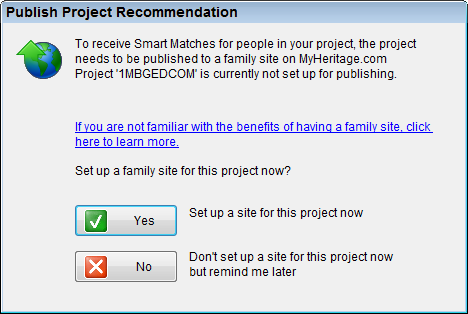
In Family Tree Builder 4, the Smart Research feature is not
available unless you become a paying MyHeritage member, in which case you’ve
probably uploaded your tree already. In fact, if you try finding matches by
clicking the Matches
button on the button bar, you get to see a dialog box titled Publish Project Recommendation
, which tells you
that To receive Smart Matches for people in your project, the project needs to to
be published to a family site on MyHeritage.com
.
The GenCircles site continues to offer SmartMatching for free.
conclusion
character support
Although another two years have passed, Family Tree Builder 4.0 has still not been upgraded to Unicode yet. It remains a code-page application and as such still provides very limited character support.
It is relatively easy for a codepage application to export to ANSEL and UTF-8, yet even version 4 still does not do that. What is especially weird about the lack of support for ANSEL and UTF-8 export, is that Family Tree Builder does support import from ANSEL and UTF-8, insofar a codepage application can do so.
That a codepage application such as Family Tree Builder does not support UTF-16 isn’t surprising, but that
it does not even recognise UTF-16 is embarrassing.
Another remarkable thing is
that is does not even support import from ASCII. That is just weird.
GEDCOM
The GEDCOM 5.5 specification mandates that codepage application export to ANSEL, but even version 4 of FamilyTree Builder still does not support that. It only export to ANSI GEDCOM, which is illegal. Technically, those ANSI GEDCOM files are not real GEDCOM files.
The GEDCOM import does not seem to have improved at all. The issues the version 2.0 review noted two years have not been fixed. Family Tree Builder still pauses the import to asks for user input it could and should have asked beforehand. The GEDCOM import still does not produce an import log, and will only produce a post-import report if you take trouble to save it. The quality of the errors and warnings in the post-import report has not improved, and it still pretends there is something wrong with your GEDCOM file instead of admitting Family Tree Builder’s limitations.
slow
Family Tree Builder’s GEDCOM import speed seems as stable as a yo-yo, but no matter, it is fast enough. However, Family Tree Builder is slow to start-up; start-up is slower than Family Tree Maker 2009! Family Tree Builder does not scale well either; Not only is Family Tree Builder still rather memory hungry, it is still so slow and unresponsive for anything but toy-sized files that it practically unusable.
I’d rather use Family Tree Maker 2008 than Family Tree Builder 4.0.
overall
MyHeritage’s public claims about its own product do not match reality. Family Tree
Builder is far from the best free genealogy software in the world
. It is not one of the best genealogy software programs you’ll ever find
either, but arguably one of the worst. I’d rather use Family Tree Maker
2008 than Family Tree Builder 4.0.
Even if you forget about the browser hijacking, the invasive installation,
its phone home behaviour, the continual browser adverts, its dishonest
dialogs, and that most of it recommended
options are unrecommendable, it
is still hard to get enthusiastic.
Family Tree Builder is fundamentally flawed by lack of design. Gimmicks like a slide show, screen saver and yet another toolbar do not make up for fundamental shortcomings and defects that still have not been fixed yet. MyHeritage should hire a software architect to start afresh.
import speed
Family Tree Builder 3.0
Windows XP machine
| file | 1 MB GEDCOM | 100k INDI GEDCOM |
|---|---|---|
| time | 15s | 3m27s |
| time in seconds | 15 | 207 |
| INDI per second | 324,13 | 483,15 |
| bytes per second | 70.393,00 | 187.436,69 |
Windows Vista machine
| file | 1 MB GEDCOM | 100k INDI GEDCOM |
|---|---|---|
| time | 15s | 2m22s |
| time in seconds | 15 | 142 |
| INDI per second | 324,13 | 704,70 |
| bytes per second | 70.393,00 | 273.235,16 |
Family Tree Builder 4.0
Windows XP machine
| file | 1 MB GEDCOM | 100k INDI GEDCOM |
|---|---|---|
| time | 15s | 5m50s |
| time in seconds | 15 | 350 |
| INDI per second | 324,13 | 285,91 |
| bytes per second | 70.393,00 | 110.855,41 |
Windows Vista machine
| file | 1 MB GEDCOM | 100k INDI GEDCOM |
|---|---|---|
| time | 15s | 1m36s |
| time in seconds | 15 | 107s |
| INDI per second | 324,13 | 935,21 |
| bytes per second | 70.393,00 | 362.611,15 |
product details
| property | value |
|---|---|
| product | Family Tree Builder |
| version | 4.0 |
| organisation | MyHeritage |
| website | MyHeritage Family Tree Builder |
| price | registration |
| requirements | |Windows 98 or later |
| note | aggressive installer |
| Verdict | Fundamentally flawed |
| Rating | Avoid |
links
MyHeritage Family Tree Builder
- MyHeritage Family Tree Builder
- MyHeritage Family Tree Builder 3.0 direct download link
- MyHeritage Family Tree Builder 4.0 direct download link
- MyHeritage Family Tree Builder 4.0 Installation
- MyHeritage wins Award?
- MyHeritage hijacking homepages
- MyHeritage Family Tree Builder 2.0
- www.search.myheritage.com (defunct)
- Vista Genealogy Icons
- GEDCOM Import Speed
MyHeritage marketing
- PRWeb 2009-01-02: MyHeritage makes family history research easier with launch [sic] of Family Tree Builder 3
- PRWeb 2009-08-13: MyHeritage.com adds Maps to its Family History Suite -- New Version 4.0 of MyHeritage.com’s Family Tree Builder Visualizes Family History in Colourful Maps, and offers Family Chat™ in a New Family Toolbar
- MyHeritage blog 2007-8-28: Family Tree Builder 2.0 released!
- MyHeritage blog 2009-01-02: Family Tree Builder 3 starts with new research, matching and publishing features
- MyHeritage blog 2009-08-13: Family Tree Builder 4.0 launched: adds Maps for Visualizing the Life Journeys of Your Relatives, and Family Chat
also mentioned
- Family Historian 3.1.2
- It’s Our Tree Home Edition 1.0 (now dynastree Home Edition)
- Relatives 1.0
- Family Tree Maker 2008 Released
- Family Tree Maker 2009
- Legacy 7
- The Complete Genealogy Reporter
- GenCircles
- GenCircles: SmartMatching
Copyright © Tamura Jones. All Rights reserved.