2010-11-30 Family Tree Builder 5.0
MyHeritage
Worst Genealogy Product of 2009
MyHeritage just announced version 5.0 of Family Tree Builder. Last year,
Family Tree Builder 4.0 won the GeneAward for Worst Genealogy Product
of the Year, for all the deliberately evil things that Family Tree Builder does, and MyHeritage won the Worst Genealogy Organisation of the Year, for that and a lot more shenanigans, including reviewing
their own software.
yearly releases
Family Tree Builder was introduced in 2006. I first wrote about Family Tree Builder when MyHeritage introduced Family Tree Builder 2.0 in 2007. They probably meant to release version 3.0 late in 2008, but it became 2009 Jan 2. Version 4.0 was released late in 2009 and they just released version 5.0, late in 2010.
It sure seems like MyHeritage is aiming for yearly Family Tree Builder releases, just like Ancestry.com's yearly Family Tree Maker releases. Ancestry.com's yearly releases have been disappointment to many for years, and no one was very enthusiastic about Family Tree Builder 4.0, but apparently MyHeritage's marketing department this there must be a yearly release.
features
When it comes to features, MyHeritage seems more focussed on improving existing ones and adding new ones than Ancestry.com is. The yearly release of a new version of Family Tree Maker often leaves me with the impression that the developers were called away to work on other project most of that year. It doesn't feel like a year's worth of work was done, but a few months worth of work was done.
The release of MyHeritage Family Tree Builder 3.0 was unexciting, and apparently mostly about fixing the many serious defects that plagued version 2.0. Version 2.0 was supposed to offer the SmartMatching that MyHeritage had gained when it acquired Pearl Street Software, but it could not even do a DumbMatch. Fixing that probably was a lot of work that involved rewriting major parts of the application.
Family Tree Builder 4.0 added a mapping feature and a photo album. MyHeritage
was playing catch-up with the competition, but it were two major new features.
According to MyHeritage, Family Tree Builder 5.0 offer better charting through a
completely a new charting module, better privacy controls, a to-do list, and
Excel export. I always wonder why anyone would use Excel for genealogy, when
then are hundred of genealogy applications available. One major new item shows
that MyHeritage has been listening to one complaint I have with many genealogy
applications: no consistency checker. Family Tree Builder 5.0 finally offers
this fundamental feature.
installation issue
The biggest problem with Family Tree Builder 2.0 is the low quality of the
application. It does not behave as it is supposed to, and crashes way too
easily. The big problem with Family Tree Builder 3.0 is that it is, in one word,
evil. It almost attempts to take over your PC; it changes your browser home page and
search engine, and tries to install several components to run at Windows
start-up. I exposed this misbehaviour in MyHeritage hijacking homepages.
I had to warn readers to exercise caution installing Family Tree Builder 3.0. I
did not only warn against hastily clicking all OK
buttons, but had to add that
you should uncheck a recommended
option.
I also warned MyHeritage that they were destroying their own reputation with this
sort of thing. I called upon them to show that they are above these tactics. I
called on them to the right thing: withdraw Family Tree Builder 3.0 immediately
and release Family Tree Builder 3.1 without any homepage hijacking code.
Sadly, MyHeritage seems
focused on the short-term monetary gains they obtain from by getting unsuspecting users
to install their free
Family Tree Builder. They did not withdraw Family Tree Builder 3.0. They did not
release Family Tree Builder 3.1 without hijacking code. Sadly, even the next
major release, Family Tree Builder 4.0, isn't any better. MyHeritage Family Tree Builder 4.0 Installation
details how MyHeritage continued its practices with version 4.0. So the big question about version 5.0 is whether MyHeritage has
left its malware practices behind it or not, and the only way to find is to install it.
installation
I do not recommend downloading or installing Family Tree Builder. You do so at your own risk. I installed Family Tree Builder 5.0 multiple times, safe in the knowledge that I have backups and that I am running various security applications that offer real-time protection against malware.
Installation of Family Tree Builder 5.0 starts by downloading it. That is where the disappointment starts; what MyHeritage offers for download isn't the actual installer, but one of those annoying download-then-install web installer apps. MyHeritage introduced this step backwards with version 4.0 and apparently hasn't come to its senses yet. They do not offer a real installer for Family Tree Builder 5.0.

The family_tree_builder5_p.exe app (less than 1 MB) downloads family_tree_builder_1144.exe
(more than 27 MB) to a temporary directory, and then starts it; family_tree_builder_1144.exe is the real installer.
It is very easy to find the real installer once it is downloaded; the moment
that the downloader tries to start it, your firewall or other security software
should warn you against its attempt to run an unauthorised application and give
you the choice whether to proceed or not. If you already installed Family Tree
Builder 5.0 and wanted to install it again, you could skip the annoying download
app and simply start the already downloaded family_tree_builder_1144.exe yourself.
Oddly, although the family_tree_builder5_p.exe app isn't
much more than yet another download application, it tries to register itself as
an auto-start application, one that is automatically started as soon as Windows
starts up. Perhaps it is used to automatically check for updates, but Family
Tree Builder already does that, and comes with another application for doing
that. I naturally denied the family_tree_builder5_p.exe app
the desired permission to auto-start.
I don't want dozens of start-up applications slowing the start-up down, using up the
precious RAM, and slowing the PC down with all the useless things they do.
Essential applications like anti-virus software and a firewall are the only
applications I want to auto-start.
Sadly, the Family Tree Builder 5.0 installation is very much like the Family
Tree Builder 4.0 installation. There is a difference, and it isn't a difference
for the better. With version 4.0., MyHeritage introduced a Family Toolbar
, but
it did not install by default. Sadly, with version 5.0, the default is too install it this piece of junk.
Both Family Tree Builder and the so-called Family Toolbar
hijack your search engine.
I initially thought that Make MyHeritage.com my home page
isn't a default
action, but I am not entirely sure about that. Perhaps the installer merely noticed that I unchecked this
option before. At some point In noticed that if you uncheck all options (except the install of Family Tree Builder, which you cannot uncheck) and
then opt for Standard installation
again, the installer turned all options on again.
However, when I tried the same thing again later, it did not turn that option
on. In fact, it would turn it off again. I did not bother to try and find out
when it did what. Be alert and uncheck everything you do not want.
standard installation

The Standard installation is decidedly not recommended
. Once again,
MyHeritage tries to trick unsuspecting users by saying it is. The ostensibly recommended
settings are good for MyHeritage's bottom line, they are not good for you or
your blood pressure. Having some installer mess with your browser settings,
particularly your home page and search engine, is not funny.
wrong directory
Other than making the installation of the so-called Family Toolbar
the
default, the installation does not seem different from the Family Tree Builder
version 4.0 installation at all. It even still makes the blunder of defaulting
to installation of the application into the C:\MyHeritage directory, in direct
violation of Microsoft's very simple rule that applications should install in
the Program Files directory.
Because I don't fancy MyHeritage-quality plug-ins messing up my web browser, I temporarily made Internet Explorer the default browser, and then let it perform its default actions. The Family Tree Builder installer still tries to install several (not just one, several!) things to run at Windows start-up without asking your permission or even bothering to inform you about it.
auto-start
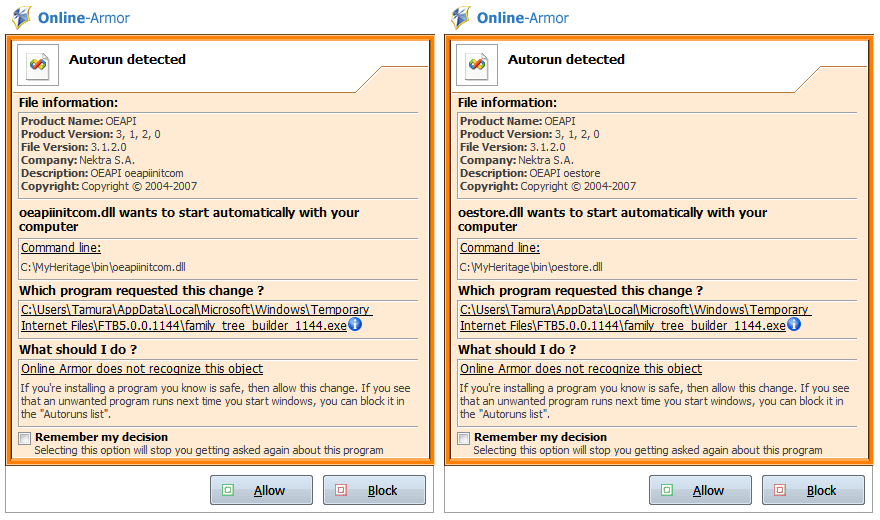
These pop-ups from Online Armor, the firewall I currently use, respectively alert to the installer trying to making oeapiinitcom.dll and oestore.dll auto-start.
installation failure
If you use your security software to detect and refuse this misbehaviour, the installation of Family Tree Builder fails. If you want to finish the installation of Family Tree Builder 5, you have to allow these DLLs to auto-start.

If you do not allow these DLLs to start, the Family Tree Builder installer will claim that registration of the DLLs failed.
It is innocent5 registration of the DLLs that failed. Registering a DLL is a matter of adding some information to the registry. That is not what failed. What failed was the attempt to auto-start these DLLs.
By the way, there is no reason to auto-start these DLLs. Family Tree Builder works fine without auto-starting these DLLs. That the installer forces you to allow auto-start of these DLLs anyway is reprehensible.
more auto-start
When you allow the Family Tree Builder installation to continue despite the unnecessary auto-start attempts, the installer will try to auto-start yet another two components; SearchEngineQuery2.dll and FTBCOM.ocx.

starting other applications

I noticed that the installer tries to start several other
applications it installed, while it should merely be installing stuff. It starts Languages (please wait).exe, Silhouettes.exe and Containers.exe.
The installer does not warn you it is about to start other applications. I have not checked out what each of these apps does. There seems to be nothing more going on here than a rather clumsily constructed installer calling on several mini-installers instead of installing files itself. All that can be concluded without further examination is that the MyHeritage Family Tree Builder 5 installer isn't exactly a model of installer excellence.
The Complete Genealogy Reporter
It is somewhat odd that MyHeritage claims that Family Tree Builder 5 has a
completely redone charting module, while it still lacks a reasonable reporting module.
Family Tree Builder still comes with a trial edition of The Complete
Genealogy Reporter, and still calls on that for report generation. The Family Tree Builder installer starts tcgrsys.exe, the installer for this trial edition, without asking for your permission and without telling so.
The installer for The Complete Genealogy reporters tries to add yet another
auto-start
entry; tcgrsys.exe calls on regsrv32 in an attempt to auto-start PaintX.dll.
Family Toolbar
The Family Tree Builder installer also starts off.exe. This is the
installer for the Family Toolbar, which apparently creates
What process the Family_Toolbar.exe
and then starts that. And oh, Family_Toolbar.exe repeatedly starts
taskkill.exe, a Windows command-line utility that installers should not be relying upon.Family Toolbar
installer wants to kill and why, it does not tell.
It presumably tries to kill browsers before installing the toolbar.
Family_Toolbar.exe also calls upon regsvr32.exe, a command-line utility for registering and
unregistering DLLs and controls. That is not so unusual. The first time I ran
through the entire Family Tree Builder installation, immediately after that, I got both a Firefox
and a Chrome error message, while Firefox was not even running, and Chrome crashed.
I then decided to terminate the install of the toolbar, to try again later.
auto-start
When Family_Toolbar.exe runs successfully, it does not just go
around killing tasks and registering DLLs, but also attempt to make, you guessed
it, several DLLs to auto-start with Windows. It attempts to auto-start
tbcore3.dll and tbhelper.dll. Again, both attempts at auto-starting these DLLs
are completely unnecessary.

toolbar installation

It turns out that the Family Toolbar isn't just for Internet
Explorer, but for Firefox too. Complaints about MyHeritage toolbars and
how difficult they are to remove can be found all over the Internet, in many
support forums, including MyHeritage's own message board. I do not know whether MyHeritage improved the
behaviour or removal of the Family Toolbar
, but I do know that modern browsers
protect you against unwanted toolbar installation.
The installer does not ask which browser you want to install the toolbar in; it installs it in every browser it finds and knows how to install to. This meant that it installed itself in both Firefox 3.6 and the Firefox 4 Beta.
installation alert
Both Firefox 3.6 and the Firefox 4 Beta alert you to the attempt to install a toolbar and lets you decide whether you want to install it or not. Firefox 4 would probably have rejected the toolbar it outright, if I had not changed a setting to allow installation of incompatible plug-ins; once installed, Firefox told me the plug-in is not compatible with Firefox 4.

Internet Explorer 9 shows a dialog similar to the warning it showed for the
search engine change. It allowed installation of the toolbar, but did not enable
it; it is installed but its status is New
, which effectively means that is
disabled for now. You have to enable to run it.

MyHeritage.exe
Once
finished doing its things, Family_Toolbar.exe has family_tree_builder_1144.exe tries to
install two applications to run at Windows startup; FTBCheckUpdates.exe and
MyHeritage.exe - that is Family Tree Builder itself. While the final dialog of
the Family Tree Builder installer puts on a deceptively well-behaved face, and
nicely asks whether you want to run Family Tree Builder upon completion of the
installation, it is sneakily registering the application for auto-start behind
your back.
start-up

Family Tree Builder itself is also rather ill-behaved. As soon as it is
started, it attempt to connect to the Internet. It does not without asking your
permission or even bothering to tell you it is about to do so.
Another thing MyHeritage does without telling you about it or asking your permission is
start FamilyTreeBuilder-Comm.exe. As the name suggests, this is
some communication module of Family Tree Builder.
Like MyHeritage.exe, FamilyTreeBuilder-Comm.exe tries to
access the Internet as soon as it started.
product activation
Family Tree Builder starts in an evaluation mode that does not allow you to
save your data. You need to activate the product. This essentially
demands that you create a user account with MyHeritage. If you already have a
MyHeritage account, you can use that account. If you installed an earlier
version of Family Tree Builder, you do not need to activate
again.
Upon activation, MyHeritage associates an 16-letter ftbKey with your
installation that uniquely identifies your installation.
data upload
Family Tree Builder does not just present the option to automatically publish
(i.e. upload to MyHeritage) your data, they've also already checked this option, so
that you will agree
to upload your data if you just want to move on and hastily click the button
.
backup
In case you do not hurry on, but decide to read the dialog, you'll find that
MyHeritage is still trying to paint the upload of your genealogy data to their
site as a backup (it isn't! any copy can be thought of as a backup, but it only
is a proper backup when the data is not used for something else), despite the
fact that they now offer MyHeritage Backup as an optional service for
uploaded data...
By the way, notice how they try to scare you into leaving
the box checked by enumerating things that could go wrong with your computer.
All these things are excellent reasons to have a backup. None of these things is
any reason to give your genealogy data to some commercial company. There are
several sites that offer free backup of your data up to a few gigabytes, and
there even is BackupMyTree, a site specifically created for backing up
genealogy data. I do not recommend using specialised sites to back up just your
genealogy files. I recommended backing up all your data.
secure and encrypted
MyHeritage is still claiming that publishing (uploading) is secure and encrypted. Interesting claim that. I asked MyHeritage a few years ago how they secured and encrypted the connection. I also asked how they protect the uploaded data once it is on their server, apparently unencrypted. Daniel Horowitz promised to answered the next day, and I have reminded them of that and others questions several times, but never got any answer. I therefore consider this particular claim to be rather doubtful.
recommended

MyHeritage is still trying to dissuade you from unchecking the option box, which should not be checked in the first place. People should not have to opt out of doubtful services being pushed onto them, vendors should offers services so compelling that people decide to opt in.
FamilyTreePublisher.exe
The MyHeritage.exe application also tries to start FamilyTreePublisher.exe.
It does so rather aggressively, on multiple occasions; it tried to start that
application on start-up, when it presented the dialog with the already checked
option box, when you start creating a new project, when you've finished creating
a new project and probably several other occasions. At some point I got annoyed
enough by the continual pop-ups alerting to me to the recidivist behaviour of
Family Tree Builder, that I told the firewall to remember my decision, and block
all attempts to start FamilyTreePublisher.exe.
You should probably use your firewall to block that particular application from running. That is the data uploader, the application that uploads your data your MyHeritage if you do not pay attention and uncheck the option to do every time you open your project in Family Tree Builder.
Internet Explorer
The MyHeritage Family Tree Builder installer tries to do several things to
Internet Explorer. It tries to change the home page to myheritage.com, it tries
to change the search engine to their Google custom search engine, and it tries
to install the so-called Family Toolbar
.

I'm using Windows Vista and have upgraded Internet Explorer to Internet
Explorer version 9. Microsoft has not made Internet Explorer 9 available for
Windows XP, but if you are running Windows Vista or Windows Seven, you really
should have upgraded already. Unlike previous versions of Internet Explorer,
Internet Explorer 9 actually is a real web browser, with excellent support for
web standards. It also features the latest version of Microsoft's protection
technologies. The screenshot shows Internet Explorer 9 warning against
MyHeritage's attempt to change your engine (I have not checked to make sure,
but I think version 8 already offers this particular protection). The smart thing to do is to choose
the Don't Change
button.
However, as you can see, the home page has been changed to search.myheritage.com,
MyHeritage's Google custom search
engine, and you'll have to change it back, in my case to google.com, unless you
want MyHeritage to make money from messing your browser settings.
I've explained this before, but will briefly explain again. Everyone can make a
Google custom search engine. When you get people to, you get some of the
advertising revenue that Google makes. That is why MyHeritage made this Google
custom search engine, and that is one of the reasons why they are trying to get everyone to install
their free
software. Once they've successfully changed your search engine,
they'll make money from you every time you search.
Perhaps you don't care much about whether MyHeritage makes money from their deceptive tactics, because it still doesn't impact your bottom line, but there is another thing about custom search engine you should know; it allows the creator to influence the search results. Read up on Google Custom Search Engine if you want more details. It is likely that MyHeritage skewed the search results in their favour. That's the whole idea of custom search engines build on top of regular ones; it allows the creator to emphasise certain sites and topics over others. To make sure you get regular search results, you have to change the search engine back to a regular search engine.
uninstall

To write this article, I installed and deinstalled Family Tree Builder 5
several times. One thing I noticed about the uninstall is that it creates
applications (somewhat remarkable behaviour for a deinstaller) called
Au_.exe, Bu_.exe, Cu_.exe and so on. I had a look in the temporary directory it
creates these in, and it seems that all it really creates are Au_.exe and
Bu_.exe. These applications appear to be the real uninstallers.
standard uninstall
Comparing the default install actions with the default uninstall actions says a lot about the MyHeritage
mindset; when you only want to install Family Tree Builder, they recommend
letting them mess with your browser settings and install their Family Toolbar
, and even make that the default
action for the Standard installation
. When you decide to uninstall Family
Tree Builder, restoring your browser settings or uninstalling aren't
recommended
or default actions; while their Standard installation
will
install all their stuff on your computer, the Standard uninstallation
will only
remove Family Tree Builder itself, it will leave their Family Toolbar
installed
and will not restore your browser settings.
I strongly recommend opting for a custom uninstallation
and to check both
boxes. You know it is uninstalling the Family Toolbar
when your security
software warns you that it is starting off.exe.
uninstall page
Upon uninstallation, the uninstaller will start your browser to show the MyHeritage Family Tree Builder uninstall page, which asks some questions about why you uninstalled. This is rather annoying, and simply closing the browser is a perfectly valid response.

Take a good look at the URL of the uninstall page. You can see start of my ftbKey, the code that MyHeritage uses to
identify and track each installation of Family Tree Builder; they do not just know that someone uninstalled
Family Tree Builder, they also know who did so.
conclusion
MyHeritage Family Tree Builder still comes with dishonest recommended
actions. The standard installation
installs stuff that the standard
deinstallation
does not remove. The installer is remarkably convoluted, but
that does not hide its signature or actions from software protecting your PC.
The version 5.0 installer pushes the Family Toolbar
by default to installing
it. As anyone who has been around for a while knows, any toolbar that can not
stand on its own merit, but needs to be pushed by installers for other
applications, isn't worth installing.
The Family Tree Builder installers still installs The Complete Genealogy
Reporter without asking your permission or even telling you. It still registers
multiple components for auto-start with Windows, thus robbing you of your
valuable RAM, without asking your permission or even telling you. The installer
fails if you do not allow auto-start of some DLLs, despite the fact that there
is not necessary to auto-start these DLLs at all.
They are still using automatically generated installation keys to track installations. It
still connects to the Internet as soon as you start it without asking your
permission or even telling you, enabling them to profile your usage of the
application. It still prompts you to upload your data and keeps doing so every
time you open a project, even if you uncheck that option a hundred times
already. If you forget to uncheck it just once, it will upload your data an
MyHeritage will keep it, claiming that you opted to upload it yourself. It still
starts other applications without asking your permission or telling you.
malware
MyHeritage Family Tree Builder behaves like malware, and deserves to treated as such. I strongly disrecommend downloading and installing this ill-behaved application. Handle with extreme caution, terminate with extreme prejudice. Permanent uninstall strongly recommended.
updates
2010-12-01 Myheritage blog
MyHeritage has posted Introducing Family Tree Builder 5.0 on their blog. Their blog post does not mention any aspect of Family Tree Builder's malware behaviour in any way.
links
- MyHeritage Family Tree Builder
- MyHeritage Family Toolbar
- Family Tree Builder 5 New Features
- MyHeritage blog 2010-12-01: Introducing Family Tree Builder 5.0
- BackupMyTree
- MyHeritage Backup
- MyBadges
- MyHeritage Security
- MyHeritage Family Tree Builder 4.0
- MyHeritage Family Tree Builder 4.0 Installation
- MyHeritage hijacking homepages
- MyHeritage Family Tree Builder 2.0
- GeneAwards 2009
Copyright © Tamura Jones. All Rights reserved.