2009-11-04 FamilySearch Community Trees
FamilySearch Labs
GEDCOM hosting site
FamilySearch Community Trees is a project of FamilySearch Labs. It is a website on which FamilySearch hosts genealogy databases contributed by the community. It is yet another GEDCOM hosting site.

The Next Generation of Genealogy Site building
FamilySearch Community Trees uses The Next Generation of Genealogy Site building (TNG) just like FamilyLink’s FamilyHistoryLink site does.
powered by
FamilySearch apparently replaced the
This site powered by TNG
line with This site powered by FamilySearch
, but
it is not hard to recognise TNG, and if you choose to download a GEDCOM, the
GEDCOM header will tell you that the file was created by The Next Generation of
Genealogy Sitebuilding version 7.0.3.
slow
If you decide to give the site a try, be warned that it can be excruciatingly slow at times. TNG isn’t a speed demon to start with, the databases are larger than most and FamilySearch may have underestimated the public interest in this project.
place studies
FamilySearch Community Trees is a GEDCOM hosting site, but do not think that it is not your average GEDCOM hosting site. You cannot just upload your file to the site, but have to contact the project manager to get your data listed. That allows the project manager to make sure that all source citations are includes.
family reconstructions
For this site, FamilySearch isn’t particularly interested in pedigrees or
name studies, but in place studies for particular time periods, reconstructions
of the all families that once lived in some place.
FamilySearch is hoping that
many historical societies who already undertook such projects will provide their
data. Although it makes more sense for societies to host the data on their own
server to attract visitors interested in their region, several have provided
their research to FamilySearch.
It is great to see FamilySearch, which is both loved for publishing lots of genealogies and loathed because so much of it is junk, embark on a project in which the data they publish comes from regional experts, and to present it complete with source citations.
statistics
The statistics for FamilySearch Community Trees are quite different from those for other GEDCOM hosting sites. The Average Genealogy Size series looked at the average size genealogy databases in GEDCOM hosting sites. Average Size Month provides a quick overview and links to all related articles. The last article in the Average Genealogy Size series ends with the observation that for one such site, the average size is about 12.500 individuals, while the median is about 2.500 individuals.
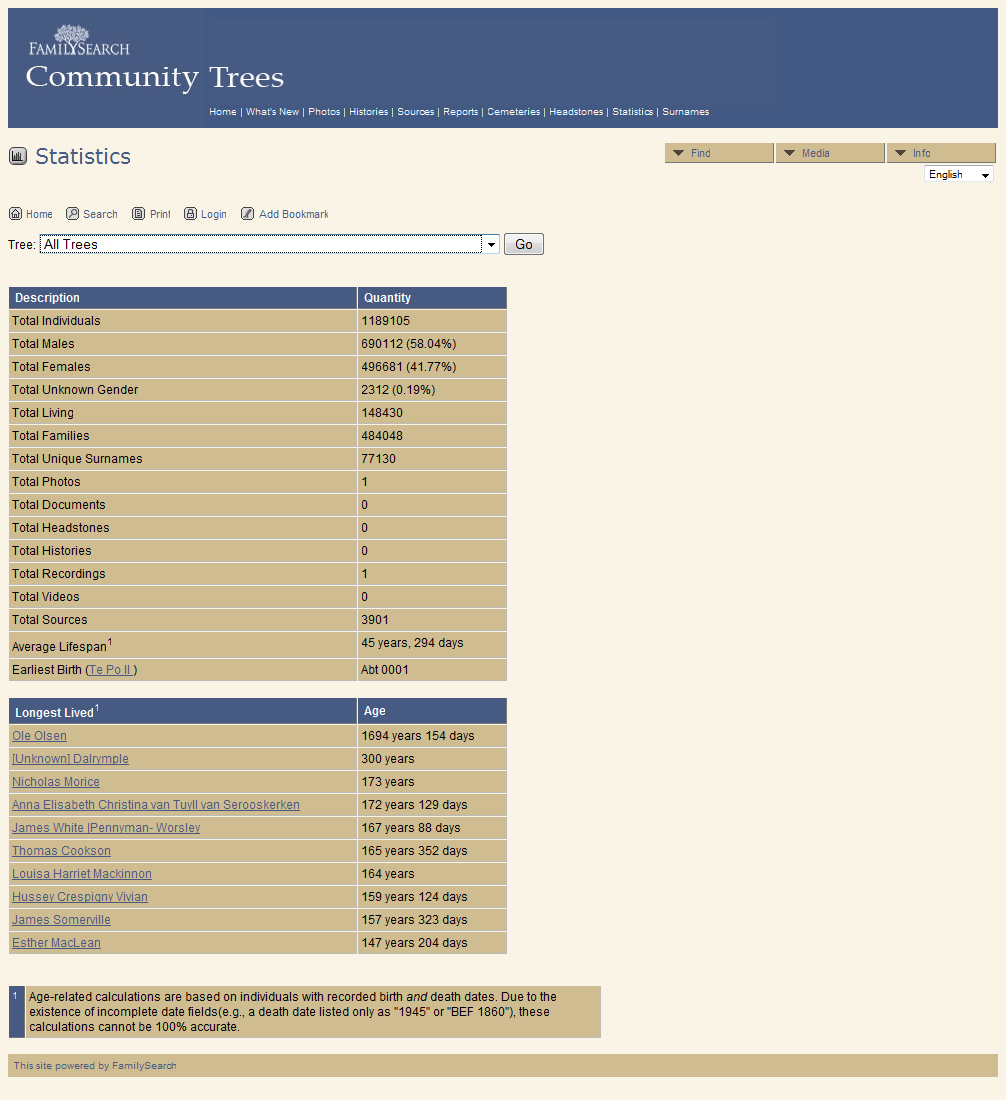
According to the statistics page, there are 1.189.105 individuals in All
Trees
. The page does not list the number of trees
, but a quick count of the
databases shown in the pull-down menu shows that there are 19 GEDCOM databases. Thus,
the average size of these databases is 1.189.105 / 19 = 62.584,48 individuals
per database.
That not only confirms my suggestion in the Average Genealogy Size series that database for place studies are larger than a medium-sized GEDCOM for an extensive ancestral study, it also gives a number: five times as big. These databases are the result of a serious amount of research.
That the research was done by subject experts and the tree includes source citations still does not mean that you can trust this site blindly.
quality
That the research was done by subject experts and the tree includes source citations still does not mean that you can trust this site blindly. The statistics pages also shows that the oldest person in these database is Ole Olsen. According to FamilySearch, Ole Olsen managed to reach the quite respectable age of 1.694 years and 154 days.
Somehow I doubt that. Luckily, these are databases complete with sources, so it should not be hard to pinpoint the error. Indeed, a quick look at the individual record for Ole Olsen shows that his birth date of 10 Jun 183 is well outside the period (1692-1932) covered by the source listed in the citation.
According to FamilySearch, some people are their own grandpa.
data quality
Apparently, FamilySearch does not bother to do any consistency checks before putting a database online.
I’d love to say that I am surprised that FamilySearch publishes databases
without performing basic consistency checks, but I am not really surprised
at all. FamilySearch has a long tradition of publishing data without regard for
quality.
Luckily, it does seem that FamilySearch is starting to care. In particular, the
aim of the FamilySearch Community Trees seems to be to present databases of
scholarly quality.
Alas, the ten ostensible 147+ year old people highlighted by the TNG’s Statistics
page are not even the most serious issue.
There are actually loops in these database. According to FamilySearch, some people are their own grandpa.
Knowles Collection
This issue was brought to my attention by Den Toms, the author of GEDCOM Explorer. One of the GEDCOMs in the FamilySearch Community Trees is the Knowles Collection.
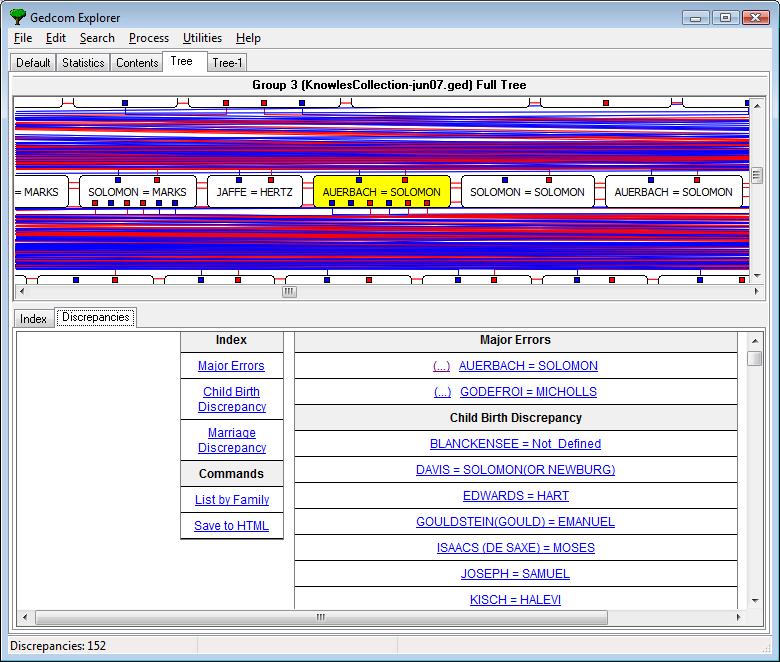
Image: GEDCOM Explorer 2.0.0.5 (private beta) detects Major Errors
in the Knowles
Collection.
Den Toms uses the Knowles Collection as a test case for GEDCOM Explorer. The
help file uses it as an example, and for those who do not want to download the
full database, the relevant slice of the Knowles database is offered on the
support page for GEDCOM Explorer. The help files remarks that This GEDCOM file is a good example of a bad GEDCOM file - it is full of
errors!
.
availability
There are multiple versions of the Knowles Collection database. The Knowles Collection is available for download from both the FamilySearch Research Wiki and the main FamilySearch site in both PAF and PAF GEDCOM format.
The one for download on the FamilySearch Research Wiki is from June 2007. The one on the main site is from October 2009. The FamilySearch Community Trees appears to contain the one from Oct 2009. Both versions include the loop between Leopold Auerbach and Moritz Auerbach shown here.

This image of the KnowlesCollection-jun07.paf database in PAF shows the loop between Leopold and Moritz Auerbach.
FamilySearch loop
If you searched for Leopold Auerbach in the FamilySearch Community Trees, you
probably did not find him. He is in there, but as Living
instead of Leopold
Auerbach
. Why that is so is discussed below.
The PAF screenshot shows that Leopold’s record identification number (RIN) is
1147. It is not too hard to navigate to Leopold Auerbach via his sibling Henry
Auerbach and then double-check that that the URL includes that number. When you do so, and then ask for an overview of Ancestors, it looks
just the same as the PAF screenshot, except that a lot of the individual names have
been replaced with Living
.

loop detection
Neither PAF nor TNG complains about the loop when you load the database. Few
genealogy application bother to check for loops, but there are several that do.
For example,
Behold does detect these issues upon import, and presents individuals who have
themselves as their own descendant in a section titled Incorrectly Linked
Families
.
Legacy Charting does not complain about a loop, but the screenshot shows how the left quarter of the fan chart is missing. Some other charts are complete, but the data is missing; apparently Legacy Charting does not keep following the loop like PAF and TNG do.

the Living
dead
Now, you might think that the FamilySearch Community Trees shows Leopold
Auerbach and other individuals as Living
because the loop confuses TNG.
That is not the case. The Living
issue and the loop are not related.
The Next Generation
Den Toms first noticed that TNG showed long-dead individuals as Living
for
Clara Magnus, the first person listed in Knowles Collection. There are no loops
here, yet several individuals show up as Living
.
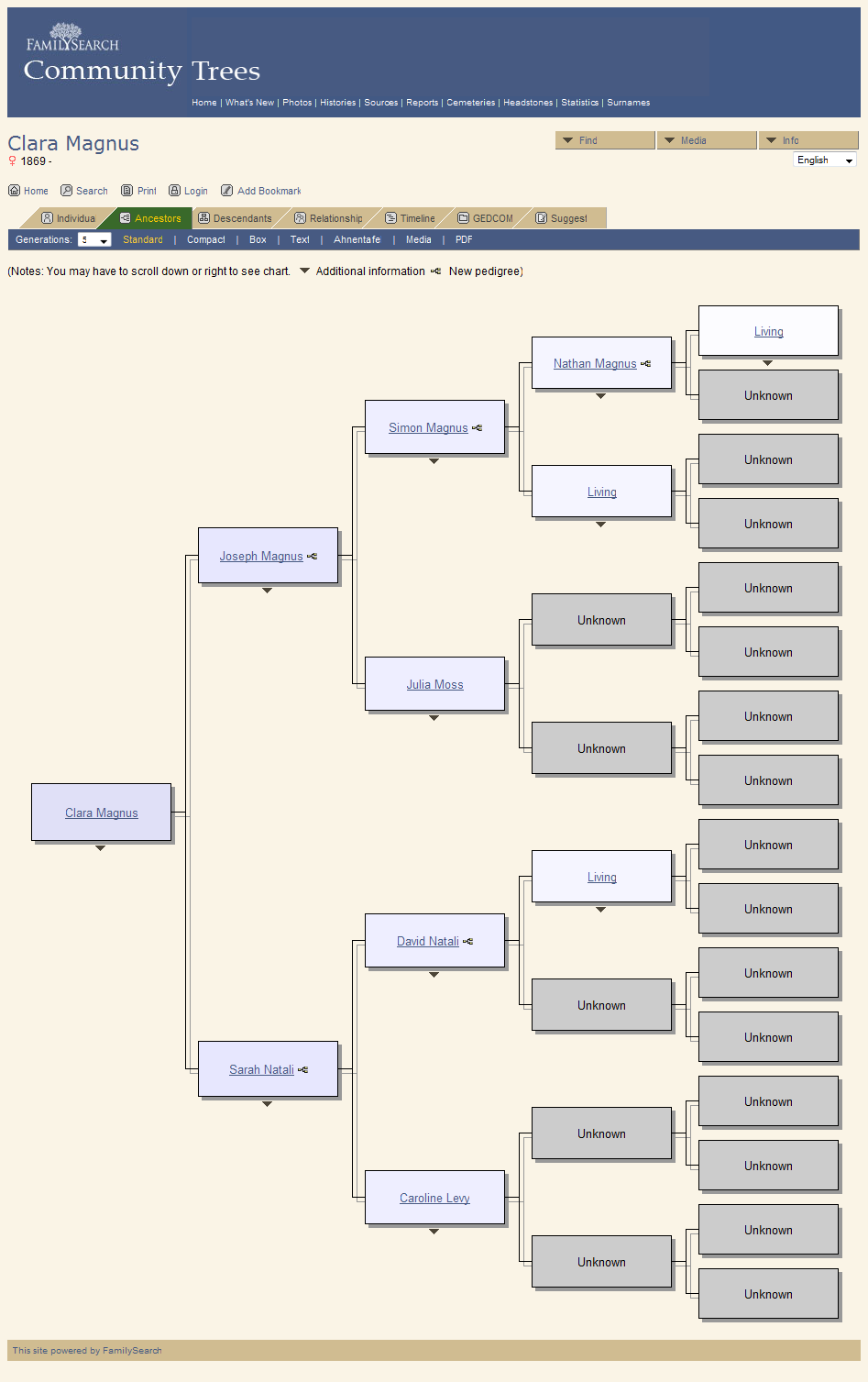
The first thing to know about what is going is on here, is that it is TNG doing this. The names are in the data files, TNG is just not showing them to you, because TNG somehow thinks those people are still alive.
privacy settings
TNG has various settings relating to privacy of living persons. You can opt
to show living data to either Always
, Never
or Depending on User Rights
.
Obviously, FamilySearch did not opt for Always
.
Living Flag
Whether TNG considers an individual as living depends on the GEDCOM import settings. The TNG Wiki page on privacy explains this.
TNG keeps a Living Flag for each individual in the database. This is set upon import. If there is a death date, the flag is set to dead. If there is no death date, and the person was born recently, the flag is set to living. If there is no death date and the person was born long ago, the flag is set to dead. TNG defaults to assuming people are dead when they would be older than 110, but you can enter another number.
The interesting case is what happens when there is neither a death date nor a
birth date to go on. TNG allows the administrator to set the If no birth date
,
assume option to either Person is deceased
or Person is living
.
Neither choice is perfect. If you choose to assume these individuals are
deceased, it may show living persons for who you have no birth date. If you
choose to assume these individuals are living, it will not show living persons,
but will mark long-deceased persons for which you do not have dates as Living
.
That is what is happening here.
TNG does allow you to manually override the resulting Living Flag, but
historical databases do not need that manual approach.
FamilySearch choose to set the If no birth date, assume
option to Person is living
. For
these historical databases, FamilySearch should have chosen Person is deceased
.
conclusion
TNG could be a bit smarter in calculating whether an individual might be
alive or not, but FamilySearch should have read the manual - or the wiki.
Right now,
FamilySearch can and should correct the Living
issue by reloading the databases with the
correct import options.
updates
2009-11-04 instant update
FamilySearch says the Auerbach loop has been removed and that all databases will be reloaded. FamilySearch expects to have done this within a week. FamilySearch will also look into other data errors.
2009-11-25 FamilySearch Labs blog
The FamilySearch Labs blog has posted a blog entry about FamilySearch Community Trees. It does not acknowledge the data quality issues, and a quick check shows that FamilySearch has not fixed these yet either.
2011-04-23 FamilyHistoryLink
The FamilyHistoryLink domain is defunct. The broken link has been removed.
links
FamilySearch Community Tree
- FamilySearch Labs
- FamilySearch Community Trees
- Knowles Collection
- FamilySearch: Jewish Family History Resources (updated Knowles database)
- TNG Wiki: Privacy
articles
- Average Size Month
- Millennia introduces Legacy Charting
- More about Legacy Charting
- FamilyLink is FamilyHistoryLink now
- FamilyLink abandoning FamilyLink
- FamilySearch Labs 2009-11-24: Introducing Community Trees
software
- The Next Generation of Genealogy Sitebuilding
- GEDCOM Solutions: GEDCOM Explorer
- Legacy Charting
- Behold Genealogy
Copyright © Tamura Jones. All Rights reserved.