2010-09-14 BackupMyTree
free genealogy backup

backup my tree
BackupMyTree has introduced BackupMyTree; a web service for backing genealogy data.
There is a Windows applications for automatically uploading files. There is no MacOS or Linux variant of the application, but you do not strictly need that application.
Like MyHeritage backup, BackupMyTree stores files using Amazon's S3 cloud
services. Unlike MyHeritage backup, BackupMyTree can be used with multiple
applications, and is free. The FAQ says that company plans
to make money by introducing a Pro version later, which will offer more features
for a small
yearly fee
, but that we will always keep the free version the way it is
.

Oddly, this product, introduced only yesterday, already has version number 6.1.4.1.
how it works
The BackupMyTree application runs in the background. It finds genealogical
files by recognising their extension and uploads these to the server. It detects
updated files, and then uploads these to the server.
The BackupMyTree website offers an interface for managing your uploads.
file types
The Windows apps recognises a limited a number of genealogy data files for
several popular genealogy applications. According to the BackupMyTree site, the
application
recognises Ancestry's Family Tree Maker, MyHeritage's Family Tree Builder, PAF,
Legacy Family Tree, RootsMagic and GEDCOM.
BackupMyTree additionally supports Pearl Street's discontinued Family Tree
Legends.
file extensions
Support for RootsMagic is limited to RootsMagic 4 and later. BackupMyTree recognises genealogy data files by their file extension. RootsMagic 4 stores all data in a single file, and BackupMyTree will recognise that file. RootsMagic 3 and earlier use a directory containing multiple files; BackupMyTree does not support that.
FamilyLink Desktop
This high-level description of the how the application works may sound familiar. It is how FamilyLink Desktop works. FamilyLink Desktop uploads photos and BackupMyTree uploads genealogy data, and they upload to different servers, but other than that, the applications are remarkably similar.
strings.txt
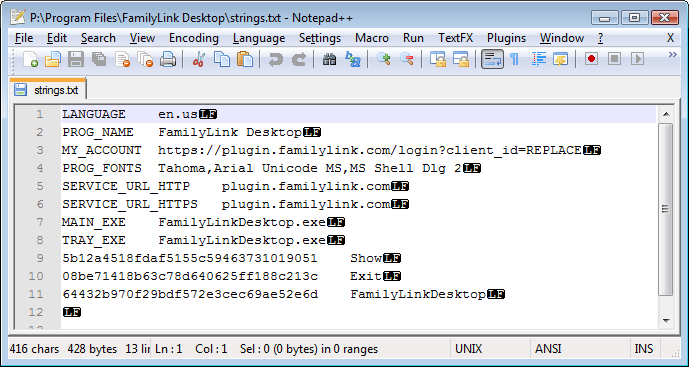
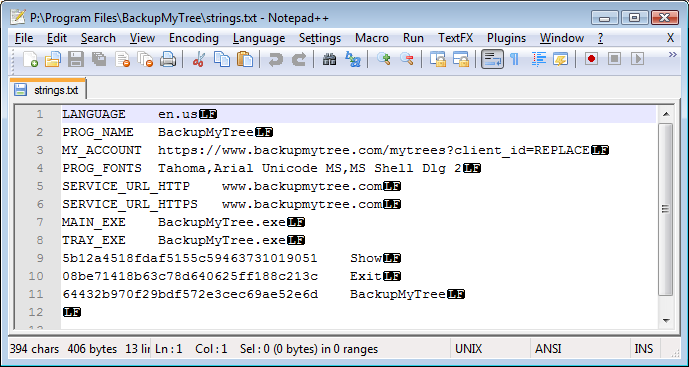
The similarity between these two applications is more than skin-deep. Both applications have an installer that directs you to web site for the Terms of Service. Both applications install a text file named
strings.txt in their application directory. These two text files
clearly have the same structure. They even contain exactly the same large
hexadecimal numbers. Those numbers are just the right length for a GUID, and
accidentally identical GUIDs are impossible. The applications also use exactly
the same registry keys.
version
So, it sure seems that the BackupMyTree application is the Family Desktop application under another name. Only the supported file extensions and the website have changed. Well, there apparently where a few minor changes to the code as well, and that explains why FamilyLink Desktop was released with version number 6.0.9.1 and BackupMyTree was released with version number 6.1.4.1.
manifest
FamilyLink Desktop uploads photos, and BackupMyTree uploads genealogy data,
but other than the file types and supported web site, the two applications seem
practically identical. The BackupMyTree site is owned by Cliff Shaw, who worked
as a programmer for FamilyLink.
The BackupMyTree application manifest, an information file embedded in the
executable, confirms that BackupMyTree is FamilyLink Desktop under another name;
through its application manifest, BackupMyTree
identifies itself as Microsoft.Windows.FamilyLinkPlugin.
That the two applications seem to use the same GUIDs made me wonder what would happen if you tried to run both at once, but I thought it best to not try.
Getting Started
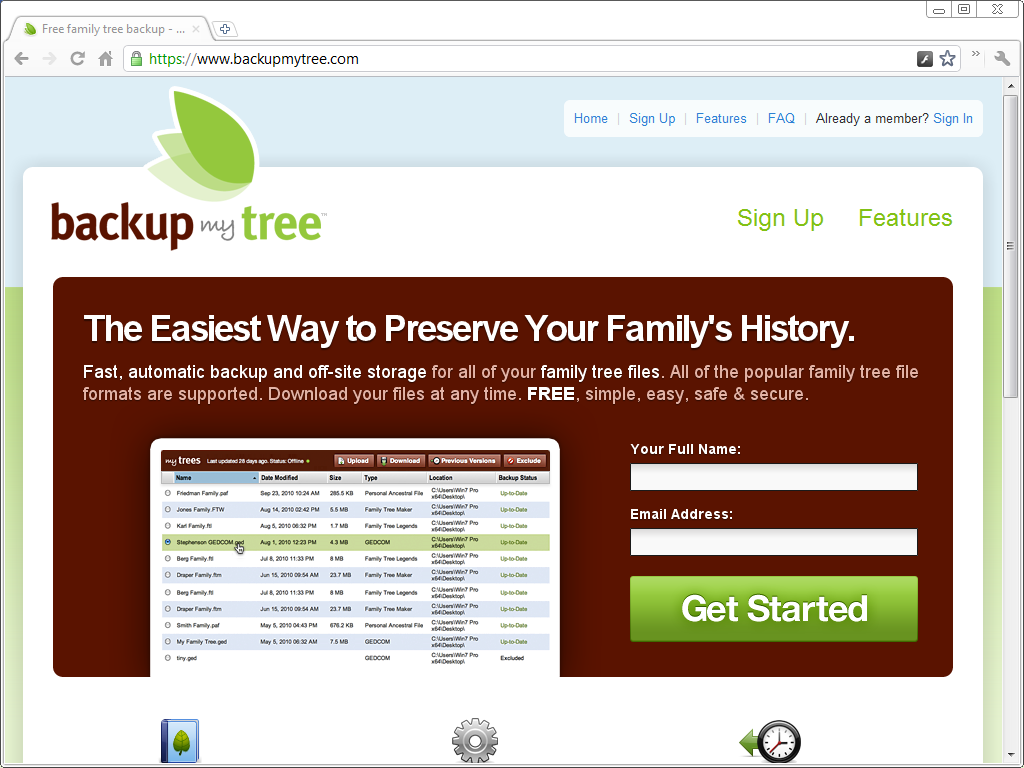
To get started using BackupMyTree, you need to enter your name and email and
choose the Get Started
button. That takes you to the Create an
account page where you are prompted to enter a password.
password
BackupMyTree claims to offer safe backups, but if I understand their FAQ correctly, they use encrypted communication, but do not use encrypted storage.
The BackupMyTree site does not even ask you to enter your password twice… what
happens if I make a mistake? They did not sent a registration confirmation email
either, so I decided to try their forgot my password
link later. I found
out there is no such link. There is a form that allows you to ask for your
password by sending them an email with the pre-entered message Please send me my password
.
That sure sounds like they store your password in an unencrypted database.
Anyway, more than five hours later I still hadn't received any mail from them.
download

Once you have registered, you are taken to the download page. BackupMyTree is an application for Windows XP later. I installed it on Windows Vista and it should run fine on Windows 7.
installation
The BackupMyTree-Installer.exe is a download of about 1½ MB. The installer presents an easy to use installation wizard.
The second page of the installation wizard does not present the BackupMyTree license agreement. Instead, it refers you to the Terms of Service on the BackupMyTree site. It does present the following text:
When you install BackupMyTree for the first time, it scans all your disks, locates your family trees, and begins backing them up automatically. BackupMyTree starts every time you boot your computer, running in the background and looking for changes to your tree files so it can protect them when they're added or modified.
I am of two minds about this. One the one hand, it's nice that BackupMyTree scans all the disks to locate all the genealogy files it recognises. After all, this is about backup, and you don't want to find out later that you forgot the one file you're now looking for. On the other hand, this is a new company without any track record, yet they expect me to let their unproven application grab each and every genealogy file I have and trust them with all my data? I think I'll pass.
upload all
I am not particularly fond of applications that run on start-up. I want a fast start-up and I do not want a dozen ostensibly little apps gobbling up memory and CPU cycles.
However, what I find much more worrisome than their desire to burden my PC
with yet another start-up application, is that the app will scan all
disks, and will upload all the genealogy files it recognises as soon
as it has been installed, and offers no option to do otherwise.
It is normal for a backup application to let you select
what you want to backup, but BackupMyTree does not give you a chance to select
which files will be uploaded, it will bluntly upload all of them. The FAQ says
that you can exclude files from backup, but that is exclusion
after they have been uploaded
in the first place. I also discovered that you have to exclude
files one by one.
Their eagerness to grab all files, the lack of a selection screen and having to go
their site to exclude
files from backup after they have been uploaded in the
first place all set of alarm bells. That isn't how trustworthy backup applications
operate. That isn't proper exclusion. I should be able to include and exclude
files on a selection screen before the selected files are uploaded, not
have to delete uploaded files afterwards.

I continued installing out of morbid curiosity, knowing that my firewall would
protect me from any unauthorised uploads. I did not like the pop-ups I received.
For example, the installer tried to access the processes of all the applications
I was running! I denied each attempt to access running processes.
I don't know why the installer tried to do that, but it sure did not seem
necessary to me, and in fact, the installer agreed with that; it reported a
successful
install despite the denials of its suspicious access attempts.
The last screen of the installation wizard offers to start the BackupMyTree app. One pop-up dialog told me it wanted to start BackupMyTree.exe, and then another pop-up told me it wanted to stop it again. I allowed both actions. In between, nothing seemed to happen. I later started BackupMyTree manually.
The installer had configured BackupMyTree to run at start-up, but various tools, such as the System Configuration Tool included with Windows, and allow you to undo that. CCleaner is a popular third-party application that, among other things, allows you to manage auto-start applications.
running BackupMyTree
BackupMyTree is an taskbar application. Its icon shows that it is running and
it has just two menu items; open
and exit
. The open menu item
opens a web page in the default browser, the exit menu exits the application.
While it is running, it continually tries to connect to the Internet. I allowed it to do its things for a few hours,
yet it never uploaded any of the many genealogy data files on my desktop.
MacOS and Linux
You can use BackupMyTree from MacOS or Linux. There is no taskbar application for either, but you do not really need that application. All it does not is find files and upload them, and you can do so manually.

When the BackupMyTree website fails to contact the upload application, the My Trees page shows the following message:
We do not detect that you've installed the application. Click here to download and install the application. Mac/Linux users or anyone not interested in running our application can upload tree files manually.
This is how I discovered that MacOS and Linux users can use BackupMyTree using the web site interface, and that Windows users can do the same. Installing the BackupMyTree taskbar application is not necessary.

Using BackupMyTree this way is not very practical if you have a lot files. As
the screen shot shows, the upload dialog allows you to select multiple files for
upload; each time you select a file, the dialog box adds another button to allow
selection of another file, up to four files. That is nice, but you still have to select each
file separately. A somewhat annoying
user interface quirk is that you when you choose the OK button, nothing happens.
To upload files, you must choose the Upload Tree(s)
button.
Once you've done so, the My Trees page shows the files you've uploaded.
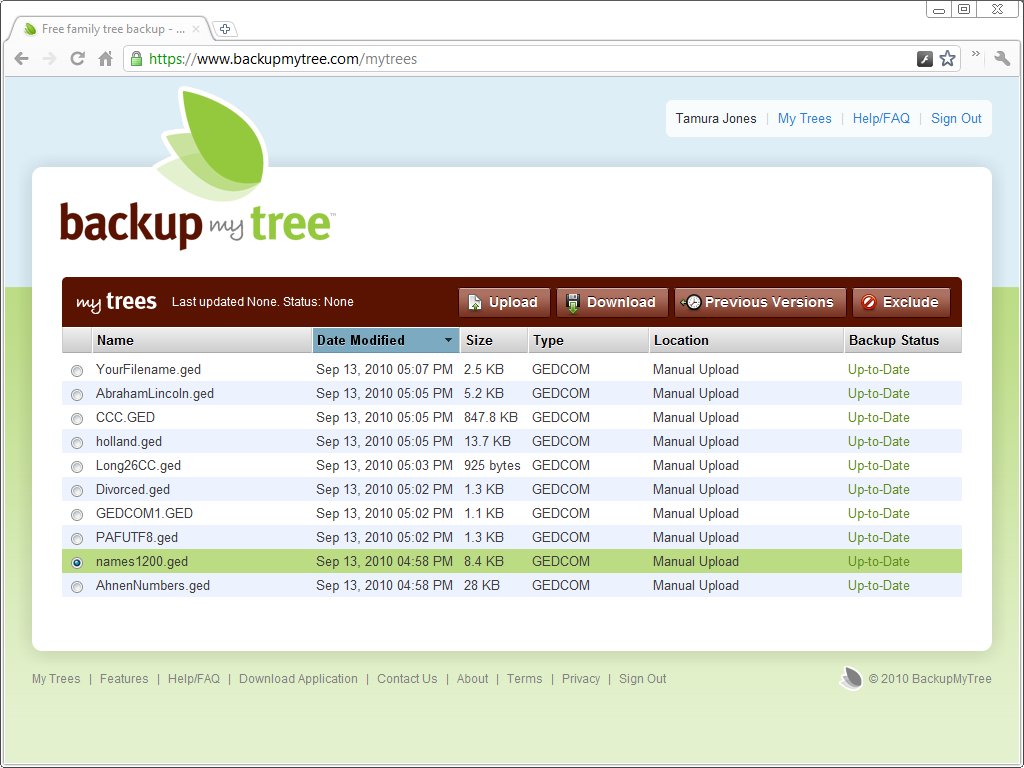
Downloading an uploaded file is a matter of selecting the file and choosing the download button. Files are downloaded the download directory set for the browser.

corporate history

Pearl Street
The BackupMyTree application recognises genealogy data files by their file extension. It supports a bunch of fairly well-known and popular genealogy applications - and it supports Pearl Street's Family Tree Legends, a product that was discontinued years ago. That BackupMyTree supports this product seems odd, but is not hard to explain.
Pearl Street was company started by Cliff Shaw and Ryan Sphon. Their main
products were GenCircles and Family Tree Legends.
Family Tree Legends was a commercially sold desktop genealogy application.
Pearl Street
was still releasing and promoting new versions in 2005. In the first half of
2006, the owners of Pearl Street Software abandoned their paying users for other
ventures. On bulletin boards, users complained about the lack of support. Several months later, they put Pearl Street up for sale and in 2007
the world was informed that Pearl Street had been bought by MyHeritage.
ProtectMyPhotos

Cliff Shaw and Ryan Sphon went on to co-found a website called ProtectMyPhotos. ProtectMyPhotos was a site for backing up photos started in October of 2006.
The ProtectMyPhotos site worked with a small system tray app that would scan your system for photos and then upload these to the web. The site was discontinued in December of 2007.
DocSyncer

Ryan Sphon went to work for HiveLive. Cliff Shaw started DocSyncer.
DocSyncer was an application that synchronised your
documents with Google Docs.
DocSyncer was started in October of 2007 and
discontinued in June of 2008.
PicStreem

Shaw then started PicStreem, an application that uploading pictures to the
PicStreem web site.
PicStreem started in August of 2008,
and discontinued in 2009.
FamilyLink Desktop

In March of 2009, Cliff Shaw officially joined FamilyLink and in April his former business partner Ryan Spohn joined as well.
At the time, Cliff Shaw and Ryan Sphon had already done several things for FamilyLink, such as their WebTree site. The Flash-based WebTree site wasn't a success and FamilyLink recently abandoned it.
It seems that, while he has there, FamilyLink licensed the code he created for ProtectMyPhotos, DocSyncer and PicStreem for use in FamilyLink Desktop, another attempt to resurrect the ProtectMyPhotos / PicStreem idea. That explains why the FamilyLink Desktop started with version number 6.0.9.1.
BackupMyTree
Now, Cliff Shaw and Ryan Spohn are operating as BackupMyTree. BackupMyTree is yet another variation on the same idea; a background application for automatic uploading and a website to manage the uploaded files. This time it is genealogy data files.
conclusion
competition
When ProtectMyPhotos folded, the official reason was competition from services like Mozy and Carbonite. That competition is still out there. Backing up your genealogy data is a good idea, but backing up all your data is a better idea. It does not make sense to use separate services for photos, office documents or genealogy data when it is easier to a service that backs up all your data.
business model
When DocSyncer folded, the official reason was that DocSyncer was a cool idea for which he had failed to find a viable business model. There is no convincing business model for BackupMyTree either. The current product is free. The site claims that a pay-for-use Pro service will be introduced later. That is the freemium model that did not work for ProtectMyPhotos, why would it work for the conceptually identical BackupMyTree?
senseless product
The BackupMyTree site does not even follow proper registration procedure, and does not allow you to reset your password. You have to fill in a form to ask for your password, which suggests that they keep passwords in plain text! The installer tries to access running processes, their application does not allow excluding files from upload. When you allow it to run anyway, it does not seem to upload anything.
All that is worrisome, but all that can be fixed. What cannot be fixed is that BackupMyTree is a senseless product; either you already make backups and therefore don't need it, or you simply don't care about backups.
updates
2011-04-23 PAF-LUG blog post
The link to the PAF-LUG blog post GenCircles & MyHeritage merge
has been removed, because the
PAF-LUG blog has been removed from blogger.
product details
| property | value |
|---|---|
| product | BackupMyTree |
| version | 6.1.4.1 |
| organisation | BackupMyTree |
| website | BackupMyTree |
| price | freemium |
| requirement | Windows XP or later |
| note | |
| Verdict | repeat application |
| Rating | senseless |
links
- BackupMyTree
- FamilyLink Desktop 1.0
- MyHeritage Backup
- MyHeritage growing through Acquisitions
- FamilyLink introduces WebTree
- WebTree no more
Copyright © Tamura Jones. All Rights reserved.