2012-05-09 AncestorSync Beta 2012

New Family Tree Maker
AncestorSync Beta
AncestorSync is a commercial product of Real-Time Collaboration that went into Public Beta almost a year ago.
How AncestorSync works explains what AncestorSync is and how it works.
This article assumes you are familiar with the information in there.
The early betas released last year were a proof of concept for the technology, the current release really feels like a product beta.
Beta history
Real-Time Collaboration announced AncestorSync in May of 2011.
Later that month, AncestorSync Beta provided an exclusive technology preview based on the Closed Beta.
The first Public Beta of AncestorSync for Geni was released in June of 2011.
There were several updates during June, but after that, it almost was as if AncestorSync didn't exist.
Many who took advantage of the pre-order special (no longer available) may already have forgotten about it.
After more than half year without any updates, there finally is a new AncestorSync Beta.
what took them so long?
I've been in frequent contact with Real-Time Collaboration and I don't know how often I've been told that the next beta would be released in just another few days, but every time, there was just one more issue they wanted to change, solve or fix first. After many months of many changes, there is little left that hasn't changed since the previous betas. The desktop client, the AncestorSync server, the Geni.com API, all of it has changed to work together better. The early betas released last year were a proof of concept for the technology, the current release really feels like a product beta.
installation
The AncestorSync Beta releases are still numbered using the date of release.
I just installed AncestorSync 2012.05.08.
The installer is a download of about 26 MB.
Installation requires about 55 MB.
The Beta uses a real installer, created with the NullSoft Install System.
Installation is simple and uneventful, as it should be.
The installer chooses a reasonable default installation directory, but you can choose another one if you so desire.
The installer shows the steps it takes.
Installation was not entirely uneventful.
I am currently using avast! antivirus, and it popped up a dialog to warn me that it did not know whether to trust the installer.
program folder
There were no real surprises, but that does not mean the AncestorSync installer is perfect; it installed an uninstaller, but it did not detect that I still had a older version of AncestorSync for Geni installed, and did not offer to remove it.
Installation of the early AncestorSync for Geni Betas defaulted to the %PROGRAMFILES%/AncestorSync/Geni folder,
the new AncestorSync Beta defaults to %PROGRAMFILES%/Real Time Collaboration/AncestorSync.
I ran %PROGRAMFILES%/AncestorSync/Geni/uninstall.exe to get rid of the old version.
That did not get rid of everything, so I deleted the %PROGRAMFILES%/AncestorSync/Geni/uninstall.exe folder.
AncestorSync supports the file formats of various desktop genealogy applications through plug-in DLLs, and there are more plug-ins now, to support more desktop file formats.
changes
A quick comparison of the installation directories of the latest version with the previous release of mid 2011 shows that a lot has changed since then. Not only are there many more subdirectories, there are more DLLs in the main directory too. AncestorSync supports the file formats of various desktop genealogy applications through plug-in DLLs, and there are more plug-ins now, to support more desktop file formats.
good news & bad news
There is good news and bad news.
The user interface has been redone and is looking much better.
There is one AncestorSync application for multiple web services now.
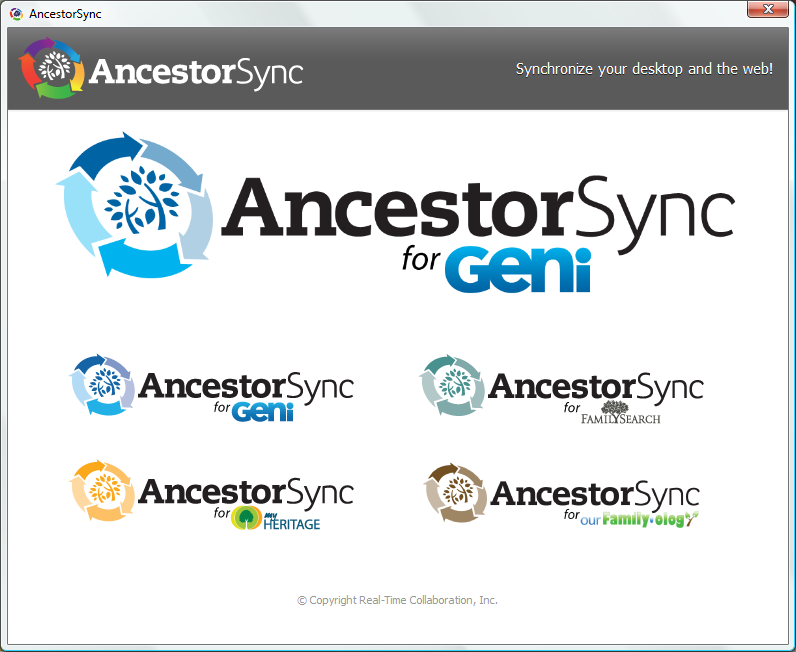
The main AncestorSync dialog box does not only show AncestorSync for Geni,
but shows AncestorSync for FamilySearch, AncestorSync for MyHeritage and AncestorSync for ourFamily•ology as well.
You click on the logo for the desired service to start that variation of AncestorSync.
However, if you choose anything but AncestorSync for Geni, you'll only be presented with a messagebox that tells you This service is not yet implemented.
Please sign into AncestorSync for Geni.
.
The best and most important news is that this is the first Public Beta that truly is AncestorSync, and not merely AncestorDownload like the previous Betas.
That AncestorSync for FamilySearch, AncestorSync for MyHeritage and AncestorSync for ourFamily•ology are not ready for prime time, or even for Public Beta,
is a bit disappointing.
However slow development of AncestorSync seems to move, that Real-Time Collaboration still doesn't release products before they are ready is a Good Thing.
That Real-Time Collaboration is confident enough to show the additional choices is moderately good news.
Still, the simple fact remains that these choices are not available yet.
Like previous Betas, this AncestorSync Beta only works with Geni.com.
The best and most important news is that this is the first Public Beta that truly is AncestorSync, and not merely AncestorDownload like the previous betas.
AncestorSync Ultimate?
I'm happy to note that Real-Time Collaboration is moving in the direction of the Ancestor Ultimate idea; one edition that does it all.
Their initial plan was to have separate AncestorSync for X products for the different web services,
but now they are combining all of them into a single AncestorSync product.
That does not mean that there won't be different AncestorSync editions.
For now, all it really means is that there is just one AncestorSync product to download.
Real-Time Collaboration's current thinking seems to be that a single AncestorSync product will include support for all the different genealogical web services, but that you will still need to buy a separate license for each genealogy web service you want to synchronise your data with.
AncestorSync for Geni
The main dialog box shows multiple choices, but AncestorSync for Geni is the only one that works, so this is still an AncestorSync for Geni for Beta. You need a Geni.com account to use it.

This beta can synchronise data between Geni.com and desktop databases, but you cannot start by selecting a desktop database to upload yet.
You must start by downloading your Geni.com data into a desktop database.
Downloading your data from Geni takes three steps; log in to Geni, selecting what data to download,
and deciding which desktop formats to save it to.
logging in
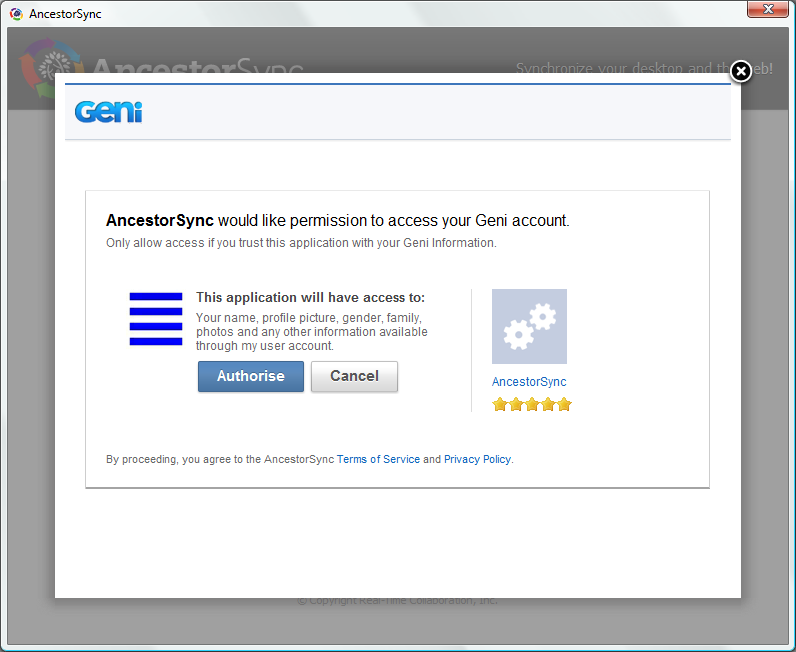
Logging into Geni is done using the OAuth 2 protocol. So, the first time you use AncestorSync with Geni, Geni will show a dialog box asking you to confirm that it is okay for AncestorSync to access your data.
selecting data to download
Once you are logged in, AncestorSync will display the selection dialog box. Here you choose how many generations of ancestors and descendants you want to download.
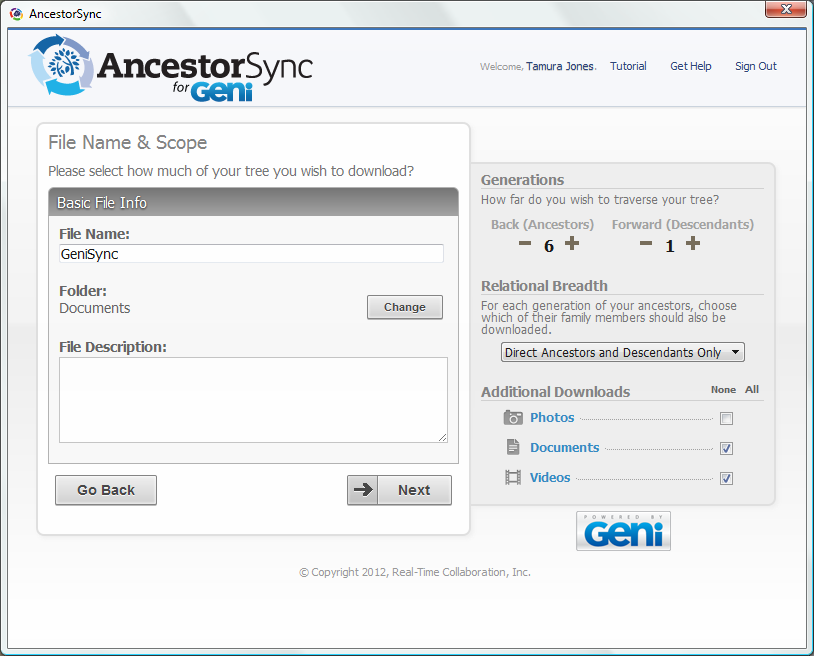
There used to be two drop-down boxes, that let you select up 9 generations of ancestors, and 3 generations of descendants. These two drop-down boxes are gone now, and have been replaced with plus and minus buttons. More importantly, the limits imposed by the drop-down selection are gone too; you are no longer limited to 9 generations of ancestors or 3 generations of descendants, but can select up to 20 generations either way.
Twenty generations of ancestors is more than most Western people can provide documentation for,
and you certainly do not have 20 generations of descendants yet.
The ability to select up to 20 generations of descendants anyway suggests that AncestorSync may add the ability
to choose one of your ancestors instead of yourself as the starting person.
relational breadth
You can additionally choose the relational breadth of the download; a drop-down box offers the following options:

- Direct Ancestors and Descendants Only
- + Children
- + Children and Spouses
- + Grandchildren
- + Grandchildren and Spouses
AncestorSync can download multimedia files associated with the selected individuals. Geni categories multimedia files into photos, documents and videos, and AncestorSync lets you select which types you want to download.
scope restriction
The current beta restricts the scope of your sync to four generations of direct ancestors (and four generations of descendents).
The beta does not bother to limit your dialog box choices, or warn you about these restrictions.
The AncestorSync user-interface lets you choose any scope you like, but this restriction has been hard-coded into the Beta.
However many generations you choose, and whatever you relational breadth choose, this beta will not sync more than four generations of your Direct Ancestors and Descendants Only.
The idea behind this restriction is to focus your testing on the part of your tree that you are most familiar with and will most readily notice any syncing issues.
Synchronisation of media files is supported.
If you choose to download photos, documents and videos, AncestorSync will download the selected type of media files, but only the media associated with the restricted group of individuals will be downloaded.
I find it a bit odd that the first dialog, which is about what you want to download from Geni, also asks you to choose a base file name and directory. It makes more sense to me to make those choices on the next dialog, where you select the desktop database to download to. On that dialog, the lists of supported desktop formats serves as a direct reminder that you should only choose a base file, because the file extension depends on the formats you select.
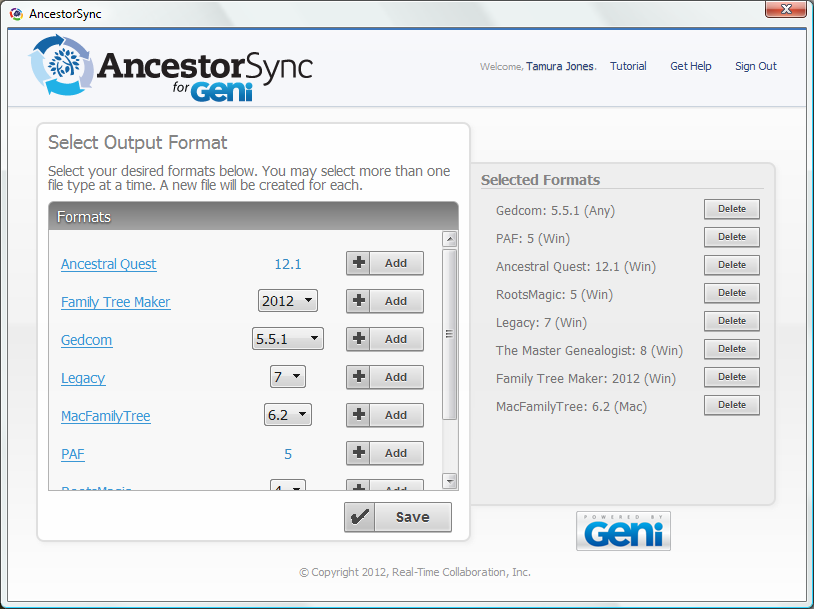
choosing desktop database formats
AncestorSync can write the data you download directly to any of several supported desktop database formats. Although you probably need to save to only one format, the database format you commonly use, AncestorSync does not limit you to just one format, but lets you choose as many as you want.
The Select output format dialog box lets you choose the desired file formats from a list of supported formats in a scroll box on the left, and adds the selected formats to the list on the right. If you choose a add a lot of formats, the list on the right will sprout a scrollbar too.
| database format | Beta |
|---|---|
| GEDCOM 5.5.1 | Y |
| Personal Ancestral File 5.2 (PAF) | Y |
| Ancestral Quest 12.1 (AQ) | Y |
| Legacy Family Tree | Y |
| RootsMagic | Y |
| The Master Genealogist (TMG) | Y |
| Family Historian | N |
| Family Tree Maker Classic (FTM Classic) | y |
| New Family Tree Maker (New FTM) | Y |
| Family Tree Maker for Mac (FTMM) | Y |
| MacFamilyTree (MFT) | Y |
| Heredis | y |
| Reunion | y |
| GRAMPS | N |
Supported database formats
The latest AncestorSync Beta supports more desktop database formats than the previous Beta. The major addition to the supported desktop formats is New Family Tree Maker. The table provides a quick overview of the supported file formats. This overview is based on the latest Beta itself.
The new AncestorSync Beta supports more desktop applications than the previous ones. The early AncestorSync Betas already supported Personal Ancestral File (PAF), Ancestral Quest (AQ), Legacy Family Tree (LFT) and RootsMagic 4 (RM4). The new AncestorSync Beta adds support for Family Tree Maker (FTM), The Master Genealogist (TMG) and MacFamilyTree (MFT).
The AncestorSync site just had a make-over.
The new site went live today.
The AncestorSync Beta is gone now. If you try to visit it, you are redirected to the order page.
Before the make-over, the Beta mentioned several other genealogy applications formats not yet supported but development in progress or intended
,
including Heredis and GRAMPS.
The table shows what desktop formats are currently supported, and which ones are planned.
All the support is for regular releases. AncestorSync does not support any Betas.
native formats
All the desktop database formats that AncestorSync supports will eventually be available on both Windows and Mac OS X,
but in this beta release, several database formats are only supported on the native platform.
In this Beta release, Personal Ancestral File (PAF), RootsMagic, Legacy Family Tree and The Master Genealogy are only supported on Windows.
According to the AncestorSync Compatibility Chart, MacFamilyTree is only supported on OS X, but it is already supported on Windows as well.
AncestorSync for Windows supports both New Family Tree Maker and Family Tree Maker for Mac,
while AncestorSync for Mac supports Family Tree Maker for Mac, as well as FTM 2010 and FTM 2012, the two Windows releases that the two Mac releases correspond to.
The current release of AncestorSync for Mac does not support FTM 2008, FTM 2009 or FTM 2011.
Family Tree Maker support is easily the most requested AncestorSync feature, and the new AncestorSync Beta delivers.
The list of supported desktop database formats is sure to keep changing. The AncestorSync site now features a Compatibility Charts page that shows which desktop database formats AncestorSync supports. It has more detail, clearly listing which version of the various file formats it supports. That page is in Beta too, and may not always exactly match the very latest Beta.
GEDCOM
AncestorSync is a Unicode-based application, so it writes UTF-8 GEDCOM 5.5.1 files.
If the genealogy application you use still cannot read and write UTF-8 GEDCOM 5.5.1 files,
and AncestorSync does not support its database format directly,
then you really need to start complaining to your vendor about the lack of UTF-8 GEDCOM 5.5.1 support.
Heck, even if AncestorSync makes up for it by supporting the desktop database format directly,
you should still complain to your vendor that their product is lagging the GEDCOM specification by more than a decade.
AncestorSync supports PAF GEDCOM and Legacy GEDCOM in addition to the generic GEDCOM file. That oddity is in there because the code to support these GEDCOM dialects already existed. Support for these GEDCOM dialect is superfluous. PAF reads UTF-8 GEDCOM 5.5.1 files just fine, and AncestorSync supports both the PAF and Legacy file formats directly. The presence of these two export options may confuse users into thinking that they need those dialects, so although this is present in the Beta, Real-Time Collaboration may decide to remove these superfluous export options.
New Family Tree Maker
Family Tree Maker support is easily the most requested AncestorSync feature, and the new AncestorSync Beta delivers. The Family Tree Maker support in this Beta of AncestorSync is for New Family Tree Maker only. Family Tree Maker Classic is not supported, at least not yet.
The current version of AncestorSync does support all regular releases of New Family Tree Maker for Windows, that is FTM 2008 through FTM 2012, as well as the recent releases of New Family Tree Maker for Mac, confusingly called Family Tree Maker for Mac version 1 and 2. Do not expect support for Brøderbund's original Family Tree Maker Deluxe Edition II for Macintosh any time soon.
more new formats
Other database formats the latest Beta supports while the previous one did not are The Master Genealogist (TMG), both version 7 and 8, and MacFamily Tree (MFT). The previous Beta already supported RootsMagic 4 (RM4), this one adds supports for RootsMagic 5 (RM5). Support for Family Historian, Heredis and Reunion is still being worked upon.
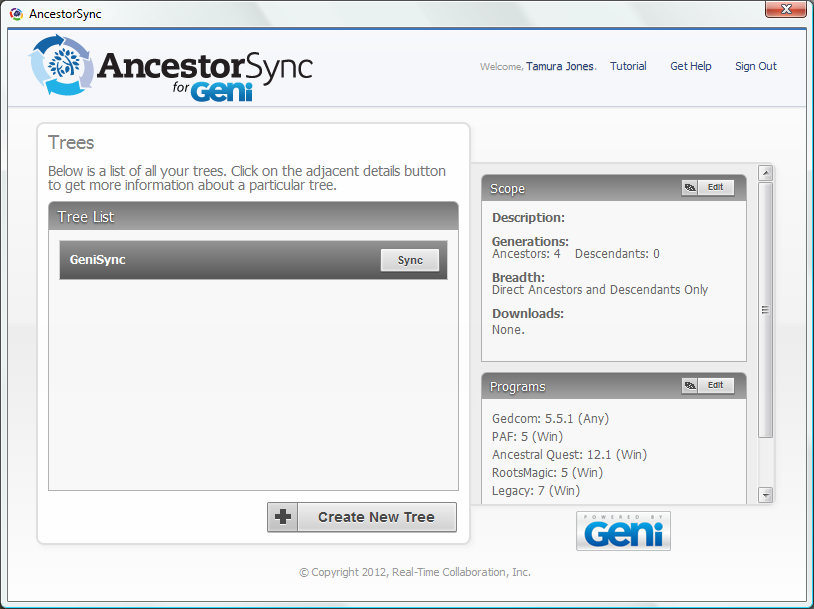
sync
Everything done so far is setup and configuration.
The final step in downloading data from Geni is the actual download itself.
You download the data into the selected desktop formats by performing a sync.
The Tree
dialog shows a list of databases you have configured for syncing with Geni,
and when you select a particular database, it shows the options you selected for that database.
You perform a sync by clicking the Sync
button.
Although the latest Beta may be faster than the previous one, the first sync your database is still a test of patience.
There is no progress dialog, there is just a spinning wait cursor in front of the Sync
button.
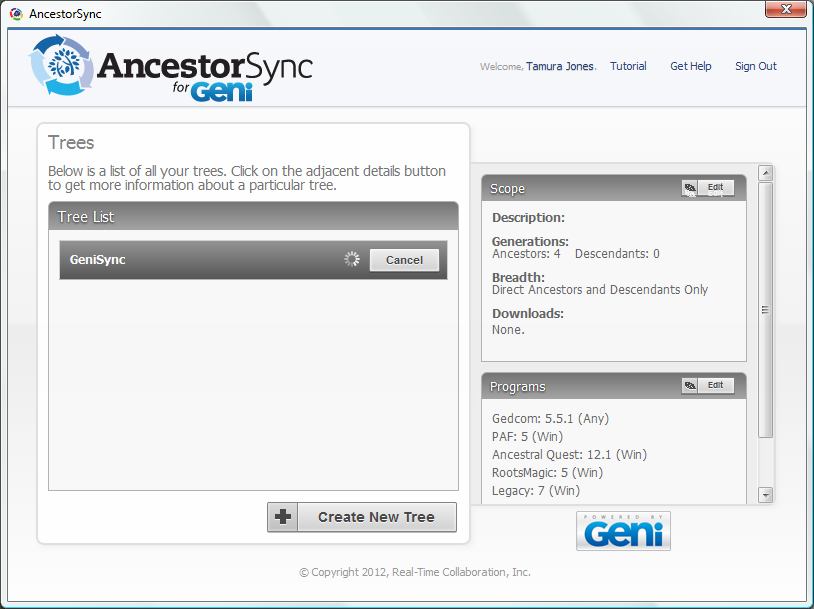
The ugly screen saver-like progress dialog box used in earlier Betas is gone.
That is great, but it has not been replaced by anything else.
This Beta provides no indication how much has already been done, how much remains to be done, or how much progress has been made.
You do not know whether it is making any progress at all.
A proper progress dialog box will be added before AncestorSync exists Beta.
I initially tried AncestorSync with a minuscule test tree, less than a dozen individuals, on Geni.com.
The first time I tried to sync it took minutes, and minutes, and yet more minutes and it still did not complete.
I guessed that perhaps my Geni session had timed out without AncestorSync being aware of that.
I clicked the Cancel
button to abort the sync, and AncestorSync aborted immediately.
After closing AncestorSync and restarting AncestorSync to try again, the sync completed in less than a minute.
Experiences like this are not uncommon for Beta software.
Syncing should happen considerably faster than the initial download.
sync or retry
In my rather limited testing of various AncestorSync Betas, it always seems to read and write the desktop files flawlessly.
I never experienced any file formats problems using either AncestorSync or the desktop application themselves.
My syncing experience isn't as spotless.
My current impression is that syncing either works or doesn't work, with nothing in between.
Sometimes, AncestorSync keeps displaying the spinning wait cursor while it is not making any progress at all.
The current lack of a progress dialog box does not help you recognise that situation, but here's a rule to keep in mind: syncing should take less time than the initial download.
Syncing should happen considerably faster than the initial download.
If it takes longer, something is wrong, and you should probably cancel the sync, and then close & restart AncestorSync to retry.
technical difficulties
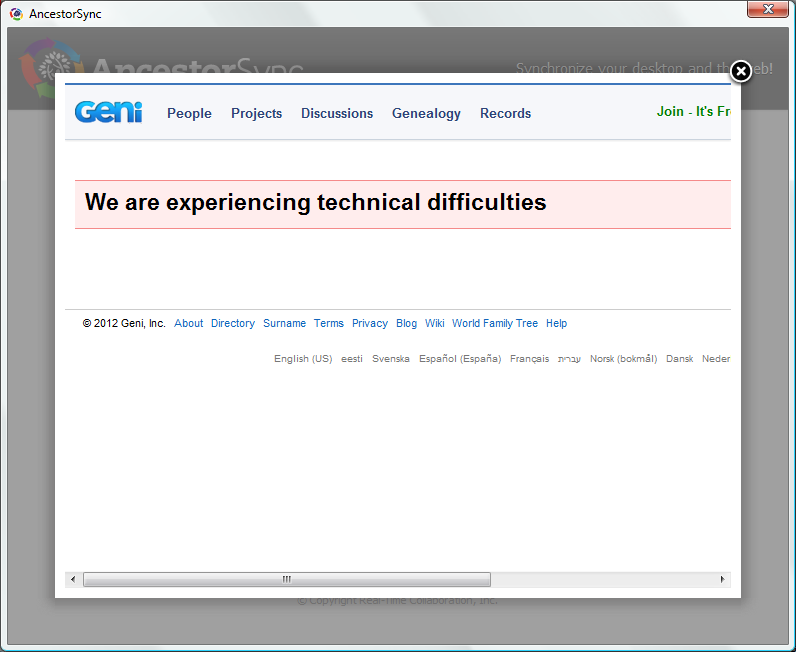
You should not get see this We are experiencing technical difficulties
error message from Geni.com, but if you do, AncestorSync is definitely failing to connect to geni.com,
and until the AncestorSync server and Geni server talk to each other again, your desktop and Geni data will not be synced.
Beta limitations
The addition of Family Tree Maker support is sure to increase interest in this product, even though the current AncestorSync Beta only syncs with Geni.com, and not with Ancestry.com Member Trees, like Family Tree Maker's TreeSync does. Still, the main new feature of this beta is that actually syncs, as it was always supposed to do.
There are several deliberate limitations to the sync feature.
One is that is the scope has been limited to four generations of direct ancestors and descendents.
Another limitation is that AncestorSync does not sync automatically, but you have to initiate the sync.
The third limitation is that this AncestorSync Beta does not perform any conflict resolution yet;
if you change the same record on both the desktop and server, one change will overwrite the other without so much as a warning.
Real-Time Collaboration's Chief Technology Officer Dovy Paukstys has told me that all these limitations are to make sure that the beta testers of this release focus on just the sync functionality. They do not want to hurry the product to market, but make sure that existing features work before adding the next layer of complexity. They plan to loosen the scope and add automatic synchronisation once the sync itself works fine, and to add conflict resolution last of all.
There is no bulletin board or mailing list to discuss beta issues. You can use the email address for AncestorSync support listed on the AncestorSync download page to reports any defects you run into. and the updated site include a Support section now.
updates
2012-06-05 new Beta lifts scope restriction
A new AncestorSync Beta (2012.06.02) became available over the weekend.
There are two major differences with the previous beta (2012.05.08).
The four-generation scope limitation has been lifted.
You do no longer need to start with a download from Geni, you can also start with an upload to Geni.
2012-06-20 Release Candidate 1
A new AncestorSync Beta (2012.06.19) just became available.
This is AncestorSync Release Candidate 1 (RC1).
It does not offer any new features, but does includes many small fixes.
This release does not support FTM 2012 anymore, but continues to support FTM 2008 through 2011.
links
AncestorSync & Geni
- AncestorSync
- AncestorSync download
- AncestorSync: Compatibility Chart
- AncestorSync Support
- AncestorSync Beta
- How AncestorSync Works
- AncestorSync versus GenBridge
- The Geni API
- The Geni Model
- MyHeritage Family Graph API
- FamilySearch Family Tree API Public
Family Tree Maker & TreeSync
Copyright © Tamura Jones. All Rights reserved.